
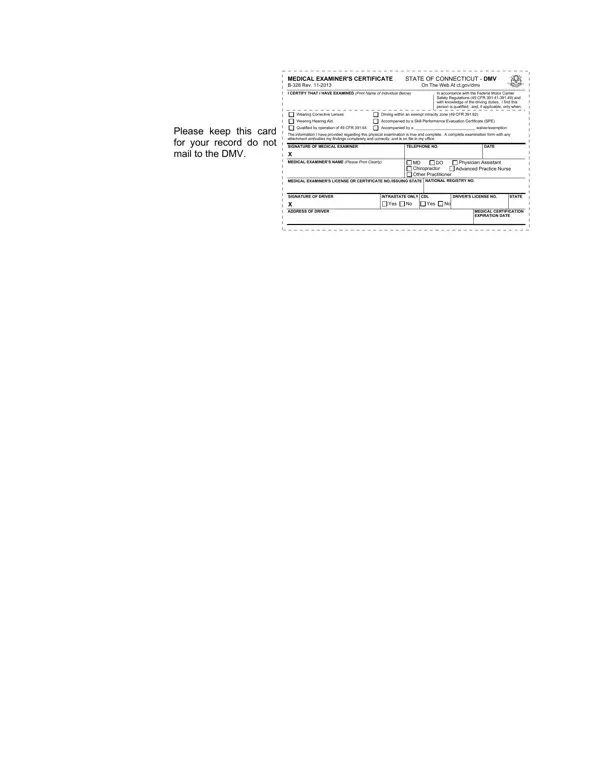
The Certificate B 328 is a Medical Examiner's Certificate issued by the State of Connecticut Department of Motor Vehicles. It documents the results of a physical examination conducted on a commercial motor vehicle driver. The form verifies that the driver's health status meets the requirements established by the Federal Motor Carrier Safety Regulations (49 CFR 391.41 through 391.49). Once completed by a qualified medical examiner, the certificate becomes part of the driver's permanent file.
Any commercial vehicle driver operating in or through Connecticut must have a valid Certificate B 328 on file. The physical examination must be performed by a certified medical examiner listed on the National Registry of Certified Medical Examiners. Qualified examiners include licensed physicians, physician assistants, advanced practice registered nurses, and chiropractors. The form must be renewed before the medical certificate expiration date printed on it.
The examination evaluates several areas of the driver's physical and sensory health. The examiner checks vision, hearing, blood pressure, and overall physical capability. Drivers who require corrective lenses or hearing aids must have this noted on the certificate. The form also records whether the driver qualifies for an exempt intracity zone operation, holds a Skill Performance Evaluation (SPE) Certificate, or has been granted a specific waiver or exemption. Drivers preparing for the medical evaluation should also review the DOT Medical Form and the Physical Examination Form to understand the full scope of requirements.
The validity period depends on the examiner's determination of the driver's health status. In most cases, the certificate remains valid for up to 24 months. Drivers with certain conditions may receive a certificate valid for a shorter period, requiring more frequent examinations. The medical certificate expiration date is printed directly on the completed form, and drivers must renew before that date to maintain their commercial driving privileges.
| Question | Answer |
|---|---|
| Form Name | Certificate B 328 Form |
| Form Length | 1 pages |
| Fillable? | No |
| Fillable fields | 0 |
| Avg. time to fill out | 15 sec |
| Other names | ct dmv medical card self certification, cdl medical card ct, ct dmv cdl medical card fax number, ct dmv medical card |