
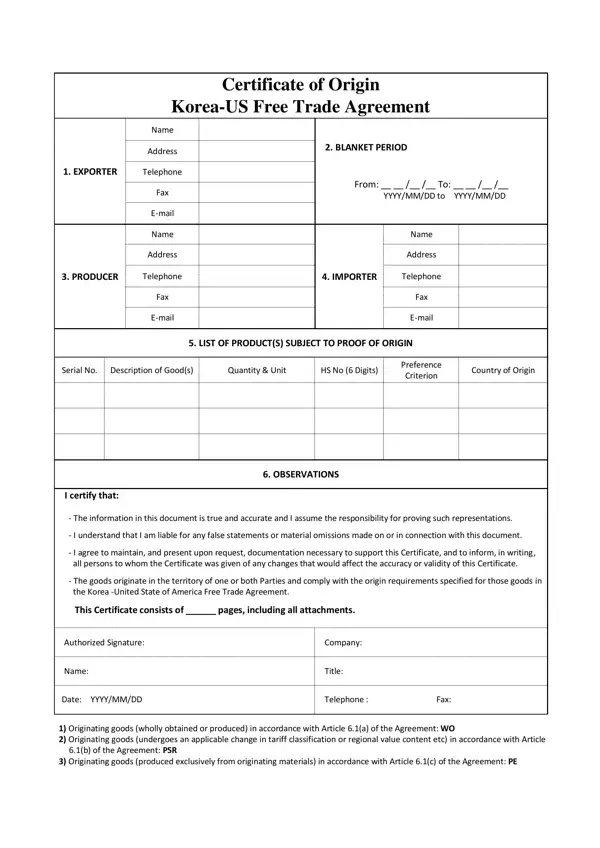
The certificate of origin for the KORUS Free Trade Agreement verifies that products shipped between the United States and the Republic of Korea meet specific rules of origin. Exporters or producers complete this two-page document to claim preferential (reduced or zero) tariff rates on qualifying goods. Without a valid certificate, customs officials assess standard Most Favored Nation (MFN) duty rates, which can be significantly higher.
The form captures several critical data points across 11 numbered fields. Exporter, producer, and importer legal names, addresses, phone numbers, and tax identification numbers go into Fields 1 through 3. Field 4 holds a blanket period, which allows one certificate to cover multiple shipments of identical goods for up to 12 consecutive months. Field 5 is the core section. Each line in Field 5 requires the goods description, quantity, Harmonized System (HS) tariff classification number at the six-digit level, the invoice number, and the preference criterion (A through F) that demonstrates the item qualifies as an originating good. If you also ship goods to other destinations, consider the general certificate of origin form for non-FTA trade.
Each product listed on the form must cite one of six preference criteria to justify its originating status:
The exporter or producer who signs the certificate takes on binding legal obligations. They must keep all records that support the origin claim, including purchase invoices, production cost records, and shipping documents, for a minimum of five years from the date the certificate was issued. Customs authorities in either country can request these records during a verification audit. Providing false information on the form can result in civil penalties, denial of preferential treatment for future shipments, and in serious cases, criminal prosecution under customs fraud statutes.
This certificate is similar in purpose to forms used for other U.S. trade agreements. For trade with North American partners, see the NAFTA certificate of origin. Businesses importing goods through U.S. ports may also need to file a CBP Form 1302 for vessel entry. Australian trade uses the US-Australia FTA form.
| Question | Answer |
|---|---|
| Form Name | Certificate of Origin Korea Form |
| Form Length | 2 pages |
| Fillable? | No |
| Fillable fields | 0 |
| Avg. time to fill out | 30 sec |
| Other names | KORUS FTA certificate of origin, certificate of origin US trade, trade agreement certificate form |
Certificate Origin Korea Form isn’t the one you’re looking for?