
CF2 PhilHealth Form PDF Details

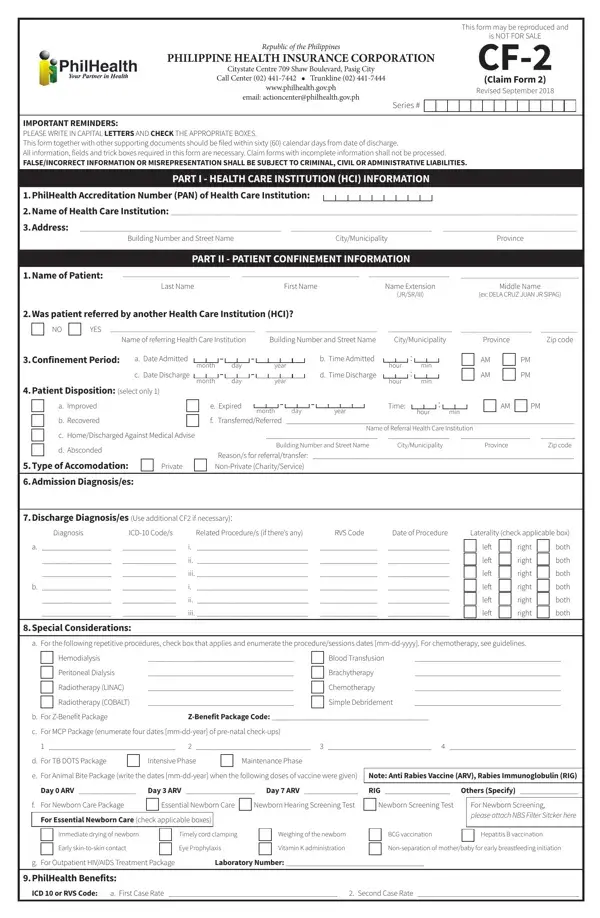
PhilHealth Claim Form 2, commonly called CF2, is one of the mandatory documents in the Philippine Health Insurance Corporation (PhilHealth) claims system. Claim Form 1 (CF1) captures the member's personal information, membership type, and employer certification. CF2 covers the medical side of the claim. It records the final diagnosis, all procedures performed, medicines dispensed, and the total charges billed by the healthcare institution.

Purpose of CF2 in the Claims Process

CF2 serves as the official medical record summary for PhilHealth claims. It connects the patient's hospital stay to specific ICD-10 diagnosis codes and RVS procedure codes. PhilHealth reviewers use this form to determine whether the case qualifies for coverage and to calculate the benefit amount. Without a properly completed CF2, no claim can move forward regardless of the member's eligibility status. The form also acts as a safeguard against fraudulent claims, since it requires the attending physician's personal attestation of the diagnosis and treatment provided.

Parts of the CF2 Form

The CF2 form is divided into four main parts that together give PhilHealth a complete picture of the confinement.

Part I: Patient Information. This section collects the patient's full name, date of birth, PhilHealth Identification Number (PIN), and the dates of admission and discharge. If the patient is a dependent, the member's details must also be filled in here.

Part II: Diagnosis and Procedures. The attending physician records the admitting diagnosis, the final diagnosis with ICD-10 codes, all related conditions, and every procedure performed with the corresponding RVS codes. This section must accurately reflect the patient's medical record.

Part III: Professional Fees. Each healthcare professional involved in the case lists their fees here. The attending physician, surgeon, and anesthesiologist each fill in a separate line with their name, PRC license number, accreditation number, and the amount charged.

Part IV: Hospital Charges. This part documents the medicines, laboratory tests, diagnostic imaging, medical supplies, room and board charges, and any other hospital fees incurred during the confinement. Hospital billing staff typically complete this section based on the patient's final bill.

Who Is Responsible for Completing CF2

Only licensed healthcare professionals can fill out the medical portions of CF2. The attending physician completes the diagnosis and treatment fields in Part II. If surgery was performed, the surgeon adds the operative details, procedure codes, and professional fees. The anesthesiologist records anesthesia-related information and charges when applicable. The patient or an authorized representative signs the consent and authorization section. Hospital billing staff typically fill in the itemized charges in Part IV.

Filing Deadline

Members must file CF2 and CF1 within 60 calendar days from the date of discharge. Claims submitted after this deadline will not be processed for reimbursement. For confinements abroad, the filing window extends to 180 calendar days. Keep copies of all submitted forms and supporting documents for your personal records in case PhilHealth requests additional information or clarification.

Required Supporting Documents by Member Type

The supporting documents you need depend on your PhilHealth membership category:

Employed members must include their employer's certification confirming active PhilHealth coverage and that premium contributions are current for the period of confinement.

Self-employed and voluntary members need to show proof of at least three months of premium contributions within the six months before the date of admission.

Retirees and lifetime members should attach a copy of their PhilHealth Member Registration Form or updated Member Data Record (MDR) to verify their membership status.

Overseas Filipino Workers (OFWs) need to present proof of OFW membership classification and premium payment receipts covering the confinement period.

Indigent members enrolled under the National Household Targeting System (NHTS) or sponsored programs need their certificate of eligibility from the local government unit or sponsoring entity.

Common Mistakes That Delay CF2 Claims

PhilHealth returns a significant number of CF2 forms each year because of preventable errors. Knowing the most common problems can help you avoid delays in processing your claim.

Mismatched patient names between CF1 and CF2 is the most frequent issue. Even minor spelling differences, missing middle names, or reversed first and last names will cause the claim to be returned for correction.

Missing or incorrect ICD-10 and RVS codes lead to claim denials. The diagnosis code must match the documented condition, and procedure codes must correspond to the treatments actually performed.

Unsigned physician sections make the form invalid. Every healthcare professional listed on the CF2 must provide their original signature, printed name, and PRC license number.

Arithmetic errors in the charges breakdown can delay processing. The individual line items in Part IV must add up to the total amount claimed.

Incomplete confinement dates, such as a missing discharge date or admission time, also trigger returns. Double-check that the date format follows the month-day-year pattern used on the form.

Difference Between CF1, CF2, CF3, and CF4

PhilHealth uses a series of claim forms, each serving a distinct purpose. CF1 is the member and employer certification form filled out by the patient or their representative. CF2 is the medical claim form completed by healthcare providers, which is the document on this page. CF3 is used for maternity-related claims and records delivery details, newborn information, and prenatal care history. CF4 covers claims for specific benefit packages such as the Z-Benefit package for catastrophic illnesses and the Primary Care Benefit (PCB) package for outpatient preventive care. For most standard hospital confinements, only CF1 and CF2 are required.

PhilHealth Benefit Packages That Require CF2

CF2 is used across all PhilHealth benefit packages that involve facility-based care. This includes the All Case Rate (ACR) packages for common conditions like pneumonia, dengue, and appendectomy. It also applies to the Z-Benefit packages for catastrophic conditions such as certain cancers, kidney transplants, and coronary artery bypass grafts. Maternity care packages use CF2 alongside CF3 to document delivery-related charges. The Primary Care Benefit package for outpatient services at accredited health centers also uses CF2 for the provider's portion of the claim.

QuestionAnswer
Form NameCF2 PhilHealth Form (Claim Form 2)
Form Length2 pages
Fillable?No
Fillable fields0
Avg. time to fill out30 sec
Other namesPhilHealth Claim Form 2, CF-2 PhilHealth, PhilHealth CF2, philhealth member registration form, philhealth registration form online

How to Edit Cf2 Philhealth Form Online for Free

You can fill out the CF2 PhilHealth form online using the FormsPal PDF editor. The editor lets you type directly into the form fields, add text, insert your signature, and save or print the completed document. Follow the steps below to complete the form quickly and correctly.

Step 1: Click the "Get Form" button at the top of this page to open the CF2 form in the online editor.

Step 2: Start filling in the required fields. The editor allows you to enter text, check boxes, and add your digital signature. You can also insert graphics, correct existing entries, and rearrange form elements as needed.

Below is a section-by-section breakdown of what to fill in on the CF2 form:

1. Start with the patient information at the top of the form. Enter the patient's last name, first name, and middle name exactly as they appear on the PhilHealth member record. Fill in the date of birth, age, and sex fields. Write the PhilHealth Identification Number (PIN) in the designated box. If the patient is not the PhilHealth member, check the appropriate relationship box (spouse, child, or parent) and enter the member's details in the corresponding fields. Make sure all names and numbers match exactly what appears on the CF1 form to prevent processing delays.

CF2 PhilHealth form section 1 showing patient information fields

2. Move to the medical information section in Part II. The attending physician enters the admitting diagnosis and the final diagnosis with the correct ICD-10 code. List any related conditions or complications in the spaces provided. Enter all procedures performed during the confinement along with their RVS codes. Record the dates of admission and discharge using the month-day-year format shown on the form. If the patient was transferred from another facility, note the name and address of the referring institution in the designated field.

CF2 PhilHealth form section 2 with diagnosis and treatment fields

3. Complete the lower portion of the form. Fill in the patient's or member's complete address, including street, barangay, municipality or city, province, and zip code. For employed members, the employer must sign the certification section and confirm that the member had active PhilHealth coverage during the confinement period. Each attending physician, surgeon, and anesthesiologist must sign in their designated areas and provide their printed name, PRC license number, and PhilHealth accreditation number.

CF2 PhilHealth form section 3 with employer certification and physician signatures

Review every entry carefully before submitting the form. The most common reasons PhilHealth returns CF2 claims include mismatched patient names between CF1 and CF2, missing or incorrect ICD-10 codes, and unsigned physician sections. Cross-reference all patient details against the CF1 form before finalizing. If you also need to make a PhilHealth premium payment, you can find the payment form in our catalog.

Step 3: Click "Done" when you have finished filling in all sections. You can then download the completed CF2 form as a PDF file, send it by email, or save it to your FormsPal account. Your data is kept secure and is not shared with third parties.