
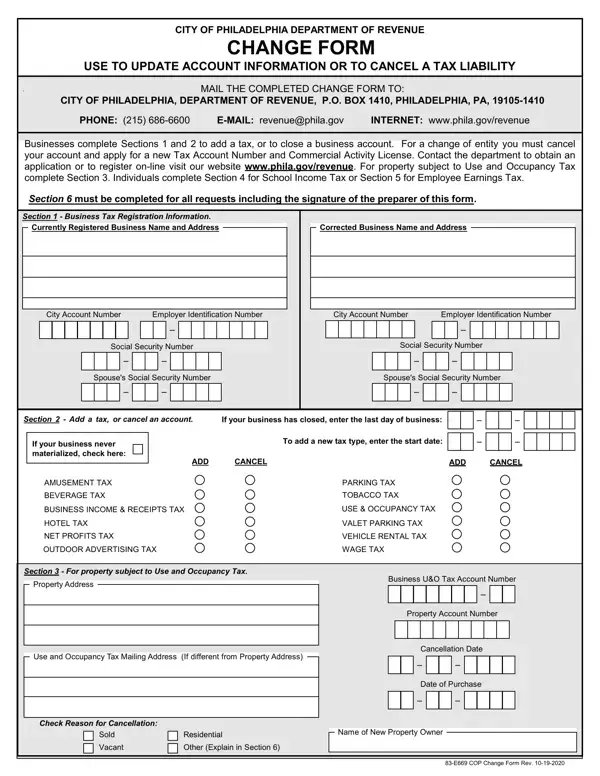
The Change Form Philadelphia, issued by the City of Philadelphia Department of Revenue, lets individuals and businesses update or cancel their city tax accounts. The 2-page form covers six distinct sections, each handling a specific type of account change. Section 1 handles business tax registration information such as address, ownership, or contact updates. Section 2 is used to close a business account or cancel an existing tax type. Section 3 allows taxpayers to add a new tax type to an existing Philadelphia account. Section 4 covers corrections to School Income Tax information, while Section 5 handles updates to Employee Earnings Tax details. Section 6 is a mandatory preparer signature block that must be completed for every submission, regardless of which other sections are filled out.
The form also covers property subject to Use and Occupancy Tax when applicable. All changes must be submitted with the taxpayer's Philadelphia Department of Revenue account number to ensure accurate processing. Completed forms can be mailed to the Department of Revenue or submitted through the Philadelphia Tax Center online portal at tax-services.phila.gov for faster processing.
| Question | Answer |
|---|---|
| Form Name | Change Form Philadelphia |
| Form Length | 2 pages |
| Fillable? | No |
| Fillable fields | 0 |
| Avg. time to fill out | 30 sec |
| Issued by | City of Philadelphia Department of Revenue |
| Purpose | Update or cancel a Philadelphia tax account |
| Submission method | Mail or online via Philadelphia Tax Center |
| Other names | CHANGE FORM - City of Philadelphia |
Change Form Philadelphia isn’t the one you’re looking for?