
Charge Account Form PDF Details

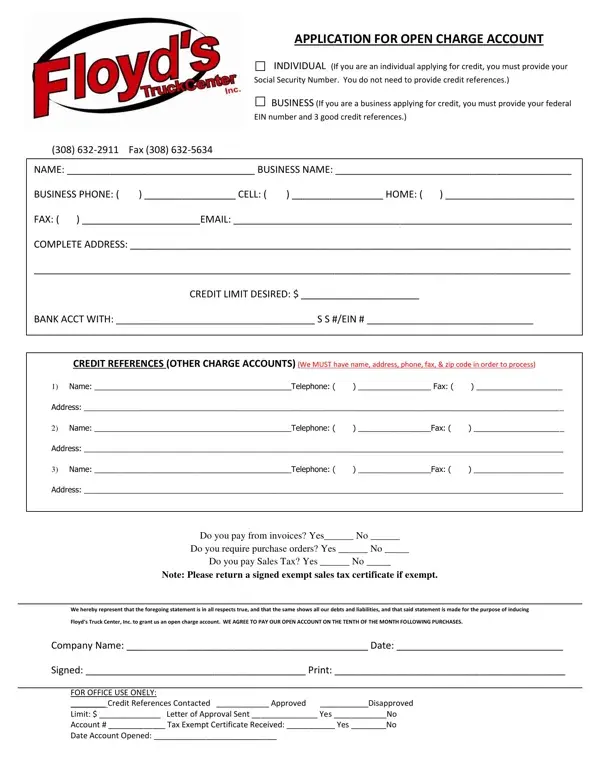
An open charge account allows individuals and businesses to purchase goods or services on credit and pay the balance according to agreed billing terms. A Charge Account Form is the first step in establishing this credit relationship with a supplier or organization.

The form collects applicant identification details including full legal name or business name, mailing address, city, state, zip code, phone number, and fax number. Individual applicants provide a Social Security Number, while business applicants enter their Federal Employer Identification Number (EIN). The desired credit limit and bank account information are also required.

A key section covers credit references. Applicants must list at least three creditors by name, along with their telephone numbers, fax numbers, and addresses. These references help the issuing organization verify the applicant's payment history before approving the account.

Applicants must also answer compliance questions about their payment practices, including whether they pay from invoices, require purchase orders, and pay sales tax. Tax-exempt businesses must attach a signed exempt sales tax certificate with their submission.

The final section of the form is reserved for internal use by the issuing organization and records the credit check results, approval decision, assigned credit limit, and account number.

QuestionAnswer
Form NameCharge Account Form
Form Length1 pages
Fillable?No
Fillable fields0
Avg. time to fill out15 sec
Other namescharge account form sample, application charge account form, charge account form online, business charge account application forms

How to Edit Charge Account Form Online for Free

Filling out a charge account form online takes only a few minutes using FormsPal's free PDF editor. No software downloads or installations are required. Simply open the form in your browser and complete all required fields at your own pace.

Steps to Complete the Charge Account Form

Step 1: Open the Form
Click the "Get Form" button at the top of this page to launch the charge account form in FormsPal's online editor. The form loads instantly in your browser with all fields ready to fill in.

Step 2: Enter Applicant Information
Fill in your legal name or business name, mailing address, and contact details. Individual applicants enter their Social Security Number in the designated field. Business applicants enter their Federal Employer Identification Number (EIN). Include your desired credit limit and bank account details in the corresponding sections.

Take care when completing these sections of the form:

charge account forms completion process explained (portion 1)

Step 3: Add Credit References
List at least three credit references in the Credit References section. For each reference, provide the creditor name, phone number, fax number, and full mailing address. Credit references from established business suppliers or financial institutions strengthen your application.

Double-check the credit references section carefully before submitting, as these entries are among the most important parts of the form:

charge account forms writing process detailed (stage 2)

Step 4: Answer Compliance Questions
Indicate whether your business pays from invoices, requires purchase orders, and pays sales tax. If your business is sales-tax exempt, attach a signed exempt sales tax certificate along with the completed form. Review the terms, sign, and print your name in the authorized representative section.

Step 5: Save or Download
Click "Done" when all fields are complete. Your completed charge account form is ready to download as a PDF. FormsPal saves your progress automatically, so you can return and make changes at any time.

Related Business Credit Forms

You may also need these related forms when establishing business credit accounts:

Common Questions About Charge Account Forms

What is a charge account form used for?

A charge account form is used to apply for a line of credit with a specific supplier or organization. It allows the account holder to purchase goods or services on credit and pay the balance on a monthly billing cycle, rather than paying at the point of sale.

What information do I need to fill out the form?

You will need your legal name or business name, address, Social Security Number or Federal EIN, bank account details, desired credit limit, and contact information for at least three credit references. Tax-exempt businesses should also have their exempt sales tax certificate ready.

Is my data secure on FormsPal?

Yes. FormsPal protects all information entered through its editor with encryption. Your completed form is available for immediate download and is not shared with any third parties.