
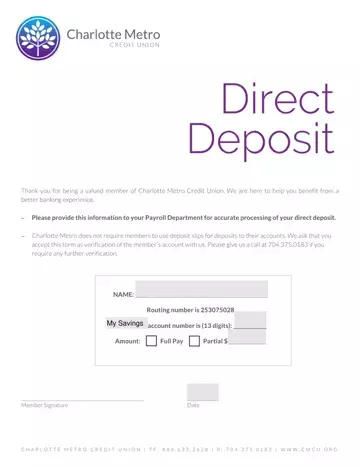
Choosing direct deposit at Charlotte Metro Credit Union delivers your paycheck to your savings or checking account on payday without requiring you to visit a branch. Funds are deposited automatically by your employer on the scheduled payment date, which means you have access to your money the moment payroll processes. This is especially valuable for members who travel frequently or who rely on same-day access to their pay for scheduled bills and automatic payments.
To complete the authorization, you will need two pieces of account information. The first is your Charlotte Metro routing number, also called an ABA transit number. The second is your account number, which is 13 digits long for savings accounts at Charlotte Metro. Both numbers appear on your monthly account statement or inside your online banking portal. Your employer's payroll department needs exactly these two numbers to route your deposits correctly. You can choose to direct your full paycheck into one account or split a partial amount between multiple accounts.
Security is one of the primary benefits of direct deposit over paper checks. Electronic payments carry no risk of a check being lost in the mail, stolen from a mailbox, or forged by a third party. Your money moves through the Automated Clearing House network, which is a regulated payment system used by financial institutions across the country. Charlotte Metro does not require a voided check to enroll because this authorization PDF serves as the official verification of your account with the credit union.
Many members also use direct deposit to automate their savings. By routing a fixed dollar amount to a savings account each pay period and sending the remainder to a checking account, you can build a savings balance without moving funds manually after each paycheck arrives. Some credit union accounts may offer additional benefits such as waived fees or higher dividend rates when direct deposits are received regularly.
After you submit the completed document to your employer's payroll department, most employers activate the new arrangement within one to two pay cycles. Until activation, your paycheck will continue to arrive by check or through your previous deposit method. Keep a copy of the submitted PDF in case your employer's payroll department requests confirmation of the account information you provided.
| Question | Answer |
|---|---|
| Form Name | Charlotte Metro Credit Union Direct Deposit |
| Form Length | 1 pages |
| Fillable? | No |
| Fillable fields | 0 |
| Avg. time to fill out | 15 sec |
| Other names | chime bank direct deposit form, charlotte metro federal credit union, chime direct deposit pdf, charlotte metro deposit |
