
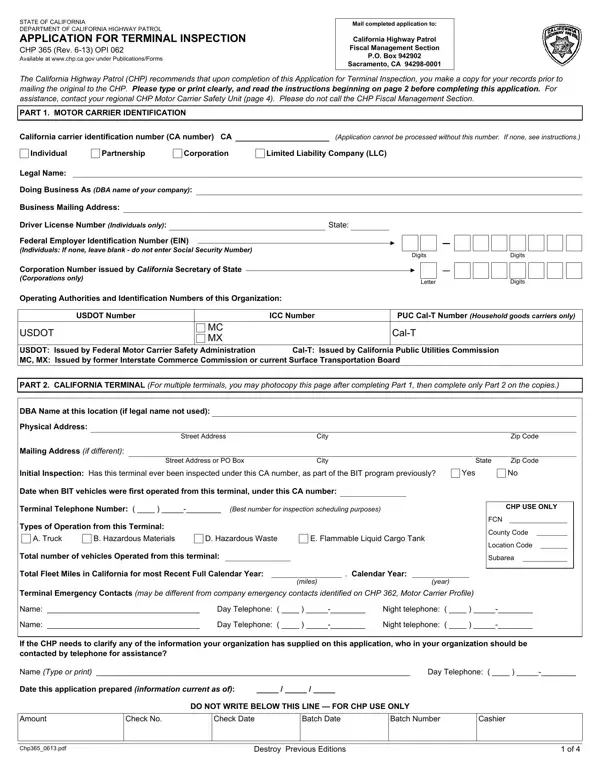
The CHP 365 form is the official Motor Carrier Terminal Inspection Application (Rev. 08/07) submitted to the California Highway Patrol to register for a Biennial Inspection of Terminals (BIT) Program inspection. California Vehicle Code Section 34501.12 mandates that all motor carriers operating commercial vehicles over 10,001 pounds on California highways participate in the BIT Program and submit this application to schedule their terminal inspection.
Motor carriers and trucking companies operating the following vehicle types in California must complete and submit this application:
The 4-page pdf application collects detailed carrier identification information, including legal name, DBA name, California carrier identification number (CA number), Federal Employer Identification Number (FEIN), and USDOT number. Carriers must also provide emergency contact details, the physical and mailing addresses of the California terminal to be inspected, and a description of vehicle types and operations at the terminal. Each section must be completed in full to avoid delays in scheduling the inspection.
The BIT Program requires an annual inspection fee payable to the California Highway Patrol when submitting the application. Providing inaccurate information or failing to comply with terminal inspection requirements may result in penalties under the California Vehicle Code. Motor carriers must keep their carrier information current with the CHP. Contact your local CHP Commercial Vehicle Section office to confirm the current fee schedule before submitting the form.
For related CHP inspection pdf documents, see the CHP 362 form (Motor Carrier Permit Application) and the CHP 398 form. You can also review the commercial vehicle lease agreement if you operate leased equipment.
| Question | Answer |
|---|---|
| Form Name | CHP 365 Form |
| Form Length | 4 pages |
| Fillable? | Yes (online with PDF editor) |
| Avg. time to fill out | 10 min |
| Issuing Agency | California Highway Patrol (CHP) |
| Program | Biennial Inspection of Terminals (BIT) |
| Other names | CHP 365 application, terminal inspection form, chp form 365, motor carrier BIT application, Rev. 08/07 |
Chp 365 Form isn’t the one you’re looking for?