
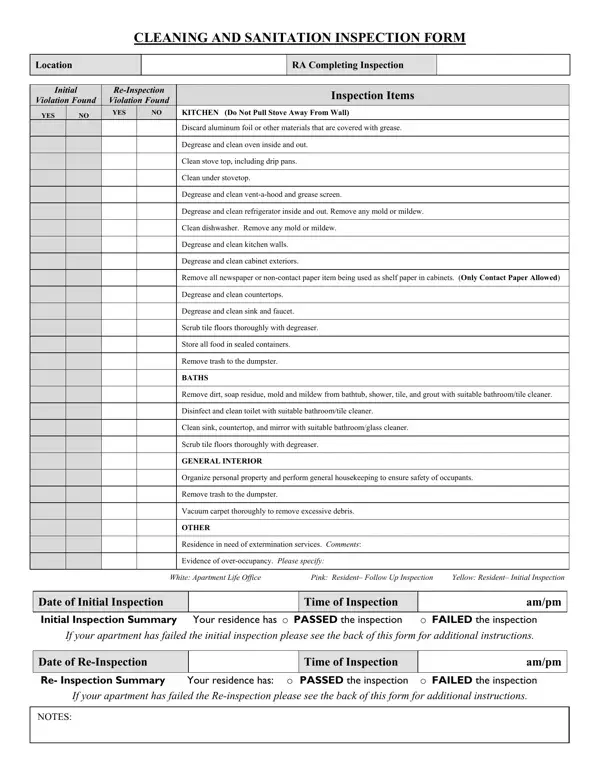
This standardized evaluation tool is used by property managers, landlords, and facility supervisors to verify that residential or commercial units meet established cleanliness and sanitation requirements. Unlike a simple to-do list, this inspection document records each area in a clear yes/no format, notes specific violations, sets re-inspection requirements, and outlines the financial consequences for tenants who fail to correct issues.
Apartment communities, residential property management companies, and individual landlords rely on this sanitation inspection form during move-in and move-out walkthroughs, routine maintenance checks, and pre-lease inspections. Janitorial supervisors and facility managers at commercial or institutional properties use similar inspection checklists to maintain compliance with internal hygiene policies and local health codes.
The kitchen section evaluates whether appliances have been degreased, whether food is stored in sealed containers, and whether tile floors have been scrubbed thoroughly. The bathroom section confirms that all dirt, soap residue, mold, and mildew have been removed, that toilets and sinks are clean and disinfected, and that all tile surfaces pass inspection. The general interior section assesses personal property organization, carpet vacuuming quality, and overall trash removal. An additional section documents whether the property needs extermination services or shows evidence of overoccupancy.
When a unit fails the initial inspection, the form records each specific violation and sets a re-inspection date and time. Tenants who fail a follow-up inspection may be charged a re-inspection fee. The re-inspection summary section captures whether the unit passed or failed the second visit, along with space for detailed inspection notes from the supervising property manager.
Repeated inspection failures can result in re-inspection fees and may constitute a lease violation. Property management teams retain signed copies of completed inspection forms as documented proof of inspection outcomes, protecting both landlord and tenant interests in the event of a dispute. Some forms also include contact information for multiple apartment communities, enabling centralized inspection tracking across a property portfolio.
| Question | Answer |
|---|---|
| Form Name | Cleaning Inspection Form |
| Form Length | 2 pages |
| Fillable? | No |
| Fillable fields | 0 |
| Avg. time to fill out | 30 sec |
| Other names | school cleaning inspection forms, janitorial inspection forms, school cleaning checklist template, school custodial cleaning template |
Cleaning Inspection Form isn’t the one you’re looking for?