Please rate Complete Physical Examination

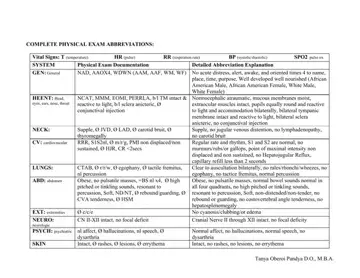
The Complete Physical Examination form is a 4-page PDF used by physicians, nurse practitioners, and medical assistants to document a full patient evaluation at a single visit. The form follows standard clinical workflow, covering every major body system in sequence.
The opening section records temperature (T), heart rate (HR), respiration rate (RR), blood pressure (BP), and pulse oximetry (SPO2). These baseline measurements are documented before moving to the body system review.
The form addresses general appearance (GEN), head, eyes, ears, nose, and throat (HEENT), cardiovascular (CV), lungs, abdomen (ABD), extremities (EXT), neurological (NEURO), psychiatric (PSYCH), skin, genitourinary (GU), rectal, lymphatic (LYMPH), and musculoskeletal (MUSK). Each system has columns for normal findings, abnormal findings, and notes.
A built-in abbreviations reference lists common shorthand found in clinical records, covering chronic conditions, medications, and examination findings. This speeds up documentation and keeps records consistent across providers. The form was authored by Tanya Oberoi Pandya D.O., M.B.A., making it a reliable reference for both experienced clinicians and those new to clinical documentation.
| Question | Answer |
|---|---|
| Form Name | Complete Physical Examination |
| Form Length | 4 pages |
| Fillable? | No |
| Fillable fields | 0 |
| Avg. time to fill out | 1 min |
| Other names | complete physical examination, physical assessment fill in, physical exam template, comprehensive physical exam documentation |
Complete Physical Examination isn’t the one you’re looking for?
Please rate Complete Physical Examination
