
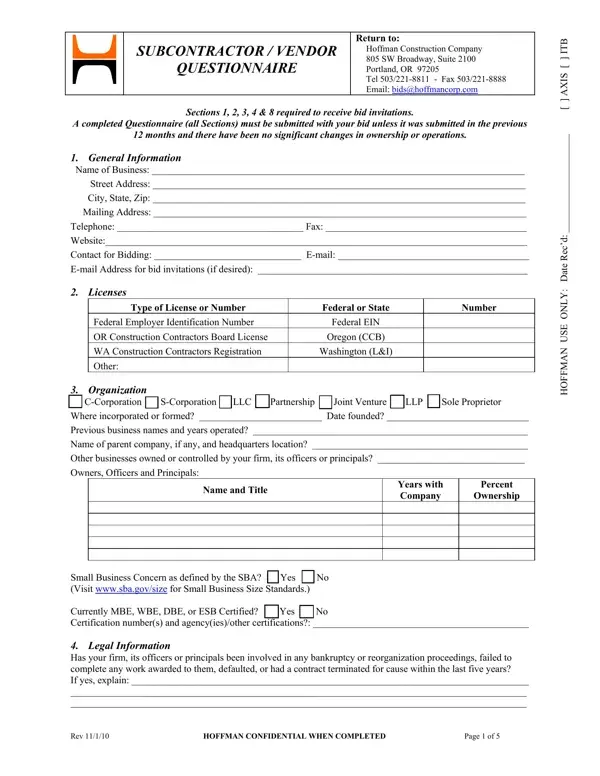
If you desire to fill out Hoffman, it's not necessary to download any applications - simply make use of our online PDF editor. To keep our editor on the forefront of efficiency, we work to implement user-oriented features and improvements on a regular basis. We're always pleased to receive suggestions - join us in reshaping how you work with PDF documents. All it takes is just a few easy steps:
Step 1: Press the orange "Get Form" button above. It will open up our pdf editor so you could begin filling out your form.
Step 2: Once you open the file editor, you will see the document prepared to be filled in. In addition to filling in different blank fields, you may as well do many other things with the form, such as adding custom text, editing the initial text, inserting illustrations or photos, affixing your signature to the form, and more.
It is actually easy to finish the document using this detailed tutorial! Here is what you should do:
1. The Hoffman necessitates particular information to be inserted. Be sure that the next blank fields are finalized:
2. The third stage is usually to submit the following blanks: Previous business names and years, Name of parent company if any and, Other businesses owned or, Owners Officers and Principals, Name and Title, Years with Company, Percent, Ownership, and Small Business Concern as defined.
3. Your next stage is usually hassle-free - fill in every one of the blanks in Small Business Concern as defined, and Rev HOFFMAN CONFIDENTIAL WHEN to finish this process.
4. Filling out Are there any judgments claims, Has your firm its officers or, Projected revenue for this year, Revenue for the last three years, Largest individual contract, Contracted withDescription, Contracted withDescription, Contracted withDescription, Are key supervisory personnel on, and Preferred contract size Current is vital in this fourth part - make certain that you devote some time and take a close look at every single empty field!
Regarding Largest individual contract and Projected revenue for this year, be sure you do everything correctly in this current part. The two of these could be the most important fields in the PDF.
5. And finally, this last subsection is what you'll have to complete prior to closing the PDF. The blanks at issue are the next: general contractor contract amount, Contracts with Hoffman within the, Correctional Athletic, Identify contract and building, DestinationHotel Industrial, DesignBuild, Educational Office, Number of Employees, Current Year Year Average, Total, Field, Shop, Office, Current Year, and Average of previous Years.
Step 3: As soon as you've looked over the information you given, press "Done" to conclude your FormsPal process. Grab the Hoffman once you subscribe to a 7-day free trial. Instantly access the pdf inside your personal account page, together with any edits and adjustments automatically saved! FormsPal ensures your information privacy by having a secure method that in no way saves or distributes any sort of personal information involved. Feel safe knowing your docs are kept safe whenever you work with our services!
Frequently Asked Questions
Who needs to submit this form?
Any subcontractor or vendor seeking to work on Hoffman Construction projects must complete and submit this prequalification document. This applies to general subcontractors, specialty trades, and material suppliers operating in Oregon, Washington, or other states where Hoffman has active projects.
How long does it take to complete?
The five-page form typically takes 30 to 60 minutes to finish carefully. Gathering your company's financial records, license numbers, and reference project details in advance reduces completion time significantly.
Can I save my progress?
Yes. After creating a free FormsPal account, your entries are automatically saved. You can return at any time to continue editing or make updates before downloading the finished PDF.
How often must I resubmit?
Hoffman requires resubmission each year. You should also file an updated version if your company changes ownership, loses a license, undergoes a significant change in financial status, or adds a new principal officer.
What happens after I submit to Hoffman?
Hoffman's procurement team reviews your submission and contacts you if clarification is needed. Approved firms join the prequalified bidder list and receive invitations when projects in their trade and geographic area go out for bid. Approval does not guarantee a contract award.
Related Construction Forms
Construction companies often need several related documents beyond this prequalification form. The following forms are available for free on FormsPal:
- Construction Proposal Form - Prepare a competitive bid proposal for upcoming construction projects.
- Subcontractor Agreement - Formalize the scope of work and payment terms between a general contractor and subcontractor.
- Subcontractor Waiver Form - Document lien waivers and payment releases for completed work.
- TDOT Prequalification Questionnaire - A similar prequalification form required for Tennessee Department of Transportation projects.
- Construction Daily Report Form - Record daily site progress, labor counts, equipment, and materials used on a project.
