
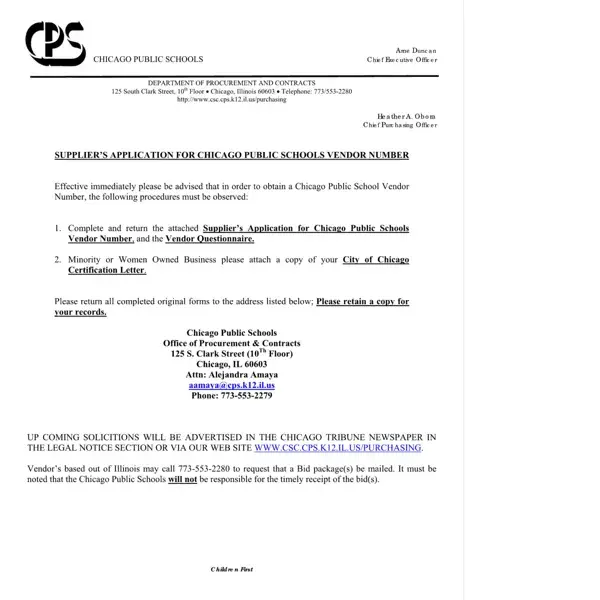
CPS Vendor Application Form PDF Details

The CPS Vendor Application is an official PDF document submitted to Chicago Public Schools by businesses and individuals seeking to become approved vendors. Chicago Public Schools is one of the largest urban school districts in the United States, serving more than 350,000 students across over 500 schools. This PDF form initiates the formal procurement review process that determines whether a business is eligible to supply goods and services to the district.

The 13-page PDF form collects information across several key areas. The first section requests business identification details, including the legal business name, federal Employer Identification Number, business address, and the applicant's CPS vendor number if one has already been assigned. The second section covers business type and organizational structure, distinguishing between corporations, limited liability companies, partnerships, and sole proprietorships. Additional sections address required certifications such as Minority Business Enterprise (MBE), Women Business Enterprise (WBE), and Disadvantaged Business Enterprise (DBE) status, as well as insurance documentation for general liability and workers compensation coverage. Suppliers must also provide contact information for key business representatives and references from prior public sector contracts.

Once this PDF application is reviewed and approved by the district's procurement department, the business is added to the official list of approved vendors and becomes eligible to respond to bid solicitations and Requests for Proposals. Maintaining approved vendor status requires periodic renewal of application materials and updated certifications. Companies that need to update their information or expand into new service opportunities must submit a revised PDF through the CPS vendor portal. The procurement process is managed by Chicago Public Schools to ensure that all approved suppliers meet the district's requirements for quality and reliability.

Any company or individual seeking to supply goods, professional services, food products, transportation, technology, or construction services to Chicago Public Schools must complete and submit this PDF form. This includes first-time applicants as well as returning vendors renewing their status or adding new service categories. Businesses can fill out this PDF online using FormsPal's free tool and download the completed document for submission to the district's procurement office.

For related procurement documents, see the Vendor Application Form, the Business Registration Form, or the Subcontractor Agreement for businesses working on CPS construction and facilities projects.

QuestionAnswer
Form NameCPS Vendor Application Form
Form Length13 pages
Fillable?No
Fillable fields0
Avg. time to fill out3 min 15 sec
Other namescps vendor application, cps vendor portal, chicago public school vendor number, approved cps vendors

How to Edit Cps Vendor Application Form Online for Free

Filling out this PDF form online is easy with our PDF editor. Our tool works directly in your browser and we strive to keep it as convenient as possible. No account creation or software download is required. Follow the steps below to complete and download your chicago public school vendor number PDF in minutes.

How to Fill Out the CPS Vendor Application PDF

Step 1: Click the "Get Form" button at the top of this page to open this PDF in the online editor.

Step 2: Once the PDF editor loads, the full 13-page document appears ready for input. You can fill in PDF form fields, add text annotations, apply your signature, and make other adjustments as needed. Take care when entering your chicago public school vendor number and other business details in the PDF.

This PDF document covers several specific areas that require careful attention when completing the form:

1. It is important to fill out the cps vendor number accurately in the PDF. Take care when working with the segments containing these specific fields:

Tips on how to complete chicago public school vendor number step 1

2. When the first PDF segment is done, proceed to the essential details in the following portion so you can move to the third stage.

chicago public school vendor number conclusion process outlined (part 2)

Applicants sometimes make errors in this PDF section. Review your entries carefully before continuing to the next page.

3. In this step, check all fields in this PDF section. Every field must be completed with the highest attention to detail.

Find out how to complete chicago public school vendor number portion 3

4. This subsection of the PDF contains additional fields for your business particulars and contact information.

chicago public school vendor number conclusion process outlined (portion 4)

5. The final section of this PDF form includes a few remaining fields. Completing them concludes the application process.

Tips on how to prepare chicago public school vendor number part 5

Step 3: When all PDF fields are complete, click "Done" to finish. Start a 7-day free trial to access and download your completed PDF. All edits are saved automatically to your FormsPal account. Your data is protected with secure encryption that keeps private business information confidential.

About the CPS Vendor Application PDF Form

The CPS Vendor Application is a 13-page PDF published by Chicago Public Schools. This PDF form is required for any business that wants to become an approved supplier to the district. The procurement process begins when an applicant submits a completed PDF to the CPS vendor registration office. Once processed, the approved supplier is listed in the district's vendor management system and can participate in future procurement opportunities. Businesses that need to renew their supplier registration or update contact information must also use this PDF form.

Frequently Asked Questions

What is this PDF form used for?
This PDF is the official application that Chicago Public Schools uses to evaluate and approve businesses and individuals who want to supply goods and services to the district. Completing the PDF accurately is required before a supplier can participate in CPS procurement processes.

What is a CPS vendor number?
A vendor number is the unique identifier that Chicago Public Schools assigns to each approved supplier. First-time applicants who do not yet have a number should leave that PDF field blank or enter "NEW" when submitting their application.

How many pages is this PDF?
The PDF form is 13 pages long. All pages must be completed and submitted to the CPS procurement office for review. The average time to fill out the PDF is approximately 3 minutes and 15 seconds.

Can I fill out the PDF online?
Yes. You can prepare the PDF using FormsPal's online PDF editor. Once completed, download and print the PDF form for submission to Chicago Public Schools through their official portal or procurement office.

Related Chicago Public Schools and Vendor PDF Forms

If you work with CPS or need related procurement documents, these PDF forms may also be useful: