
Credit Ielts Fill Form PDF Details

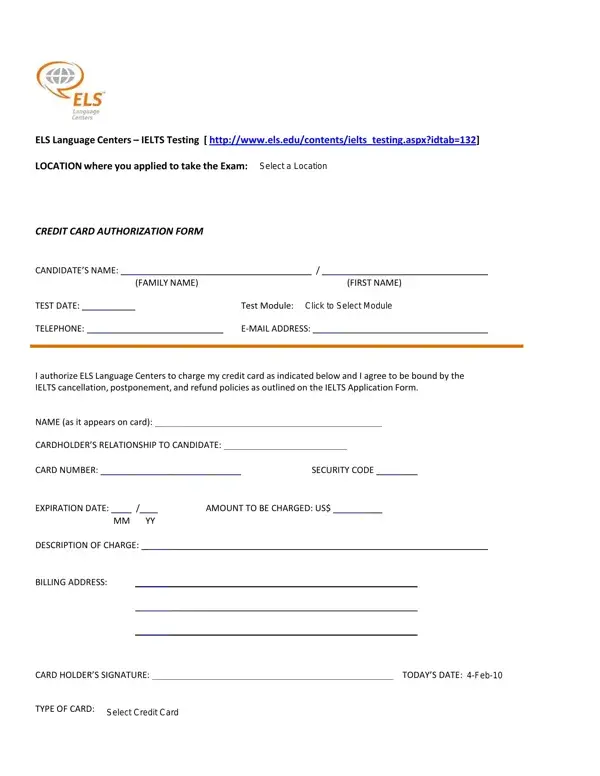
The Credit IELTS Fill form is a payment authorization document used by ELS Language Centers for IELTS exam registration. Candidates submit it to allow ELS to charge a credit card for the test fee, including any applicable deposits.

Before completing the form, gather these items: your full name and contact details, credit card number, security code, card expiration date, and the exact amount to be charged. You will also need to select your preferred test location and module type, either Academic or General Training.

The form covers three key areas. First, the candidate information section captures your personal and contact details. Second, the payment authorization section records your credit card data and authorizes the charge. Third, the policy acknowledgment section confirms you have read and accepted the IELTS cancellation, postponement, and refund terms.

For other credit card payment needs, explore the one-time credit card authorization form or the recurring credit card authorization form. If you are registering for IELTS through IDP Education instead, use the IELTS registration IDP form.

QuestionAnswer
Form NameCredit Ielts Fill Form
Form Length1 pages
Fillable?No
Fillable fields0
Avg. time to fill out15 sec
Other namesielts form els download, credit ielts form, form els fill create, ielts els fill get

How to Edit Credit Ielts Fill Form Online for Free

You can fill out this IELTS credit authorization form using our free online PDF editor. The tool works in your browser with no software installation needed. Follow these steps:

Step 1: Click the "Get Form" button at the top of this page to open the document in our editor.

Step 2: Use the editor to complete blank fields, correct text, add images, and apply your signature. The tools let you customize any part of the form to make sure all information is accurate before submission.

Complete the fields in the first section of the form:

1. Fill in all required fields in the first part of the IELTS credit form. Completing every field helps ELS process your payment without delays.

Stage no. 1 of completing idtab 132

2. Next, complete the financial details section. Enter your CARD NUMBER, SECURITY CODE, AMOUNT TO BE CHARGED US, EXPIRATION DATE MM YY, DESCRIPTION OF CHARGE, BILLING ADDRESS, CARD HOLDERS SIGNATURE, TODAYS DATE Sep, and TYPE OF CARD Click to Select.

Filling in part 2 of idtab 132

Review your SECURITY CODE carefully. A single wrong digit can prevent your payment from going through.

Step 3: Check all entries before finalizing. Click "Done" when you are satisfied. Sign up for a free FormsPal account to download the completed form right away. Your documents are stored in your FormsPal cabinet and FormsPal does not sell or share any information you enter.