
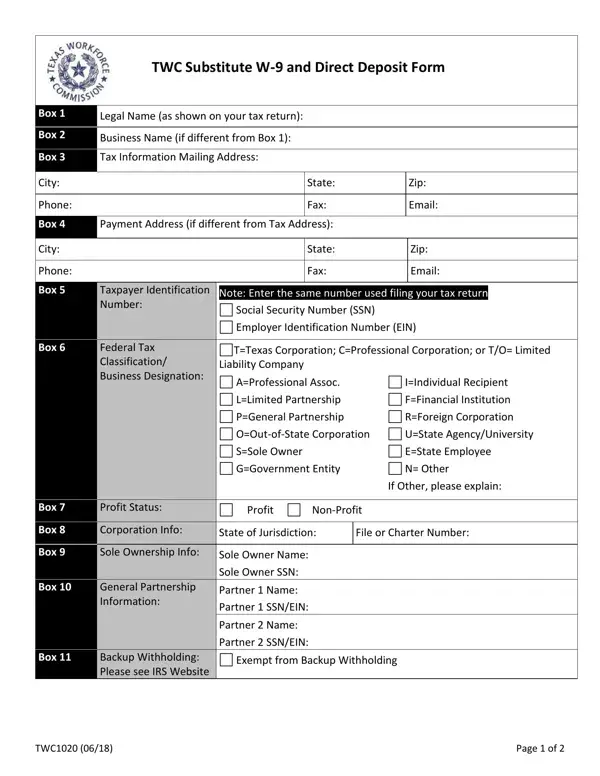
Dars 1020 Form PDF Details

This substitute W-9 and direct deposit document is used by vendors and service providers engaging with the Texas Workforce Commission (TWC). It facilitates essential tax documentation and payment processing, covering a range of vital information including legal and business names, federal tax classification, taxpayer identification numbers, and direct deposit banking details. Distinctions between individual, partnership, corporation, and other business types are clearly laid out, requiring respondents to specify their classification and business status. The form also provides options for setting up, changing, or canceling direct deposit arrangements, and specifies the type of financial account involved. Completing this document accurately is paramount, as it includes a certification section addressing compliance with tax laws under penalty of perjury. Affirming eligibility for payments without backup withholding is underscored for its legal importance. The document embodies a blend of tax compliance and payment facilitation, making it an indispensable tool for entities and individuals engaged in business with the TWC.

Who Needs to Complete This Form?

Any individual or organization receiving payments from the Texas Workforce Commission must submit this document. This includes public contractors, vendors, nonprofit service providers, state employees, and businesses supplying goods or services to TWC agencies. Federal standards require all payees to provide current taxpayer identification information and direct deposit details before receiving compensation. Entities setting up, changing, or canceling their direct deposit arrangement with TWC must also complete this form.

Related Forms

If you need additional forms related to Texas vendor payments or tax documentation, the following may be useful:

QuestionAnswer
Form NameDars 1020 Form
Form Length2 pages
Fillable?No
Fillable fields0
Avg. time to fill out30 sec
Form AuthorityTexas Workforce Commission (TWC)
PurposeSubstitute W-9 and Direct Deposit Enrollment
Other namesdars form, texas dars direct, dars form 1020 form, how to dars form

How to Edit Dars 1020 Form Online for Free

This form can be completed online in just a few steps using FormsPal's PDF editing tool. Our platform provides an easy, secure way to fill out this important document and download or submit it. Follow the instructions below to complete each section accurately.

Step 1: Click the "Get Form" button at the top of this page to open the PDF editor.

Step 2: Use the editor to complete each field. You can add text, select checkboxes, insert your signature, and review all information before saving.

Be careful when filling out each section. Make sure every field is completed properly.

1. The first section requires your identification and tax information. Ensure the following fields are completed:

Filling in the identification and tax information fields

2. Complete the business classification section by selecting the appropriate type: Professional Association, Individual Recipient, Limited Partnership, Financial Institution, General Partnership, Foreign Corporation, Out-of-State Corporation, State Agency or University, Sole Owner, Government Entity, State Employee, or Other. Verify all selections before continuing.

Completing the business classification section

3. Fill in the direct deposit section: indicate whether you are setting up a new account, changing existing direct deposit information, or canceling the arrangement. Provide the Financial Institution Name, Address, City, State, Zip Code, Routing Number, Account Type, and Account Number.

Completing the direct deposit setup section

4. Complete the authorization section with your signature, printed name, and date. This section is legally binding and confirms your compliance with applicable tax laws and direct deposit terms.

Authorization and certification fields

After reviewing all completed fields, click "Done" to finalize. You can download, email, or save the document in your FormsPal account for easy access.

Frequently Asked Questions

Who is required to complete this form?
Individuals and businesses providing goods or services to the Texas Workforce Commission must submit this document. Public contractors, nonprofit service providers, state employees, and other vendors receiving TWC payments are required to provide current tax identification and direct deposit information before receiving compensation.

What information is needed to fill out this form?
You will need your legal name or business name, federal tax classification, taxpayer identification number (TIN or EIN), and complete banking information including your financial institution name, routing number, and account number.

Is this the same as a W-9?
Yes, this document functions as a Substitute W-9 combined with a direct deposit enrollment form. It fulfills the same tax identification reporting requirements as the standard IRS W-9 and also allows TWC to set up direct deposit payments. Texas state agencies use this combined format to meet both federal reporting standards and payment services requirements in a single document.

How do I submit the completed form?
After completing the document online at FormsPal, download it and submit it to your TWC contact or the state agency handling your payments. Keep a copy for your records.