
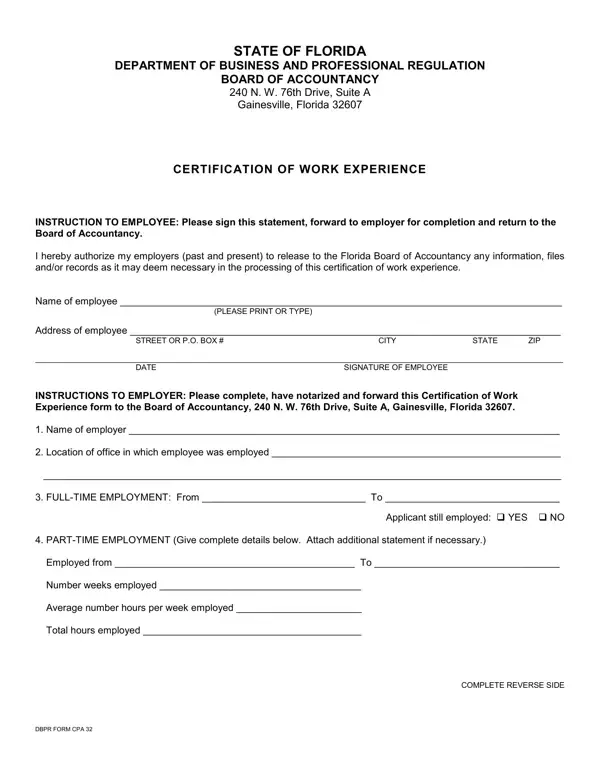
The DBPR Form CPA 32, also known as the CPA Work Experience Record, is the official verification document used to confirm supervised professional experience for Florida CPA licensure applicants. The Florida Department of Business and Professional Regulation requires all initial license candidates to submit this form with a supervising CPA's signature before the Board of Accountancy will approve the application. The form captures the applicant's employment history, the nature of the accounting work performed, and the supervisor's certification that the experience meets Florida's administrative requirements.
You must submit the DBPR CPA 32 if you are applying for an initial Florida CPA certificate and need to document qualifying work experience. The form applies to:
Your supervising CPA must hold an active Florida CPA certificate or an equivalent license from a substantially equivalent state. If your experience spans multiple employers, a separate DBPR CPA 32 must be submitted for each supervising CPA and employer of record.
Section A is completed by the licensure applicant. You must enter your full legal name as it appears on your CPA exam records, your current mailing address, and your DBPR applicant number if you have already started the license application. You also provide the name and address of the employer where you performed the documented accounting work, along with the start date and end date of that employment period. This information must match your primary CPA license application exactly so the DBPR can link the experience record to your file without delays.
Section B is completed and signed by your supervising CPA. Your supervisor enters the employer's official business name, the period of supervision in months, and confirms whether the experience was full-time or part-time. The supervisor also provides their Florida CPA certificate number and an attestation that the information is accurate and complete. The original signature is required. The DBPR will not accept photocopies or electronic signatures that lack proper authentication. If the supervisor is no longer employed at the same organization, they may still sign in their individual capacity as a licensed CPA.
Section C asks for a written description of the accounting services you provided during the documented period. The Florida Board of Accountancy reviews this section carefully to confirm that the experience meets the statutory definition of public accounting work. Common qualifying activities include:
Write clear, specific descriptions rather than general job titles. For example, instead of stating "performed accounting duties," describe the specific engagements handled, such as "prepared individual and business income tax returns and reviewed financial statements for small business clients." More detail reduces the risk of a deficiency notice from the Board.
Florida follows the 150-hour education rule for CPA licensure. In addition to passing the Uniform CPA Examination, candidates must hold a baccalaureate or higher degree and complete 150 semester hours of college education with at least 36 semester hours in upper-division accounting courses. The experience requirement, documented through the DBPR CPA 32, consists of at least one year of full-time equivalent supervised experience in public accounting. Part-time hours are counted on a prorated basis, so candidates working part-time must accumulate enough hours to equal one full year of full-time work before submitting the form.
After the DBPR receives a complete application package, including all required forms and the applicable fee, the Florida Board of Accountancy reviews the materials. Processing times typically range from 30 to 90 days, depending on application volume and whether the Board requests additional documentation.
Mail the completed and signed original to the Florida Department of Business and Professional Regulation in Tallahassee. The DBPR does not accept fax submissions for this form. Include a copy of your CPA exam score reports and any other documents required by the application checklist. Keep a copy of the signed DBPR CPA 32 for your own records before mailing the original. If you have questions about the submission address or application fees, contact the DBPR's Division of Certified Public Accounting directly.
If you are working through other Florida professional licensing requirements, FormsPal provides additional DBPR documents:
Can I document experience earned in another state? Yes. The Florida Board of Accountancy accepts experience performed under a licensed CPA in any U.S. jurisdiction. Your supervisor must hold an active CPA certificate in the state where the work was performed.
What if I worked under multiple supervisors at one employer? You may submit one DBPR CPA 32 per supervisor even if all the experience was at the same organization. Each supervisor must sign the section verifying their own period of supervision.
Is notarization required? Notarization is not required for the standard CPA 32 form. However, the supervisor's original handwritten signature is mandatory. Unsigned forms will be returned without processing.
How long does the DBPR keep my application on file? The DBPR retains application materials for a period defined by Florida's public records law. If your application is incomplete or inactive for more than one year, you may need to reapply and resubmit supporting forms including the DBPR CPA 32.
| Question | Answer |
|---|---|
| Form Name | Dbpr Form Cpa 32 |
| Form Length | 2 pages |
| Fillable? | Yes |
| Fillable fields | 33 |
| Avg. time to fill out | 30 sec |
| Other names | 1983, certified accountant certificate sample, 76th, cpa licence editable |
Dbpr Form Cpa 32 isn’t the one you’re looking for?