
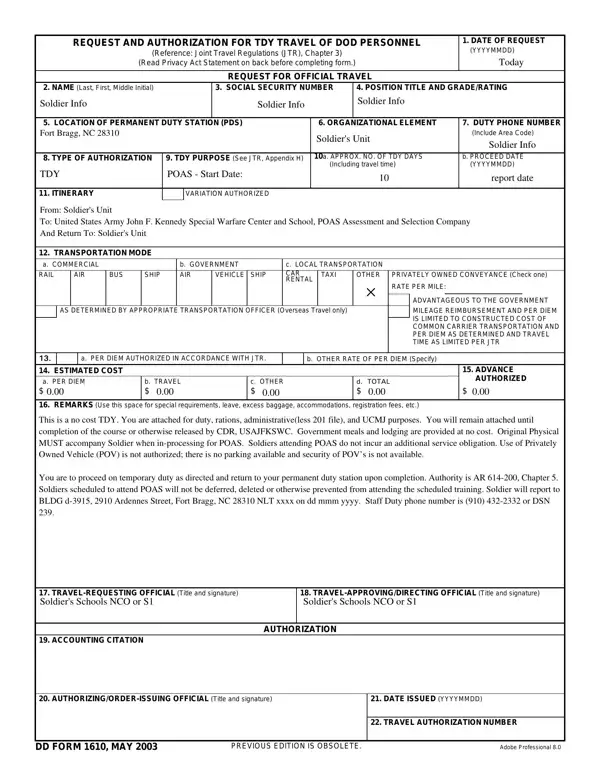

DD Form 1610 at a glance
What it is: DD Form 1610 is the Request and Authorization for TDY Travel of DoW Personnel; its principal purposes are to capture required information to allow officials to review, approve and account for authorized travel.
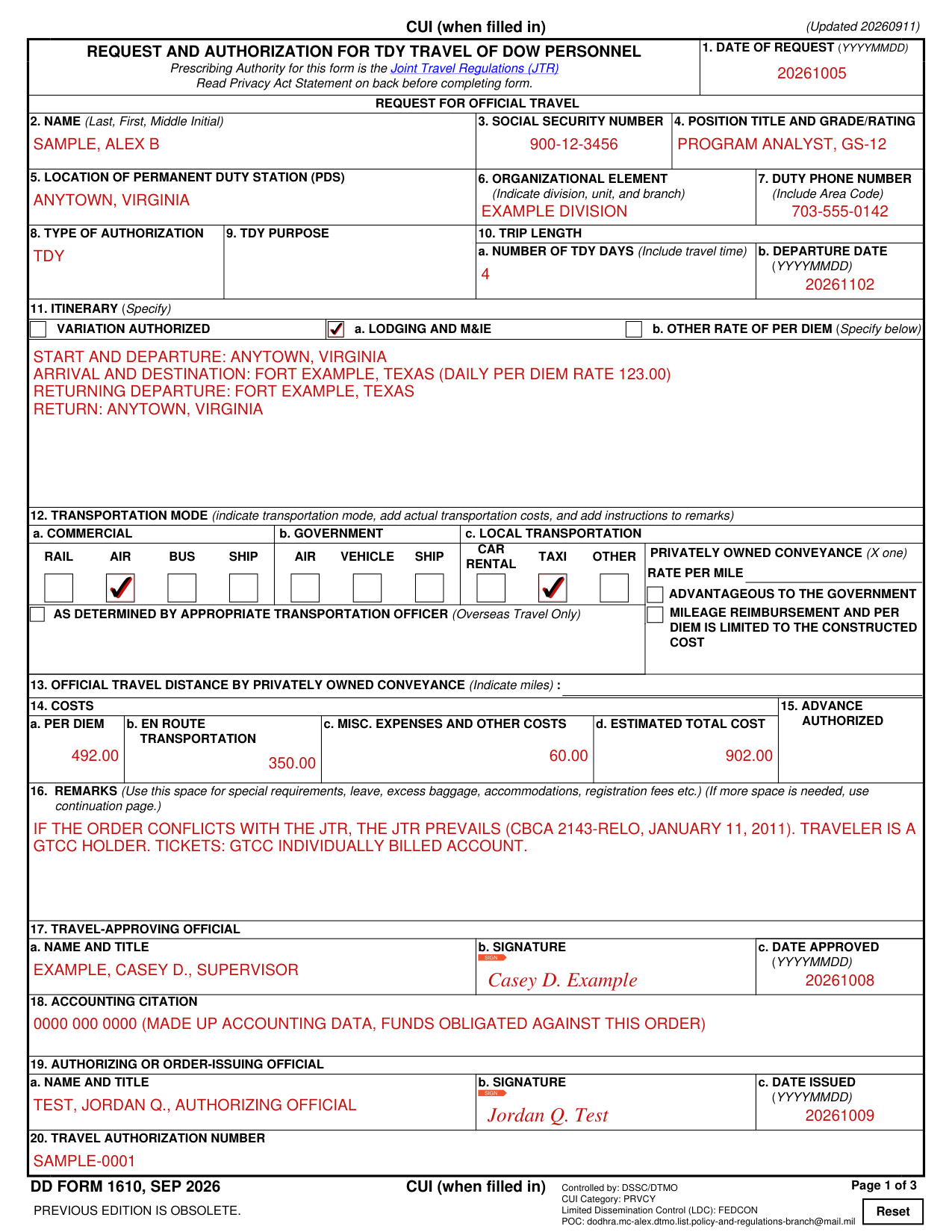
Who signs: The signature lines are 17b for the Travel-Approving Official and 19b for the Authorizing or Order-Issuing Official.
A filled-in DD Form 1610 example: a four-day TDY trip by air
How to fill out DD Form 1610, box by box
Date of request, name, Social Security Number and position (boxes 1 to 4)
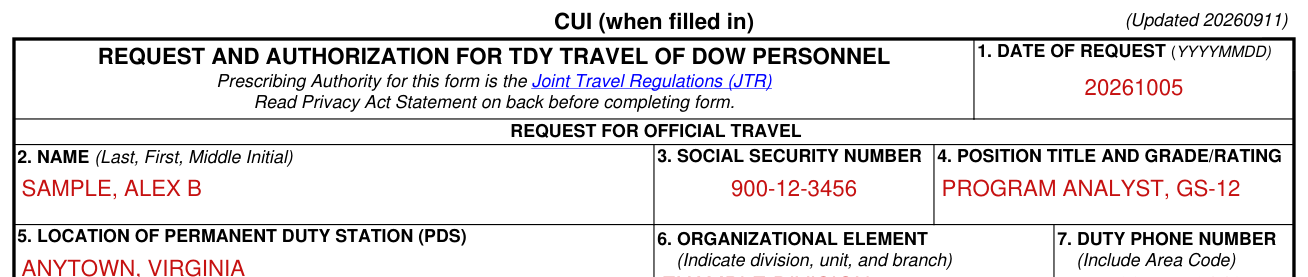
Box 1, Date of Request: enter today's date in the format YYYYMMDD.
Box 2, Name: enter the traveler's last name, first name, and middle initial.
Box 3, Social Security Number: enter the traveler's full Social Security Number (SSN). The last four digits of a traveler's SSN are insufficient.
Box 4 is Position Title and Grade/Rating.
Box 3 or box 4 (the form does not say which): this information is not required if the travel approving or directing official determines that inclusion of this information may endanger the traveler. On page 3 of the form it is shown on the line for box 4, after the line for box 3.
Duty station, organizational element and duty phone (boxes 5 to 7)

Box 5, Location of Permanent Duty Station (PDS): enter the city and state or country of the traveler's PDS.
Box 6, Organizational Element: enter the division, branch, or unit to which the traveler is assigned.
Box 7, Duty Phone Number: enter the telephone number of the duty station, including the area code.
Type of authorization, purpose and trip length (boxes 8 to 10)

Box 8, Type of Authorization: enter the authorization type requested, such as TDY, emergency visitation travel (EVT), confirmatory, amendment, extension, blanket, or group.
Box 9, TDY Purpose: enter one of the applicable identifiers specified in e-CFR Title 41, Chapter 301, Appendix C: Standard Data Elements for Federal Travel.
Box 10, Trip Length: in 10a enter the estimated number of days required for the TDY assignment (Include travel time) and in 10b the Departure Date (YYYYMMDD).
Box 10: ensure TDY beyond 180 days at one location is authorized by the responsible Service Secretarial Process prior to official travel. Use the remarks block (box 16) for authorization.
Itinerary and per diem (box 11)
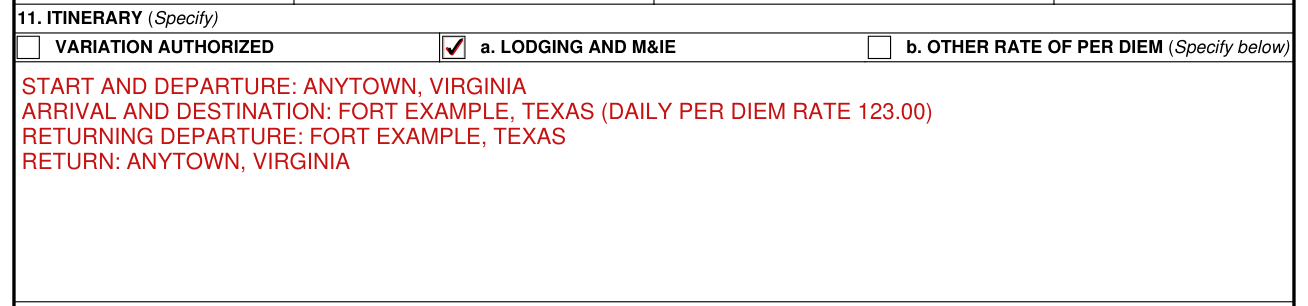
Box 11, Itinerary: list all authorized travel locations, including the starting location, departure location, arrival location, destination location, returning departure location, return location, and all associated daily per diem rates.
Box 11, Itinerary: if the TDY is to a military installation, specify the installation name, not a nearby city.
Common mistake: Variation Authorized: only mark an “X” in the box preceding “Variation Authorized” if the traveler has a high probability of needing to change the itinerary while traveling.
Common mistake: Boxes 11a and 11b, Per Diem Note: for FEML & R&R, leave boxes 11a and 11b blank, since per diem is not authorized.
Box 11a (LODGING AND M&IE): when per diem is authorized using the Lodging Plus computation method, check “Lodging And Per Diem” and make no further entry.
Box 11b (OTHER RATE OF PER DIEM, Specify below): when a different per diem rate is specified or authorized, check “Other Type or Rate of Per Diem (Specify)” and enter the appropriate rate information. For example, if there is an AEA or reduced per diem rate, check box 11b and enter “reduced rate” and the amount of the lower per diem rate.
Transportation mode and travel distance (boxes 12 and 13)
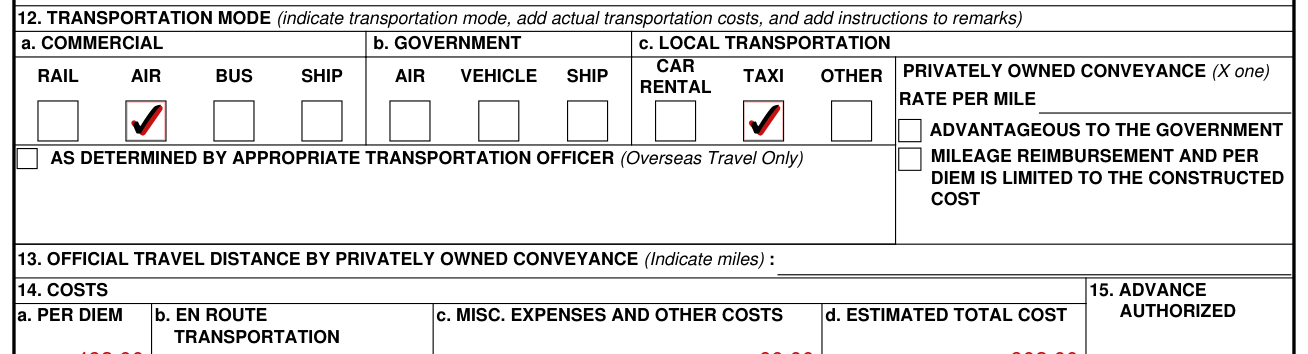
Box 12, Transportation Mode (indicate transportation mode, add actual transportation costs, and add instructions to remarks): insert the en route transportation modes that the AO authorizes.
Box 12 has check boxes under a. COMMERCIAL (RAIL, AIR, BUS, SHIP), b. GOVERNMENT (AIR, VEHICLE, SHIP) and c. LOCAL TRANSPORTATION (CAR RENTAL, TAXI, OTHER).
Box 12, Privately Owned Conveyance (X one): RATE PER MILE, then mark one of the two check boxes, ADVANTAGEOUS TO THE GOVERNMENT or MILEAGE REIMBURSEMENT AND PER DIEM IS LIMITED TO THE CONSTRUCTED COST.
Box 12 also has a check box for AS DETERMINED BY APPROPRIATE TRANSPORTATION OFFICER (Overseas Travel Only).
Box 13, Official Travel Distance by Privately Owned Conveyance (Indicate miles), shown as Official Travel Distance Between Authorized Points on page 3 of the form: indicate official distance between authorized travel locations and allowable travel days if eligible for official duty.
Box 13: Leave or personal convenience are ineligible reasons for additional travel time and distance.
Costs and advance (boxes 14 and 15)

Box 14, Costs (a. Per Diem, b. En Route Transportation, c. Misc. Expenses and Other Costs, d. Estimated Total Cost): enter the estimated cost of per diem, transportation, travel, and other expenses.
Box 14c: enter the estimated cost of transportation at the TDY location under miscellaneous expenses.
Box 14d, Estimated Total Cost: the total automatically updates in item 14d.
Box 15, Advance Authorized: the requester should leave this blank.
Box 15: if a travel advance is authorized from a Government finance office in accordance with Service finance policy, then the AO should enter the authorized amount in item 15.
Common mistake: Box 15: do not enter an ATM advance against the Government Travel Charge Card (GTCC) in item 15; indicate that amount in item 16.
Remarks (box 16)
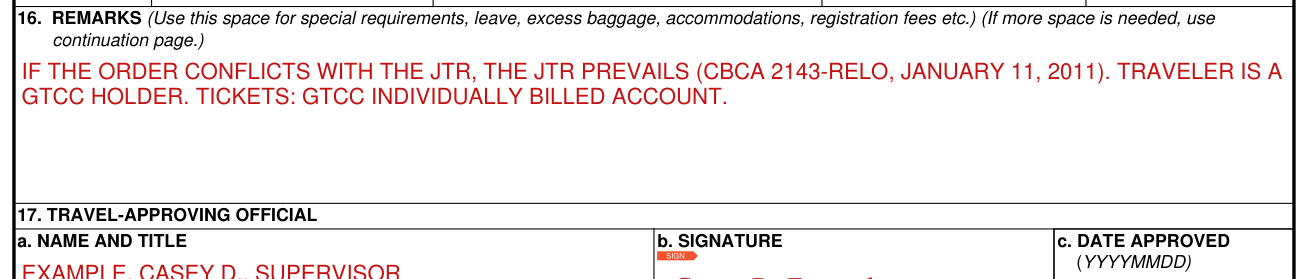
Box 16, Remarks: use this space for special requirements, leave, excess baggage, accommodations, registration fees etc.
If additional space is needed for any item, use the space in item 16 or add a continuation sheet.
Box 16, Remarks (Mandatory Statements): include the mandatory statement “If the order conflicts with the JTR, the JTR prevails (CBCA 2143-RELO, January 11, 2011).”
Box 16, mandatory statement: state whether the traveler is a GTCC holder or is exempt (See DoW Government Travel Charge Card Regulations for authorized exemptions).
Box 16, mandatory statement: state which of the following purchase methods is authorized for transportation tickets: GTCC individually billed account; Centrally billed account; Otherwise personally purchased.
Travel-approving official and accounting citation (boxes 17 and 18)
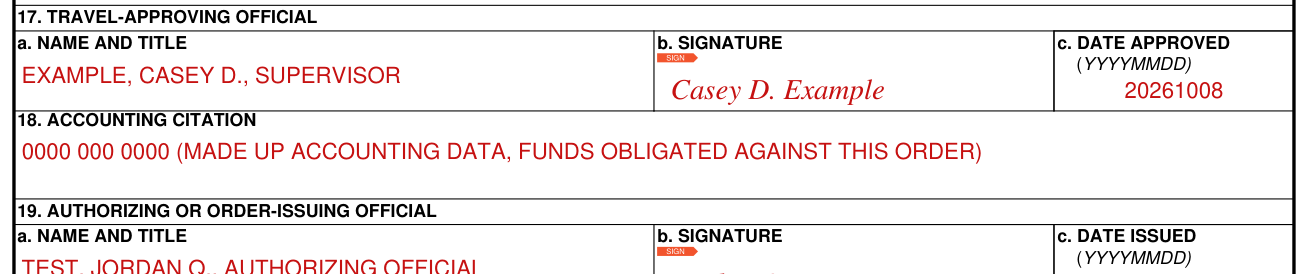
Box 17, Travel-Approving Official: enter the full name and title of the official who approves the travel request in 17a. The official signs in 17b. Box 17c is Date Approved (YYYYMMDD).
Box 18, Accounting Citation: enter fiscal data in accordance with the regulations of the DoW Component concerned.
Box 18: ensure that funds are obligated against the order.
Authorizing or order-issuing official and travel authorization number (boxes 19 and 20)

Box 19, Authorizing or Order-Issuing Official: enter the full name and title of the authorizing or order-issuing official in 19a. The official signs in 19b. Box 19c is Date Issued (YYYYMMDD).
Box 20, Travel Authorization Number: enter the identifying number assigned by the issuing office.
More rules for DD Form 1610
Read the Privacy Act Statement on back before completing the form; it is on page 3 of the form.
The DD Form 1610 preparation instructions say to refer to the Defense Travel Management Office's website on “Travel Orders.”
CUI (when filled in). Controlled by: DSSC/DTMO. CUI Category: PRVCY. Limited Dissemination Control (LDC): FEDCON.
Authority (Privacy Act Statement): 5 U.S.C. §§ 5701 and 5702, and approved exemption from E.O. 13478.
Privacy Act Statement: use of the Social Security Number is necessary for required federal income tax programs.
Routine use (Privacy Act Statement): to the Internal Revenue Service to provide information concerning the pay of travel allowances which are subject to federal income tax.
This is DD FORM 1610, SEP 2026; the previous edition is obsolete.
Common questions about DD Form 1610
What is a DD form 1610?
DD Form 1610 is the Request and Authorization for TDY Travel of DoW Personnel; its principal purposes are to capture required information to allow officials to review, approve and account for authorized travel. Prescribing Authority for this form is the Joint Travel Regulations (JTR).
Sources
[1] DD FORM 1610, SEP 2026, Request and Authorization for TDY Travel of DoW Personnel, Executive Services Directorate, Washington Headquarters Services (the Official source link on this page).