
Dd Form 1966 PDF Details

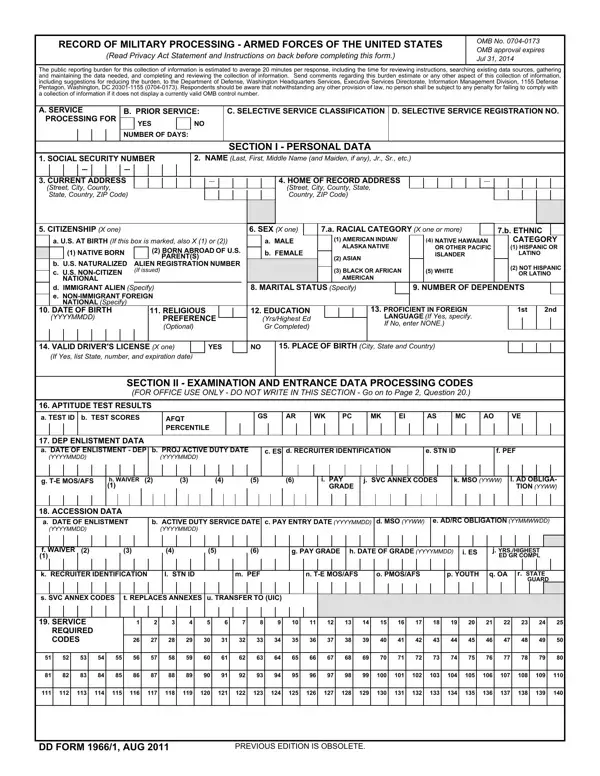
The Record of Military Processing is a foundational document in the US military enlistment process. Recruiters and Military Entrance Processing Station (MEPS) personnel use it to verify applicant eligibility, collect formal service commitments, and create permanent records for every new enlistee.

What Information the Form Collects

The form is divided into numbered sections, each covering a distinct category of personal or service-related data:

Who Completes the Form

The applicant fills out personal data sections covering identity, education, and background history. The recruiter completes administrative sections including station identification, waiver notations, and initial service branch coding. MEPS processing staff then validate aptitude scores, confirm medical eligibility, and finalize the accession data section before the applicant takes the oath of enlistment.

Privacy Act Compliance

Applicants must acknowledge the Privacy Act Statement before completing the form. This statement explains how the Department of Defense collects and uses personal data during the enlistment process. All personal information is protected under applicable federal privacy laws.

Providing false or misleading information on this federal document carries serious legal consequences. Review all entries carefully before signing and submitting the completed form to your recruiter.

For other military documents commonly filed alongside this form, see DD Form 93 (Record of Emergency Data) and the Soldier's Privacy Act Statement.

QuestionAnswer
Form NameDd Form 1966
Form Length6 pages
Fillable?No
Fillable fields0
Avg. time to fill out1 min 30 sec
Other namesdd form 1966 5 fillable, dd form 1966 page 5, army dd form 1966 page 4, dd form 1966 5

How to Edit Dd Form 1966 Online for Free

Use the FormsPal online PDF editor to complete this military processing form right in your browser. No software downloads or installations are needed. Follow these steps to get started:

Step 1. Click the "Get Form" button at the top of this page to open the document in the FormsPal editor.

Step 2. Once the editor loads, work through each section in order. You can type directly into the form fields, insert text blocks, and add your signature where required. The editor supports all standard PDF form actions so you can complete the document without printing.

Complete each required section before moving on to the next:

  • Personal Information – Enter your full legal name exactly as it appears on your identification documents. Include your social security number, date of birth, and citizenship status.
  • Education History – List every high school you attended with the enrollment dates and whether you graduated. If you have college credits, note the institution and credit hours completed.
  • Personal Background – Provide accurate marital status, number of financial dependents, and any history of civil or criminal matters. Answer every question honestly. Recruiters verify background data independently.
  • Military Service – Disclose any prior military service, previous applications to enlist, or branch rejections. List any waivers that have already been approved or are pending.
  • Test Scores – Your recruiter enters your AFQT percentile and individual ASVAB subtest scores in this section after you receive your official results.
Completing the personal data section of the military processing form

After you finish the personal sections, your recruiter or MEPS processing officer completes the accession data portion. This includes your DEP (Delayed Entry Program) enlistment date, pay grade, military occupational specialty (MOS) codes, and station identification numbers. These fields are filled in by authorized personnel and should not be altered by the applicant.

Filling out the aptitude test and enlistment data sections

Double-check all personal information for accuracy before signing. Providing false information on a federal military document carries serious legal consequences under US law. If you notice an error after submission, contact your recruiter immediately to request a correction.

Previous edition stamp and form identifier on the processing document

The form notes that previous editions are obsolete. Always use the current version when starting the enlistment process. Your recruiting office will provide the correct edition for your processing date.

Step 3. After completing all sections, review every field for accuracy. Click "Done" to finalize the document. You can then download the completed form as a PDF, print it directly from your browser, or share it with your recruiter via email.

Entering education history and personal data in the processing formFinal checklist sections of the military processing document

For related forms you may need during the enlistment process, see DD Form 93 for emergency contact designations or the Military Power of Attorney for legal authority assignments during active service.

FormsPal keeps your personal data private. We do not store or share any information you enter while using our online editor.