
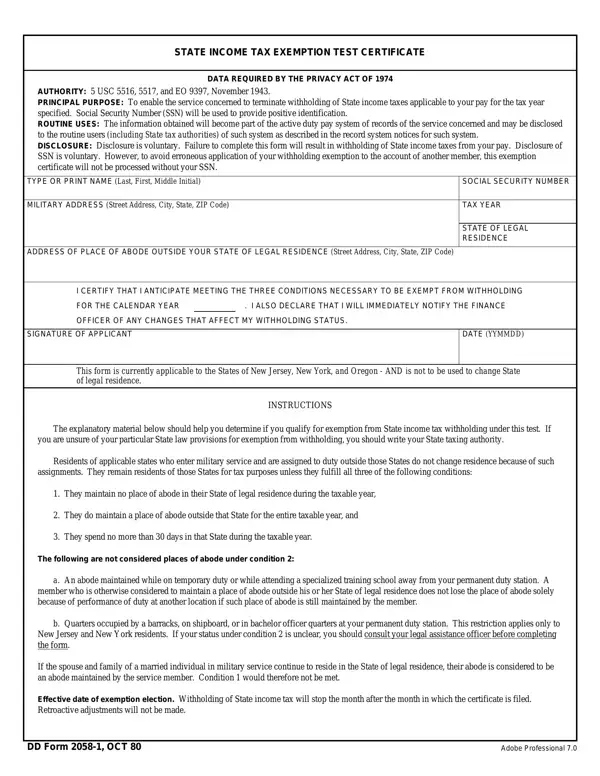
The DD 2058-1 is a Department of Defense form that lets active-duty military personnel request an exemption from state income deductions on their pay. Operating under the authority of the Privacy Act of 1974, 5 USC 5516, 5517, and Executive Order 9397, this form gives a finance officer the record needed to halt those deductions for an eligible year. Voluntary disclosure of a Social Security Number (SSN) is required to correctly identify the applicant and prevent processing errors.
A servicemember must satisfy all three of the following conditions during the applicable year to qualify for the exemption:
Under the Servicemembers Civil Relief Act (SCRA), qualifying active-duty personnel are also entitled to additional state protections. The SCRA restricts states from imposing tax obligations on servicemembers stationed outside their home state, which works alongside this form to limit financial exposure during deployment. Personnel who believe the SCRA applies to their situation should consult their JAG office for guidance specific to their state of legal residence.
A servicemember's state of legal residence is the state they regard as their permanent home — the state to which they intend to return after leaving active duty. Legal residence is established separately using DD Form 2058 and does not automatically change when a servicemember is reassigned to a new duty station in a different state. A servicemember can therefore be stationed at a base in one state while maintaining legal residence in another.
This distinction matters greatly for Form 2058-1. The form tests whether the servicemember has satisfied the three conditions relative to their state of legal residence, not their active-duty state. If a servicemember has no abode and minimal physical presence in their state of legal residence for the year, they may qualify for the exemption regardless of where they are stationed. Confirming that your home state on file with the finance office is accurate is a necessary step before submitting this form.
The form includes state-specific language for New Jersey and New York residents. Temporary presence in either state for military training, authorized leave, or official duty does not constitute a change in abode or legal residence. This applies even if you return to the state multiple times, as long as total physical presence stays within the 30-day limit for the year. Residents of these two states should review the applicable sections carefully before certifying their eligibility.
Once you fill in every field and sign the form, submit the completed record to your unit finance officer. Approval halts deductions from your pay beginning the calendar month after the officer receives and processes your exemption request. If your place of abode or residence situation changes at any point during the year, notify the finance officer right away so that the correct deductions can resume. Failure to report a change may result in underpayment of amounts owed to your state of legal residence.
Form 2058-1 covers one calendar year at a time.
File at the beginning of the year you want the exemption to apply.
Approval stops deductions from your pay starting the following calendar month.
If you file in March, deductions stop in April.
Filing early in the year allows more months of coverage.
Servicemembers at overseas or remote-duty installations should file early to allow processing time.
Each year you meet all three conditions, submit a new form to declare your eligibility.
Retroactive refunds for pay periods before the approval date are not guaranteed.
Keep the signed form, submission date, and finance officer's name in your personal records.
An updated DD Form 2058 on file with your unit makes the process straightforward.
The exemption applies only for the specific year declared on the form. It does not renew automatically. Each new year requires a fresh declaration confirming that you still meet all three eligibility conditions. Keep a copy of each year's signed form in your personal records along with the date of submission, the name of the receiving officer, and any written acknowledgment you receive. Servicemembers assigned overseas or to remote installations should submit the form early in the year to allow adequate processing time and avoid any gap in coverage.
Before submitting Form 2058-1, verify the following steps are complete:
Servicemembers sometimes submit this form without first confirming their state of legal residence on DD Form 2058. The two forms work together: Form 2058 establishes legal residence, and Form 2058-1 tests whether you qualify for the exemption in a given year. Submitting 2058-1 without an up-to-date 2058 on file can lead to processing delays. A second common error is listing a temporary duty address rather than the address of legal residence when completing the personal information section of the form.
See DD Form 2058 to establish your state of legal residence before filling out this exemption form. For related payroll needs, review the income withholding form and the earnings withholding order.
| Question | Answer |
|---|---|
| Form Name | DD Form 2058-1 |
| Full Title | State Income Tax Exemption Test Certificate |
| Form Length | 1 page |
| Issued By | Department of Defense |
| Authority | Privacy Act of 1974; 5 USC 5516, 5517 |
| Fillable? | Yes |
| Fillable fields | 9 |
| Avg. time to fill out | 15 sec |
| Other names | New_Jersey, dd form 2058 1, New_York, 2058 |
Dd Form 2058 1 isn’t the one you’re looking for?