
De 36 Form PDF Details

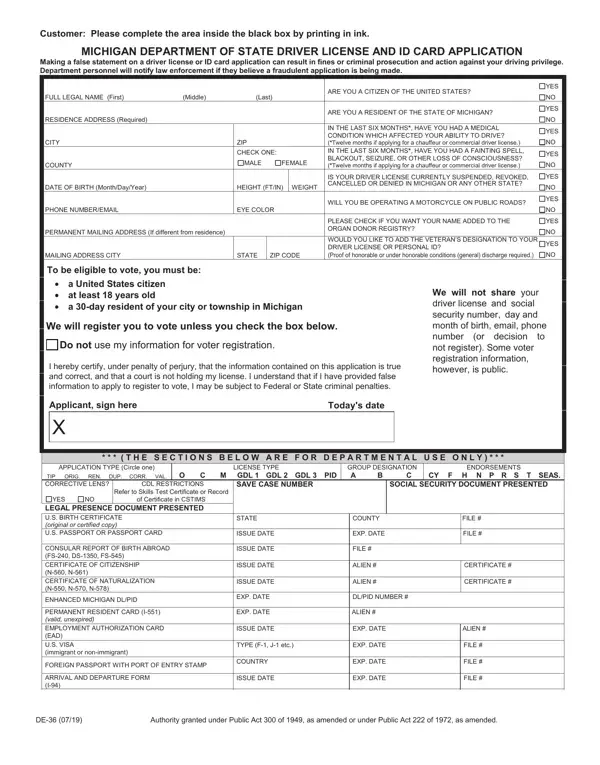
Applying for a driver license or ID card in Michigan involves a detailed process governed by the Michigan Department of State. This comprehensive application must be completed by individuals applying for their very first license, renewing an existing one, or requesting duplication or correction of current documents.

Application type and license classification. Applicants begin by selecting the application category: original, renewal, duplicate, or correction. Next, choose the license type: standard passenger vehicle license, Commercial Driver License (CDL), or Graduated Driver License (GDL) for younger drivers. Endorsements for vehicles such as motorcycles or school buses and applicable restrictions are also recorded in this section.

Personal identification and residency information. Provide your full legal name, current Michigan residence address, date of birth, and Social Security number or an accepted alternative document. First-time applicants must present legal presence documentation such as a U.S. birth certificate, valid passport, or Permanent Resident Card at their branch office appointment.

Medical and health disclosure. The application inquires about medical conditions related to safe vehicle operation, including vision impairments and other health factors. Michigan law requires accurate disclosure. Providing false information on a driver license application may result in license denial, fines, or legal action under state law.

Organ donor registry option. The form offers an optional opportunity to register as an organ donor through the Michigan Organ Donor Registry, a voluntary decision with no impact on the licensing outcome.

Current license status declaration. Applicants must confirm whether their driving privileges have been suspended or revoked in Michigan or any other state. Providing false information in this section carries serious legal consequences under Michigan state law.

Documents to bring to your appointment. When visiting a Michigan Secretary of State branch office, bring proof of legal presence in the U.S. (such as a certified birth certificate, unexpired U.S. passport, or Permanent Resident Card), proof of Michigan residency (two documents for first-time applicants, such as a utility bill or current lease agreement), and your Social Security card or an approved alternative document. Having all documents ready before your visit helps avoid delays in processing your driver license or ID card application.

Michigan Department of State personnel at your local branch office are available to help with the application, verify documents, and ensure your submission meets all state requirements before your appointment is complete.

QuestionAnswer
Form NameDe 36 Form
Form Length2 pages
Fillable?No
Fillable fields0
Avg. time to fill out30 sec
Other namesmichigan state id application form de 36, PID, MICHIGAN, michigan driver license application form

How to Edit De 36 Form Online for Free

Michigan Driver License Application: What to Prepare

The Michigan driver license and state ID card application requires specific documents depending on whether you are requesting an original license, a renewal, a duplicate, or a correction. First-time applicants must bring proof of legal presence in the United States (such as a birth certificate or valid U.S. passport), two proofs of Michigan residency, and a Social Security card or an accepted alternative document. Renewal applicants generally need only their current driver license or ID card information. Having your required documents organized before your appointment at a Michigan Secretary of State office helps ensure faster processing of your application.

How to Fill Out the Michigan Driver License Application Online

Handling PDF files online is very easy with our PDF tool. Anyone can fill out the driver license application form here and try out various other functions we provide. To have our editor on the cutting edge of practicality, we work to put into action user-driven features and enhancements regularly. We're always glad to receive feedback - play a vital role in remolding how we work with PDF documents. If you are seeking to begin, this is what it will take:

Step 1: Just hit the "Get Form Button" at the top of this site to launch our pdf editor. This way, you'll find all that is necessary to work with your document.

Step 2: Using our online PDF editing tool, it is easy to do more than merely fill out forms. Try all the features and make your forms look professional with custom textual content added in, or optimize the file's original content to excellence - all supported by an ability to incorporate almost any pictures and sign the document off.

It is easy to fill out the pdf with this practical guide! Here is what you should do:

1. You'll want to fill out the driver license application form properly, therefore be careful when filling in the segments including these specific blank fields:

Filling in part 1 of drivers license application form

2. Once your current task is complete, take the next step and fill out all of these fields - Applicant sign here, Todays date, T H E S E C T I O N S B E L O, APPLICATION TYPE Circle one, LICENSE TYPE, TIP ORIG REN DUP CORR VAL O, C CDL RESTRICTIONS, M GDL GDL GDL PID, SAVE CASE NUMBER, Refer to Skills Test Certificate, GROUP DESIGNATION A, ENDORSEMENTS, CY F H N P R S T SEAS, SOCIAL SECURITY DOCUMENT PRESENTED, and YES with their corresponding information. Make sure to double check that everything has been entered correctly before continuing!

Filling out section 2 of drivers license application form

People often make mistakes while filling out YES in this area. Be sure to revise everything you type in right here.

Step 3: Right after you've looked over the details you filled in, simply click "Done" to complete your document creation. After getting a 7-day free trial account at FormsPal, you'll be able to download the driver license application form or email it without delay. The PDF file will also be readily accessible from your personal cabinet with your every single change. With FormsPal, you can fill out forms without needing to be concerned about database breaches or entries being shared. Our secure system makes sure that your private data is kept safely.

Common Questions About the Michigan Driver License Application

Where do I submit the Michigan driver license application?
Bring your completed application form and required supporting documents to any Michigan Secretary of State branch office. Most locations offer both walk-in service and scheduled appointments. Scheduling an appointment in advance typically reduces your wait time.

Can I fill out the driver license application form online?
Yes. You can fill out, edit, and download the Michigan driver license application at FormsPal, then print and bring it to your local Secretary of State office appointment. The Michigan Department of State does not currently process the driver license application entirely online.

What happens if I make a mistake on the Michigan driver license form?
If you make a mistake, you can use FormsPal to start over with a fresh blank copy of the form. Do not use correction fluid on official government documents. Michigan Secretary of State staff at the branch office can also assist you if needed.

Related Michigan Driver License Forms and Documents

Michigan residents navigating the driver licensing process may also need related forms depending on their situation. FormsPal provides a blank driver's license template for reference, the driver application form for standard vehicle licenses, and a driver record request form for obtaining your Michigan driving history. CDL applicants should confirm their specific commercial vehicle class requirements with the Michigan Department of State before completing the driver license application form.