
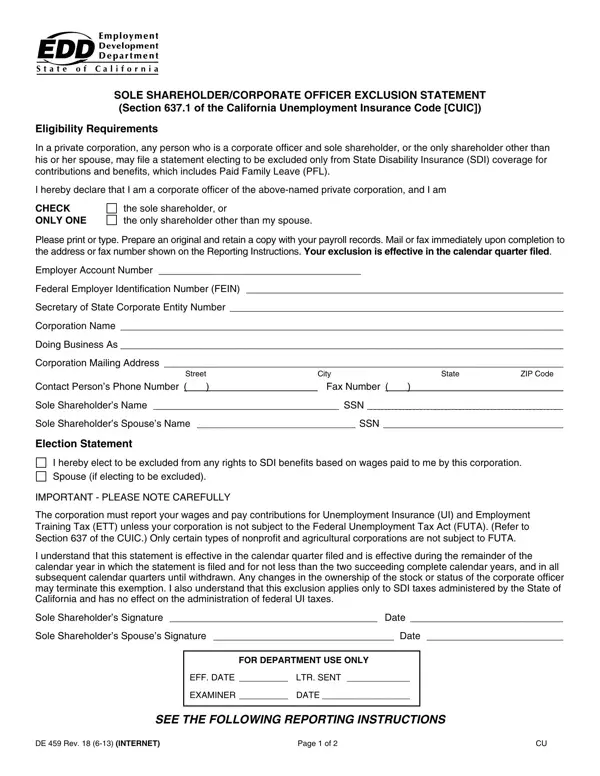
De 459 Form PDF Details

Who qualifies for the SDI exclusion

Not all corporate officers are eligible to exclude themselves from SDI coverage. To file this exclusion statement, you must meet one of the following conditions under the California Unemployment Insurance Code:

Corporate officers who share ownership with unrelated shareholders do not qualify and remain subject to standard SDI withholding on their wages. Only private corporations are covered by Section 637.1 of the CUIC. Public companies and other entity types follow different SDI rules.

How SDI and PFL exclusion affects your payroll

When the Employment Development Department approves your exclusion statement, wages the corporation pays to the qualifying officer are removed from SDI withholding. This affects both the employee-side payroll deduction and the employer's reporting obligation for those wages. As a result, the excluded officer does not accrue SDI benefit rights or Paid Family Leave credits based on the corporate wages. If the officer also works for a separate employer, those wages remain fully subject to SDI rules under normal California payroll law.

Filing requirements and effective period

File the exclusion statement before the end of the first calendar quarter in which you want the exclusion to apply. Enter your Employer Account Number and Federal Employer Identification Number (FEIN) accurately in the fields provided. If you file late, the exclusion takes effect in the following quarter. Maintain thorough payroll records and confirm your shareholder structure each year. If the ownership structure changes at any point, submit a cancellation or an updated filing with the EDD promptly to keep your payroll records compliant.

QuestionAnswer
Form NameDe 459 Form
Form Length2 pages
Fillable?No
Fillable fields0
Avg. time to fill out30 sec
Other namesSSN, LTR, EDD, ETT

How to Edit De 459 Form Online for Free

Use the FormsPal online editor to complete and download the exclusion statement without installing any software. The tool lets you type into all fields, add your signature, and save a print-ready PDF document.

Step 1: Enter employer and shareholder details

Click the "Get Form" button at the top of this page to open the online PDF editor. In the first section, enter the corporation's legal name, the EDD Employer Account Number, and your Federal Employer Identification Number. Then select the applicable statement confirming you are the sole shareholder or that only you and your spouse hold shares in the corporation. Complete all fields in this section before moving to the next part.

DE 459 form section 1 - employer account number and sole shareholder statement

Step 2: Add your signature and complete the certification

In the second part of the document, review the exclusion certification text, then add the sole shareholder's signature in the space provided. If your spouse also holds shares, fill in the Sole Shareholder's Spouse section as required. Leave the FOR DEPARTMENT USE ONLY area blank. That portion is completed by EDD staff after they receive your submission.

DE 459 form section 2 - sole shareholder signature and EDD certification

Step 3: Download and submit to the EDD

After reviewing all entries for accuracy, click "Done" to finalize the document. Download the completed PDF and mail or deliver it to the appropriate EDD office before the quarterly filing period closes. You may also need related California payroll forms. For the employee withholding allowance form, see the DE 4 Withholding Allowance Certificate. To register a new employer account, see the DE 1 Commercial Employer Account Registration. For other California payroll resources, browse employment forms or the EDD Unemployment Insurance form.