
Drug Prior Authorization Form PDF Details

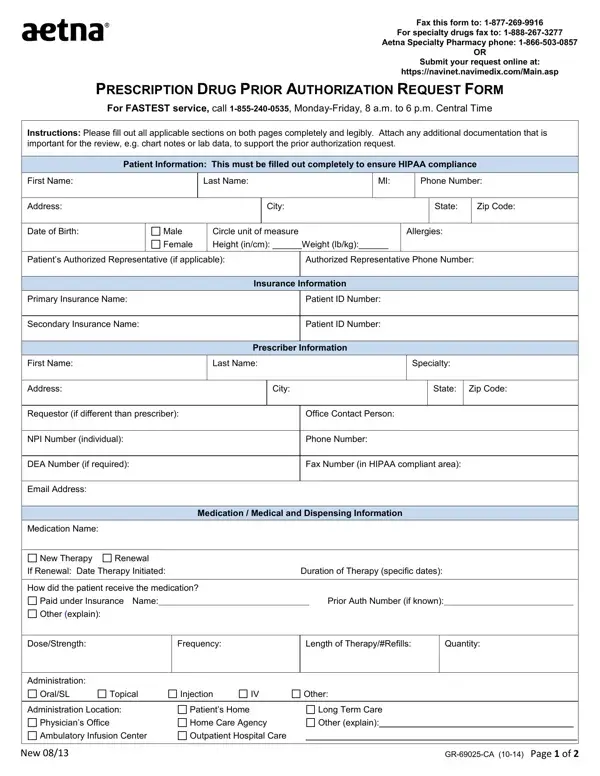
In navigating the complexities of healthcare, the Drug Prior Authorization Request Form stands out as an essential tool for ensuring patients receive the necessary medications while adhering to healthcare provider requirements. This form, vital for both patients and practitioners, serves as a gateway to obtaining approval for prescription medications that require prior authorization by insurance companies. It details a comprehensive procedure, starting from submitting patient information in compliance with HIPAA regulations to providing exhaustive details about the prescribed medication, including dosage, frequency, and method of administration. Additionally, the form facilitates the inclusion of critical clinical data, such as previous medications attempted, diagnoses, and required lab results, to support the authorization process. The urgency for accuracy and thoroughness in completing the form cannot be overstated, as it also includes a section for attestation by the prescriber to affirm the authenticity and precision of the submitted information. Moreover, the form is designed to cater to the needs of those requesting authorization for both new therapies and renewals, underlining the importance of detailed record-keeping in patient treatment continuity. Through this form, healthcare providers can articulate the necessity of a particular medication for a patient, backed by clinical evidence and in compliance with insurance policies, thereby paving the way for expedited patient access to critical medication therapies.

QuestionAnswer
Form NameDrug Prior Authorization Form
Form Length2 pages
Fillable?No
Fillable fields0
Avg. time to fill out30 sec
Other namesNPI, PDP, husky d prior authorization forms, CMS

How to Edit Drug Prior Authorization Form Online for Free

In case you desire to fill out authorizations, you don't need to download any sort of programs - just give a try to our online PDF editor. To make our tool better and simpler to work with, we consistently work on new features, with our users' suggestions in mind. Getting underway is simple! All you have to do is take the following basic steps below:

Step 1: Simply click on the "Get Form Button" above on this webpage to get into our form editor. There you will find everything that is necessary to work with your file.

Step 2: The editor offers you the opportunity to work with almost all PDF files in many different ways. Change it with your own text, correct original content, and put in a signature - all readily available!

It will be simple to complete the pdf using this detailed guide! Here's what you should do:

1. You will want to fill out the authorizations accurately, therefore take care when filling in the parts including these blank fields:

HIPAA completion process described (stage 1)

2. When this array of fields is done, you need to put in the necessary specifics in DEA Number if required, Fax Number in HIPAA compliant area, Email Address, Medication Name, New Therapy, Renewal, Medication Medical and Dispensing, If Renewal Date Therapy Initiated, How did the patient receive the, Paid under Insurance Name, Prior Auth Number if known, Other explain, DoseStrength, Frequency, and Length of TherapyRefills in order to move on further.

Stage # 2 in filling in HIPAA

3. This next part is focused on PRESCRIPTION DRUG PRIOR, Patient Name, Instructions Please fill out all, Has the patient tried any other, YES if yes complete below, MedicationTherapy, Specify Drug Name and Dosage, Duration of Therapy, Specify Dates, ResponseReason for FailureAllergy, List Diagnoses, ICDICD, Required clinical information, Please provide symptoms lab, and Attachments - fill out these blanks.

How one can fill in HIPAA step 3

4. Your next subsection needs your involvement in the following places: Attestation I attest the, Prescriber Signature, Date, Confidentiality Notice The, Plan Use Only, Date of Decision, Approved, Denied CommentsInformation, and New. Be sure that you give all needed information to move forward.

New, Plan Use Only, and Date in HIPAA

Be very careful when filling in New and Plan Use Only, since this is the section where a lot of people make a few mistakes.

Step 3: After you've reviewed the details you given, click on "Done" to finalize your form at FormsPal. Find your authorizations once you sign up for a free trial. Conveniently view the form within your personal account, with any edits and changes being automatically saved! FormsPal is dedicated to the privacy of our users; we always make sure that all personal information processed by our system continues to be confidential.