E Check Authorization Form PDF Details

In today's digital age, managing utilities and bill payments has become more convenient and streamlined, thanks in large part to options like the E-Check Authorization Form provided by NOVEC. This form signifies an easy and efficient way for customers to set up monthly electric bill payments directly from their bank account, whether it be a checking or savings account. Customers are required to fill out the form, which includes providing their NOVEC account number, bank information, and a signature that authorizes NOVEC to automatically withdraw the payment amount each month. It's a simple process: just complete the form, attach a voided check or deposit slip for verification, and then mail or deliver it to NOVEC at the indicated addresses. The form not only outlines the process clearly but also assures users that they remain in control of their payments and can opt out of the plan at any time by notifying NOVEC in writing. For any questions or concerns, NOVEC has made customer service representatives readily available. This method exemplifies a streamlined, hassle-free approach to ensuring utility bills are paid on time, every time, without the need for manual intervention every billing cycle.

QuestionAnswer
Form NameE Check Authorization Form
Form Length2 pages
Fillable?No
Fillable fields0
Avg. time to fill out30 sec
Other namessample check authorization form, form echeck, e check authorization form, e check form online

How to Fill Out e-Check Authorization Form

e-Check Authorization Form at a glance

What it is: The e-Check Authorization Form is printed, completed and signed, with a voided check or deposit slip attached, then mailed or delivered to NOVEC.

Who signs: The authorized bank account holder signs on the Signature of authorized bank account holder line and fills in the Date.

A filled-in e-Check Authorization Form example: a customer sets up e-Check payments
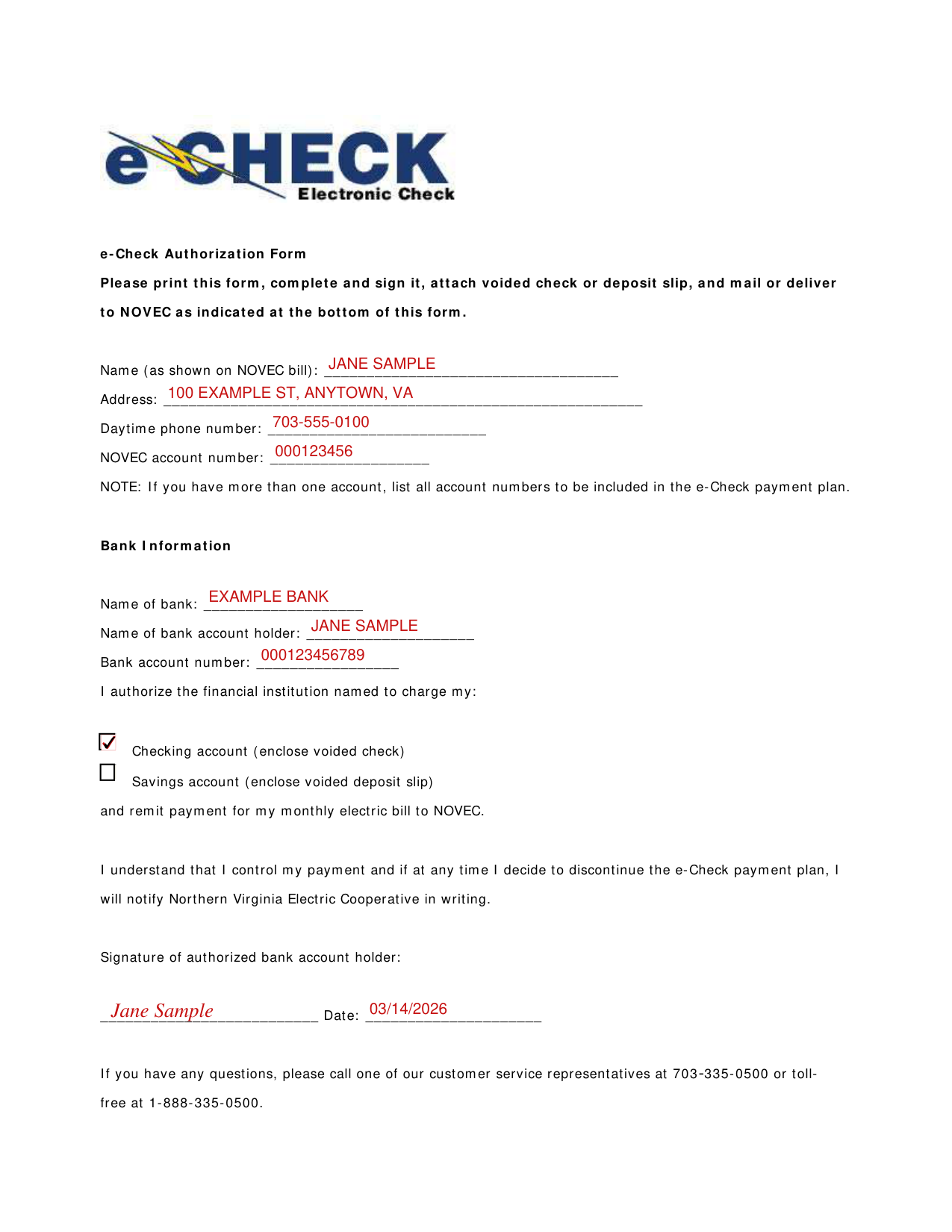
e-Check Authorization Form example filled out, example: a customer sets up e-Check payments
Jane Sample, a NOVEC customer, fills out the e-Check Authorization Form. She has one NOVEC account and pays from a checking account, so Savings account stays empty. The picture shows page 1, and none of its entries is real.

How to fill out e-Check Authorization Form, box by box

Name, address, phone and NOVEC account number

e-Check Authorization Form example filled out, name, address, phone and NOVEC account number

Enter your Name (as shown on NOVEC bill), Address, Daytime phone number and NOVEC account number.

If you have more than one account, list all account numbers to be included in the e-Check payment plan.

Bank Information

e-Check Authorization Form example filled out, bank Information

Under Bank Information, enter the Name of bank, the Name of bank account holder and the Bank account number.

Checking account or savings account

e-Check Authorization Form example filled out, checking account or savings account

Mark the Checking account box (enclose voided check) or the Savings account box (enclose voided deposit slip) to authorize the financial institution named to charge your account and remit payment for your monthly electric bill to NOVEC.

Signature and date

e-Check Authorization Form example filled out, signature and date

The authorized bank account holder signs on the Signature of authorized bank account holder line and fills in the Date.

If at any time you decide to discontinue the e-Check payment plan, notify Northern Virginia Electric Cooperative in writing.

More rules for e-Check Authorization Form

If you have any questions, call one of the customer service representatives at 703-335-0500 or toll-free at 1-888-335-0500.

Common questions about e-Check Authorization Form

Where do I file it?

Mail the completed form and the voided check or deposit slip to the NOVEC e-Check Program.

Sources

[1] e-Check Authorization Form (the Official source link on this page).

Please rate E Check Authorization Form

1 Votes
If you believe this page is infringing on your copyright, please familiarize yourself with and follow our DMCA notice and takedown process - click here to proceed .