
Employee Training Log Form PDF Details

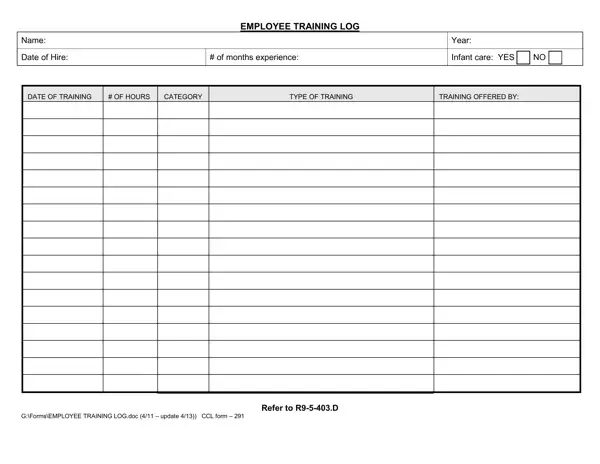
Ensuring employees are effectively trained is paramount in maintaining the highest standards of care and safety, particularly in environments where children are involved. The Employee Training Log form serves as a critical tool in this process, providing a detailed record of training undertaken by staff members. This document captures various aspects, including the employee's name, date of hire, experience level, and specific training sessions attended, complete with dates, duration, and categories. These categories are crucial for meeting regulatory requirements such as those outlined in R9-5-403, which mandates a minimum of 18 hours of annual training for each staff member across a range of critical areas. From infancy care and illness recognition to emergency procedures and nutrition, the form allows for comprehensive tracking to ensure compliance. It distinguishes between employees based on their tenure, dictating differentiated focus areas to promote continuous learning and development. For example, new staff members in their first year must complete specific hours in topics like developmental psychology and child guidance, while more experienced personnel have their unique set of requirements. Additionally, the form outlines specialized training paths for roles such as facility directors and staff working with infants, emphasizing the need for tailored educational approaches in these critical areas. Overall, the Employee Training Log form is an indispensable resource for organizations striving to uphold the highest training standards, thereby ensuring a safe, nurturing, and compliant working environment.

QuestionAnswer
Form NameEmployee Training Log Form
Form Length2 pages
Fillable?No
Fillable fields0
Avg. time to fill out30 sec
Other namesaz training log, ccl form 291, employee training log template, ccl 291

How to Edit Employee Training Log Form Online for Free

form employee training can be completed online without any problem. Just make use of FormsPal PDF editing tool to finish the job in a timely fashion. To have our tool on the forefront of practicality, we aim to put into action user-oriented capabilities and improvements on a regular basis. We are routinely grateful for any feedback - play a vital part in revampimg how we work with PDF forms. This is what you'll need to do to start:

Step 1: Press the "Get Form" button at the top of this webpage to get into our PDF tool.

Step 2: As soon as you access the editor, you will notice the form all set to be filled out. Aside from filling out various fields, you can also perform other actions with the form, particularly writing custom words, changing the original text, adding illustrations or photos, signing the PDF, and a lot more.

This document will require specific information to be typed in, thus you need to take whatever time to enter what's required:

1. Whenever filling out the form employee training, make certain to incorporate all necessary blanks in its corresponding form section. This will help hasten the process, allowing your details to be handled efficiently and correctly.

Ways to prepare form employee log step 1

2. Soon after filling out this part, head on to the subsequent step and fill in all required particulars in all these fields - GFormsEMPLOYEE TRAINING LOGdoc, and Refer to RD.

GFormsEMPLOYEE TRAINING LOGdoc, GFormsEMPLOYEE TRAINING LOGdoc, and Refer to RD of form employee log

Many people often make mistakes while filling in GFormsEMPLOYEE TRAINING LOGdoc in this section. Ensure that you double-check what you type in here.

Step 3: When you've reviewed the details in the file's blank fields, just click "Done" to finalize your form. Make a 7-day free trial option at FormsPal and obtain instant access to form employee training - download or edit in your FormsPal account. When you work with FormsPal, you're able to complete forms without worrying about data incidents or records being shared. Our secure platform ensures that your personal details are kept safely.