
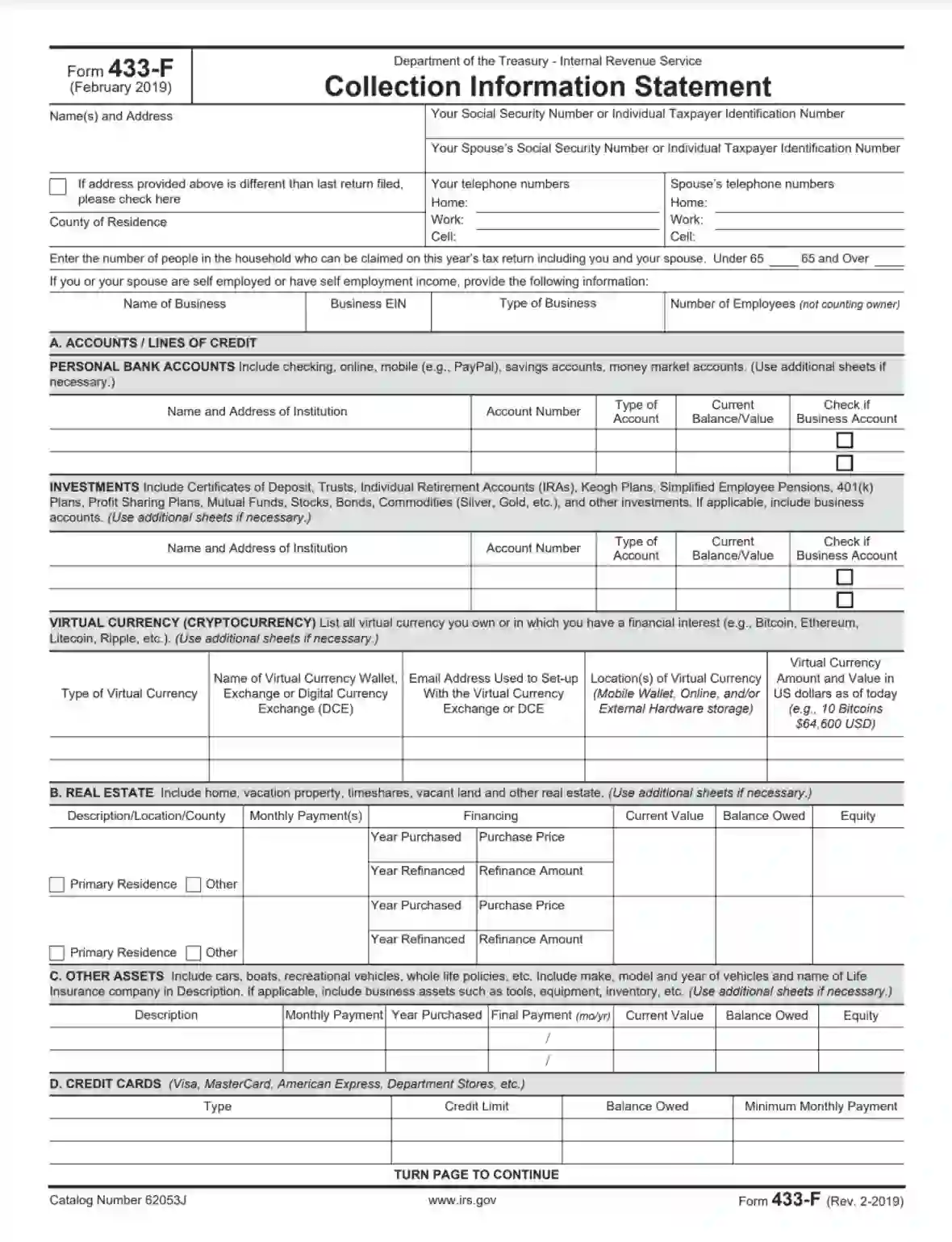
IRS Form 433-F is a tax document individuals or businesses use to provide the Internal Revenue Service (IRS) with detailed financial information when requesting a payment plan or installment agreement to settle tax debt. The form collects information about the taxpayer’s assets, income, expenses, and liabilities to assess their ability to pay the outstanding tax liability over time. It helps the IRS evaluate taxpayers’ financial situation and determine a feasible payment arrangement. Information provided on Form 433-F includes:
This form is essential in negotiating a payment plan or installment agreement. It helps taxpayers avoid more severe enforcement actions, such as wage garnishment or asset seizure, by demonstrating their commitment to fulfilling their tax obligations.
Other IRS Forms for Trusts and Estates
Are you a wage earner or self-employed individual? If yes, then check what other IRS forms might be necessary for you to file with the IRS.
The Service tries to make the most of its forms easy to comprehend. This template contains four pages, and half of them are dedicated to the instructions that will help you create your document. Thus, highly likely, you will not need any consultancy from tax specialists or Service workers.
However, in case of any doubts, we recommend asking questions to specialists immediately. This measure will help to avoid major problems in the future (after you submit the form).
To make it even easier, we have added an assisting guide to our review. It explains how to create the record step by step and line by line. If you have already received the form from the Service, move to the guide right away. If not, use our straightforward form-building software to obtain the proper IRS Form 433-F and then check the manual below.
Bear in mind that all the form’s details will be checked thoroughly so that the IRS could understand when you will cover your debts. It is crucial to provide the Service with correct data and complete the template honestly. Otherwise, you can grow your debt because some financial penalties will probably be applied.
1. Identify Yourself (and Your Spouse, If Any)
You have to begin with introducing yourself, so the Service understands who owes the money. If you have a spouse, their details should be added as well.
Enter your name and current address. If your address has changed since you have submitted your last tax return, check the box below. Insert your county of residence, phone numbers (mobile, work, and home). On the right, indicate your SSN or ITIN (social security number or individual taxpayer identification number).
For your spouse, insert their SSN or ITIN along with the three phone numbers mentioned above.

If there are other people, besides your spouse, who live with you and are included in your tax return, determine their age (under 65 years old or older) and specify their quantity in the relevant lines (depending on the people’s age).
You should complete the following line if either you or your spouse get any income from self-employment. Indicate the name of the business from where you receive this income, its EIN (or employer identification number), type, and the number of workers minus the proprietor(s).

2. Insert the Accounts Info
Here, you must list all the accounts you have (bank accounts, investments, and cryptocurrency).
The first chart is for your bank accounts. The account types you should incorporate here are listed at the top of the chart. For each, provide the institution’s name and address (for instance, a bank), account number and its type, and current balance. Mark if it is a business account or not.
On the sheet, you can have two accounts. If you have more, you must provide an additional sheet describing other accounts.

Then, do the same for your investments’ accounts (bonds, stocks, commodities, trusts, and so on: the complete list is included here, too). Remember that you should insert all accounts, so use additional papers to finish the list.

After that, you should inform about virtual currencies you either own or have an interest in. Indicate the currency type, name of a virtual wallet and the used exchange, the email address you used, virtual currency location (online, hardware storage used externally, or mobile wallet). Estimate your cryptocurrency’s value in US dollars as of the date you create this document and write the result in the chart’s last column.

3. Describe Your Real Property
You should include information about the real estate you possess or rent. For each piece of property, specify its location, state if it is your primary residence or not, indicate the amount you should pay per month, selling price, and other financial details that the template demands (the year when it was purchased, current value, owed balance, refinancing info, and so on).

4. Include and Describe Other Assets
You might own other items besides real estate, bank accounts, and virtual currencies (vehicles, life insurance, or other things described in the form).
List all assets in the chart. For each item, add a description (similar to the make and model for a vehicle), payment amount per month, the year of purchase, the final payment date, current value, owed amount, and equity (current value minus owed sum).

5. Add Your Credit Cards Info
You have to include all cards you own, even if you do not owe anything. Enter the type, credit limit, owed amount, and a minimum sum you should pay every month for all credit cards you currently have.

6. Complete the “Business Information” Section (If Needed)
The following section is for those who are self-employed or have a spouse with this work status. In the first part, insert the accounts receivable that you or your business are waiting for. Write the debtor’s name and address and the exact amount in US dollars. Include the total sum in the designated field.
If you or your business do not mind that your clients pay with credit cards, describe your business accounts in this section’s second part. Write the card’s type, bank name and address, and account number.

7. Provide Your Employment Info
Here, you must describe the current employer (yours and your spouse’s).
On the left, complete the field describing your situation. Write the employer’s name and address, specify how often they pay you (monthly, weekly, semi-monthly, or biweekly), gross per pay, and taxes per pay. State the period for which you work at this place.
On the right-hand side, insert the same details for your spouse.
There is no need to fill out this section if you can provide a current pay stub when you file this document.

8. Indicate Your Monthly Non-Wage Income
Then, you should specify your non-wage household income per month (social security income, child support, pension, alimony, and other items). Write the amounts for each item. If you have other items of income, describe them with sums on the additional sheet.

9. List Your Expenses per Month
You should list all monthly costs you have and cannot avoid. You will have five different blocks to include various information. Open the Service’s site mentioned in instructions to define the amounts allowed by the Service (check instructions). You might need to use the numbers from there.
In the first block, define the food and personal care costs (food, clothes, household supplies, and other items). Count the expenses and place them in the block by the Service’s guidelines. Determine the total amount.
The second block requires that you describe your transportation costs. Calculate those related to your vehicle maintenance, insurance, fuel, and parking. If you do not own a vehicle, count the amount you pay for using public transport. Count a total sum and write it below.
You will determine utility costs in the third block. Line by line, add the sums you transfer monthly for rent; electricity and gas (or oil), trash, water; phone, mobile phone, internet, cable TV; insurance, and taxes for real property (if they are a separate expenditure item); maintenance. Write the total sum then.
The fourth block is for your medical care costs. Include your spending on insurance and other relevant spending. Sum them up.
You can enter any miscellaneous expenses (student loans, child or dependent care, and others) in the last block.

10. Leave Your Signature
To prove you have provided correct data, you must sign the document and date it. Besides your signature, your spouse’s signature will be needed as well (if you have a spouse).

11. Double-check the Instructions
The form’s following pages contain all the instructions you might need to fill out the template successfully. Double-check them to ensure that everything is done adequately.