
Form 8594 PDF Details

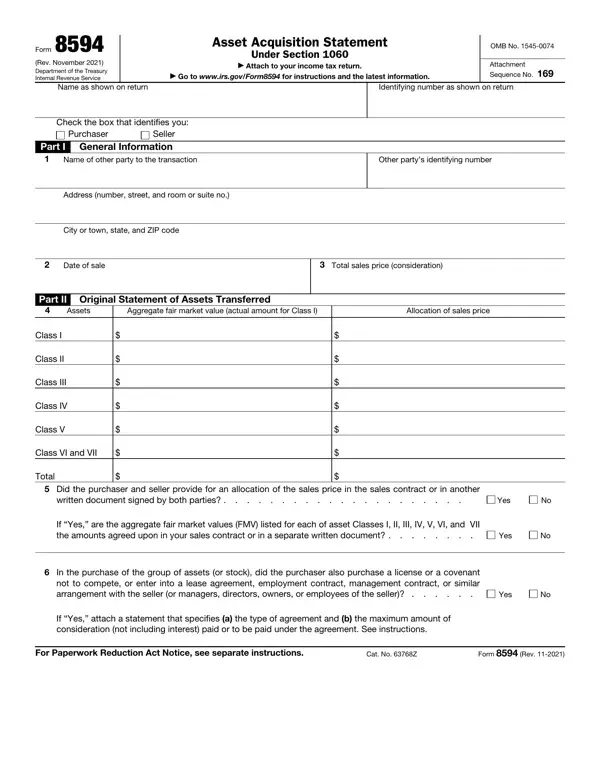
In the complex landscape of business transactions, the use of Form 8594, Asset Acquisition Statement, emerges as a crucial element for both buyers and sellers navigating the acquisition process. Mandated by the Internal Revenue Service (IRS) and relevant under Section 1060 of the Revenue Code, this form serves as a comprehensive declaration attached to one's income tax return after the sale of business assets. It meticulously records the sale's total consideration alongside the meticulous allocation of sales price across various asset classes, from tangible goods to intellectual property. The significance of Form 8594 is further underscored by its requirement for both parties to agree on the fair market value allocations documented, ensuring transparency and uniformity in tax reporting. Moreover, it plays a pivotal role in scenarios where additional agreements, like non-compete clauses or employment contracts, accompany the asset acquisition, requiring detailed attachments that elaborate on the agreements made. As the form also accommodates adjustments through subsequent amendments, it ensures that changes in consideration or asset valuation post-sale are accurately reflected. Designed for attachment to one's income tax return, the latest iteration of Form 8594, dated November 2021, is accessible via the IRS website, emphasizing the government's push for accessibility and compliance ease.

QuestionAnswer
Form NameForm 8594
Form Length2 pages
Fillable?No
Fillable fields0
Avg. time to fill out30 sec
Other names Form 8594 (Rev. November 2021). Asset Acquisition Statement Under Section 1060

How to Edit Form 8594 Online for Free

Working with PDF files online is certainly a breeze using our PDF editor. Anyone can fill out Form 8594 here in a matter of minutes. Our editor is consistently developing to give the best user experience possible, and that is due to our resolve for constant development and listening closely to user opinions. With a few easy steps, you'll be able to start your PDF editing:

Step 1: Just hit the "Get Form Button" above on this site to see our pdf editing tool. There you'll find everything that is needed to fill out your file.

Step 2: As you launch the file editor, you will see the document prepared to be filled out. Other than filling out different fields, you can also do several other actions with the PDF, including writing any textual content, changing the initial text, inserting graphics, placing your signature to the document, and more.

This document will involve some specific information; in order to ensure accuracy, you need to take note of the next tips:

1. It's important to complete the Form 8594 accurately, therefore pay close attention while filling out the sections comprising all these blank fields:

Form 8594 completion process explained (portion 1)

2. Soon after this selection of fields is completed, go on to enter the suitable information in all these - Class V, Class VI and VII, Total, Did the purchaser and seller, If Yes are the aggregate fair, In the purchase of the group of, Yes, Yes, Yes, If Yes attach a statement that, For Paperwork Reduction Act Notice, Cat No Z, and Form Rev.

The way to complete Form 8594 part 2

3. This next stage is going to be straightforward - complete all of the form fields in Tax year and tax return form, Assets, Allocation of sales price as, Increase or decrease, Redetermined allocation of sales, Class I, Class II, Class III, Class IV, Class V, Class VI and VII, Total, and Reasons for increase or decrease to complete this segment.

Form 8594 writing process explained (stage 3)

4. This fourth subsection comes next with all of the following fields to focus on: .

Step no. 4 for submitting Form 8594

You can certainly make a mistake when filling out your this field, for that reason ensure that you go through it again before you'll finalize the form.

Step 3: After proofreading your fields and details, hit "Done" and you're good to go! Get the Form 8594 once you register here for a free trial. Easily access the pdf inside your FormsPal account page, together with any modifications and adjustments being automatically kept! We do not share the information you type in whenever filling out documents at our site.