
Form 8879 Pe PDF Details

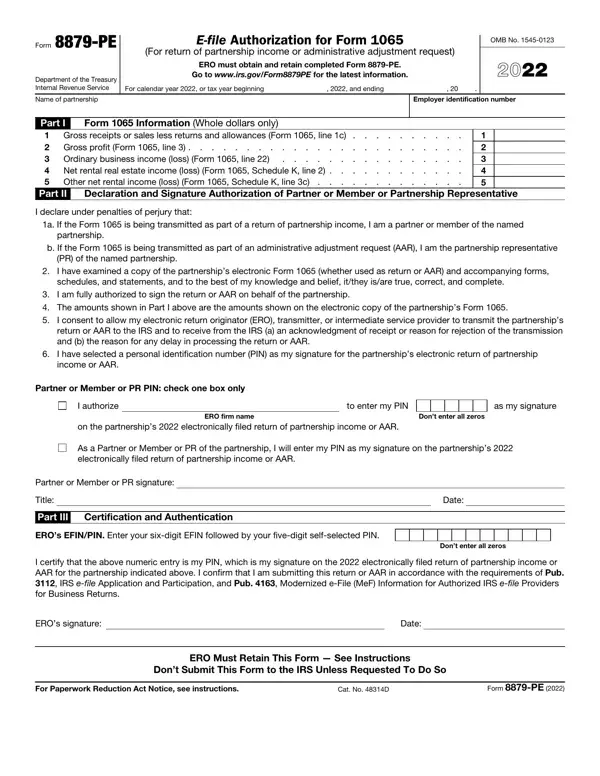
The 8879-PE form, a crucial document issued by the Department of the Treasury Internal Revenue Service, is designed for electronic filing authorization for Form 1065 concerning partnership income or administrative adjustment requests. This form bridges the gap between electronic filing facilitators and the IRS, encapsulating the consent to transmit tax details electronically. A landmark in tax filing procedures, the form empowers partners or members of partnerships, including the Partnership Representative (PR), to authenticate the partnership's electronic tax submissions using a Personal Identification Number (PIN). Key responsibilities are laid out for both the Electronic Return Originator (ERO) and the partner or member, ensuring a seamless process. The ERO is tasked with entering accurate partnership information, ensuring the submission accords to IRS guidelines, and retaining the form post-completion. On the other hand, the partner or member or PR must verify the return's accuracy, authorize PIN usage for electronic signature, and revert the signed form to the ERO. Noteworthy is the stipulation that this form should not be directly sent to the IRS unless specifically requested, underscoring the importance of EROs retaining the form for a designated period. Moreover, recent developments and instructions regarding the form can be accessed through the IRS website, highlighting the dynamic nature of tax filing protocols and the emphasis on electronic documentation.

QuestionAnswer
Form NameForm 8879 Pe
Form Length2 pages
Fillable?No
Fillable fields0
Avg. time to fill out30 sec
Other names www.taxformfinder.orgfederalform-8879-peFederal Form 8879-PE (IRS e-file Signature Authorization for ...

How to Edit Form 8879 Pe Online for Free

You may work with Form 8879 Pe instantly with the help of our PDFinity® online PDF tool. Our team is focused on making sure you have the perfect experience with our tool by regularly adding new functions and upgrades. With these improvements, working with our editor gets better than ever! This is what you'll need to do to begin:

Step 1: Click the "Get Form" button above on this page to open our editor.

Step 2: This tool offers the ability to change PDF forms in a range of ways. Improve it by writing customized text, adjust original content, and put in a signature - all within the reach of a few clicks!

To be able to complete this PDF document, be sure you provide the required information in each and every blank field:

1. Complete the Form 8879 Pe with a selection of major blank fields. Collect all of the required information and make sure nothing is neglected!

Form 8879 Pe writing process clarified (step 1)

2. The third part would be to submit all of the following fields: Partner or Member or PR PIN check, I authorize, to enter my PIN, as my signature, ERO firm name, Dont enter all zeros, on the partnerships, As a Partner or Member or PR of, Partner or Member or PR signature, Title, Part III, Certification and Authentication, EROs EFINPIN Enter your sixdigit, Date, and Dont enter all zeros.

Form 8879 Pe completion process explained (step 2)

Those who use this form frequently get some things incorrect when completing Title in this area. Be certain to re-examine everything you type in here.

Step 3: Immediately after double-checking your form fields, click "Done" and you're done and dusted! After setting up a7-day free trial account here, you'll be able to download Form 8879 Pe or send it through email immediately. The document will also be readily available in your personal account page with all your adjustments. FormsPal provides protected document editor devoid of personal data record-keeping or sharing. Feel at ease knowing that your data is secure with us!