
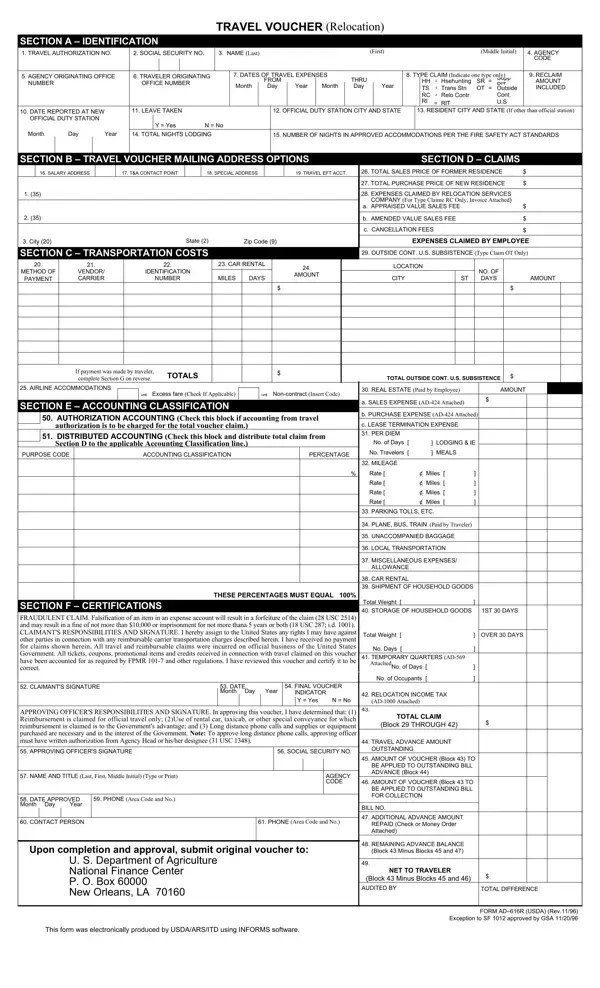
Form Ad 616R PDF Details

The AD 616R form, known as the Travel Voucher (Relocation), serves an essential function in documenting and processing the travel expenses for individuals relocating for work within various agencies. It meticulously outlines the identification details including the traveler's name, social security number, and agency codes to ensure accurate tracking and accountability. It also covers a wide range of expense types, from lodging and transportation to the costs associated with moving household goods and temporary quarters. The form requires detailed information on the travel authorization number, dates of travel, and type of claim to streamline the reimbursement process. The AD 616R form goes further to include sections for real estate transactions related to the relocation, capturing both the sale of the former residence and the purchase of the new one. Special attention is given to comply with the Fire Safety Standards for approved accommodations and the detailed itinerary of the relocation journey. Moreover, it incorporates a certification section where the claimant and an approving officer must attest to the accuracy of the information provided and the adherence to pertinent regulations. The meticulous design of the AD 616R form underlines the government's effort to manage the financial aspects of employee relocations while ensuring compliance with federal travel regulations and policies.

QuestionAnswer
Form NameForm Ad 616R
Form Length2 pages
Fillable?No
Fillable fields0
Avg. time to fill out30 sec
Other namesCFR, ad 616r form, AD-424, GSA

How to Edit Form Ad 616R Online for Free

You could work with USC instantly with our PDFinity® online PDF tool. Our editor is consistently evolving to grant the best user experience possible, and that's thanks to our dedication to continuous enhancement and listening closely to comments from users. Getting underway is easy! All you have to do is adhere to the following basic steps below:

Step 1: Click on the "Get Form" button at the top of this page to get into our editor.

Step 2: With this state-of-the-art PDF file editor, you'll be able to accomplish more than simply fill out blank fields. Edit away and make your docs seem faultless with customized text put in, or modify the file's original content to perfection - all comes along with an ability to incorporate almost any graphics and sign the document off.

In order to fill out this form, ensure you provide the information you need in every blank field:

1. Fill out the USC with a selection of major fields. Note all of the important information and make sure not a single thing overlooked!

Filling out part 1 of entitlements

2. Soon after performing the previous step, go on to the next step and fill out all required details in these blanks - REAL ESTATE Paid by Employee, AMOUNT, NFC USE, a SALES EXPENSE AD Attached, b PURCHASE EXPENSE AD Attached, c LEASE TERMINATION EXPENSE, PER DIEM, No of Days No of Travelers, LODGING IE MEALS, MILEAGE, If payment was made by traveler, Excess fare Check if applicable, Noncontract Insert Code, SECTION E ACCOUNTING, and AUTHORIZATION ACCOUNTING Check.

entitlements conclusion process described (portion 2)

3. Completing CLAIMANTS RESPONSIBILITIES AND, No Days, TEMPORARY QUARTERS AD attached, No of Days, No Occupants, CLAIMANTS SIGNATURE, DATE Month Day, Year, FINAL VOUCHER INDICATOR, Y Yes, N No, RELOCATION INCOME TAX, AD Attached, APPROVING OFFICERS, and APPROVING OFFICERS SIGNATURE is essential for the next step, make sure to fill them out in their entirety. Don't miss any details!

Best ways to complete entitlements part 3

4. Completing SOCIAL SECURITY NO, TRAVELERS NAME, SECTION G SCHEDULE OF EXPENSES, ITINERARY, FROM, DATE MonthDay, CITY, STATE, TIME, DATE MonthDay, CITY, COUNTY, STATE, TIME, and PER DIEM is key in this next section - make sure to take the time and fill in each and every blank area!

STATE, FROM, and STATE inside entitlements

5. To conclude your form, this last segment involves a couple of extra blanks. Completing RATE PER MILE, MILEAGE AMOUNT, PARKING TOLLS ETC, PLANE BUS TRAIN, Paid By Traveler, UNACCOMPANIED, BAGGAGE, LOCAL, TRANSPORTATION, NO TRIPS, DAILY EXPENSE, MISCELLANEOUS, EXPENSES ALLOWANCE CAR RENTAL Paid, Receipt and Car Rental Agreement, and RENTAL EXPENSE is going to conclude everything and you'll be done in a tick!

Step # 5 in filling out entitlements

It is easy to make an error while completing the MILEAGE AMOUNT, for that reason make sure to look again before you decide to submit it.

Step 3: Prior to addressing the next step, ensure that form fields are filled in properly. When you believe it's all fine, press “Done." Go for a 7-day free trial plan with us and obtain direct access to USC - downloadable, emailable, and editable from your personal account. FormsPal offers safe form completion devoid of personal information record-keeping or sharing. Rest assured that your data is in good hands with us!