
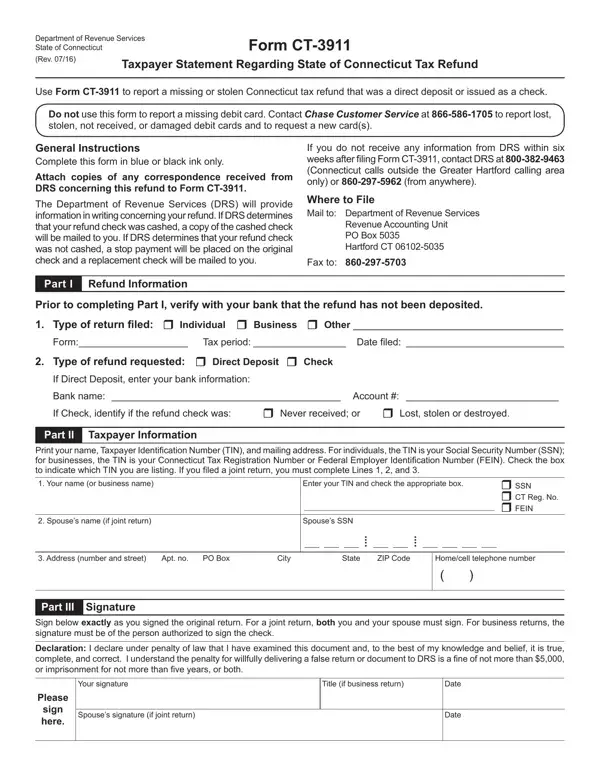
Connecticut taxpayers who are missing a state income tax refund, or believe a refund check was lost or stolen, can file this taxpayer statement to begin an investigation with the Department of Revenue Services (DRS). This document applies to both individual and business tax filers who expected a direct deposit refund or a paper check. It does not apply to debit card refunds. Before submitting, check with your bank to verify the direct deposit was not received.
Allow at least six weeks from the date you filed your Connecticut tax return before submitting this form. Common reasons to file include a direct deposit that never posted to your bank account, a paper refund check that was lost in the mail, or a refund check that was stolen before it could be cashed. The DRS recommends reviewing any prior correspondence about your refund before completing the form. Both individual and business taxpayers are eligible to file.
Use blue or black ink when completing the paper version of this taxpayer statement. Required information includes your full name, Social Security number or Federal Employer Identification Number (for business returns), the tax year and filing status, and the amount of the expected refund. Attach any prior DRS correspondence about the refund. If filing a joint return, both spouses must sign the declaration. Business taxpayers must also include their title in the signature section.
Mail or fax the completed statement to the Department of Revenue Services at the address or fax number printed on the form. After receiving the form, the DRS will provide written updates on the status of the investigation. If the original refund check was never cashed, the DRS will issue a replacement check. If you receive no response within six weeks of filing, contact the DRS directly by phone or mail to follow up. Connecticut takes refund investigations seriously and works to resolve each case in writing.
Taxpayers who are also missing a federal income tax refund should file the IRS Form 3911 separately with the Internal Revenue Service. In some cases where a refund check was fraudulently cashed, a replacement check request form from your bank may be needed as supporting documentation.
| Question | Answer |
|---|---|
| Form Name | CT-3911 Form |
| Form Length | 1 page |
| Fillable? | Yes |
| Fillable fields | 36 |
| Avg. time to fill out | 6 min 31 sec |
| Other names | ct 3911 form, ct taxpayer statement form, form ct 3911, 3911 statement tax form |
CT-3911 Form isn’t the one you’re looking for?