
Form Fl 165 PDF Details

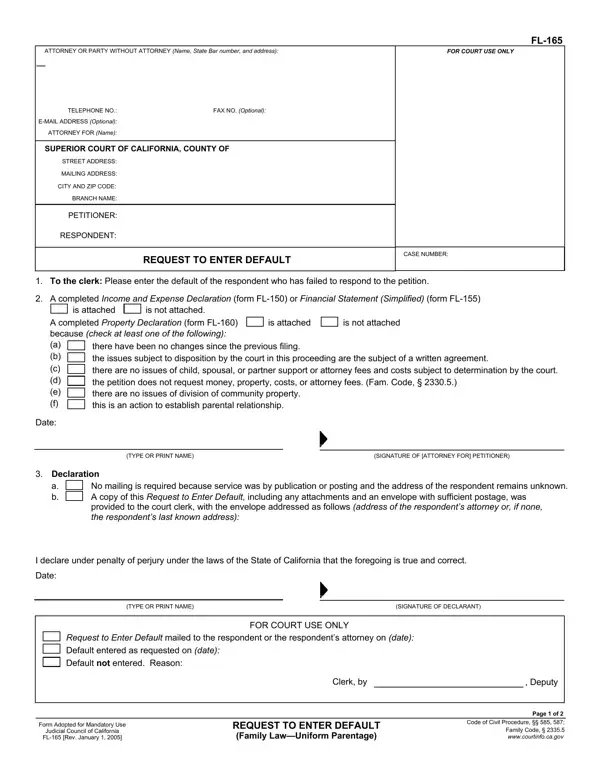
Processing a Request to Enter Default through form FL-165 in the Superior Court of California stands as a procedural aspect pivotal to advancing a case in the family law domain, particularly when a respondent fails to respond to a petition within a stipulated timeframe. This mechanism enables a petitioner to request the court to recognize the lack of response by entering a default judgment against the respondent. Form FL-165 encompasses several critical components beyond the mere request for default. It necessitates the attachment of financial documents such as the Income and Expense Declaration (FL-150) or the Financial Statement (Simplified) (FL-155), alongside a Property Declaration (FL-160), depending on the case's circumstances. These attachments ensure the court has sufficient information to make informed decisions regarding financial dispositions without the respondent's input. Additionally, the form entails a declaration section where the petitioner affirms that due effort was made to serve the respondent, thus bolstering the legitimacy of the request for default. Moreover, it includes directives for declaring costs and disbursements associated with the case, as well as a mandatory declaration regarding the respondent's nonmilitary status under the Servicemembers Civil Relief Act, ensuring protections are extended to service members as required by law. The structured process outlined by form FL-165 underscores the judicial system's commitment to fairness by emphasizing procedural integrity even in the absence of participation by one party.

QuestionAnswer
Form NameForm Fl 165
Form Length2 pages
Fillable?No
Fillable fields0
Avg. time to fill out30 sec
Other namesfl 165 form, california form 165, form 165, fl 165 request to enter default form

How to Edit Form Fl 165 Online for Free

Dealing with PDF forms online is actually super easy with this PDF tool. You can fill out fl165 form here and try out many other functions we provide. The tool is consistently upgraded by our staff, getting awesome functions and becoming greater. Starting is simple! Everything you need to do is adhere to the following easy steps below:

Step 1: Hit the "Get Form" button above. It's going to open our pdf tool so that you could begin filling in your form.

Step 2: As soon as you launch the PDF editor, you will see the document all set to be filled out. Aside from filling out various blanks, you could also do other sorts of actions with the file, particularly putting on your own text, changing the original textual content, adding graphics, putting your signature on the document, and more.

As for the blanks of this precise document, here's what you need to do:

1. When filling out the fl165 form, be certain to incorporate all of the essential fields in their associated section. It will help hasten the process, making it possible for your information to be processed fast and appropriately.

Filling out part 1 in fl 165 request to enter default form

2. Just after finishing this step, go on to the next stage and complete the necessary details in these blank fields - is attached, is not attached, A completed Property Declaration, there have been no changes since, Date, TYPE OR PRINT NAME, SIGNATURE OF ATTORNEY FOR, Declaration a b, No mailing is required because, I declare under penalty of perjury, Date, TYPE OR PRINT NAME, SIGNATURE OF DECLARANT, and FOR COURT USE ONLY.

fl 165 request to enter default form writing process shown (stage 2)

3. The next step is generally relatively straightforward, CASE NAME Last name first name of, CASE NUMBER, Memorandum of costs, Costs and disbursements are waived, Costs and disbursements are listed, Clerks fees, Process servers fees, Other specify, TOTAL, I am the attorney agent or party, I declare under penalty of perjury, and Date - all of these fields will have to be filled out here.

Writing part 3 in fl 165 request to enter default form

People generally make some mistakes when filling out Costs and disbursements are listed in this section. Ensure that you go over whatever you enter right here.

4. This particular part comes with these blanks to complete: Date, TYPE OR PRINT NAME, SIGNATURE OF DECLARANT, FL Rev January, REQUEST TO ENTER DEFAULT Family, and Page of.

Part # 4 of completing fl 165 request to enter default form

Step 3: Before moving forward, check that blank fields have been filled out as intended. When you establish that it is fine, click on “Done." Try a free trial account at FormsPal and get instant access to fl165 form - readily available from your personal cabinet. FormsPal guarantees protected document completion devoid of data recording or distributing. Rest assured that your details are safe with us!