
Form Ps 002B PDF Details

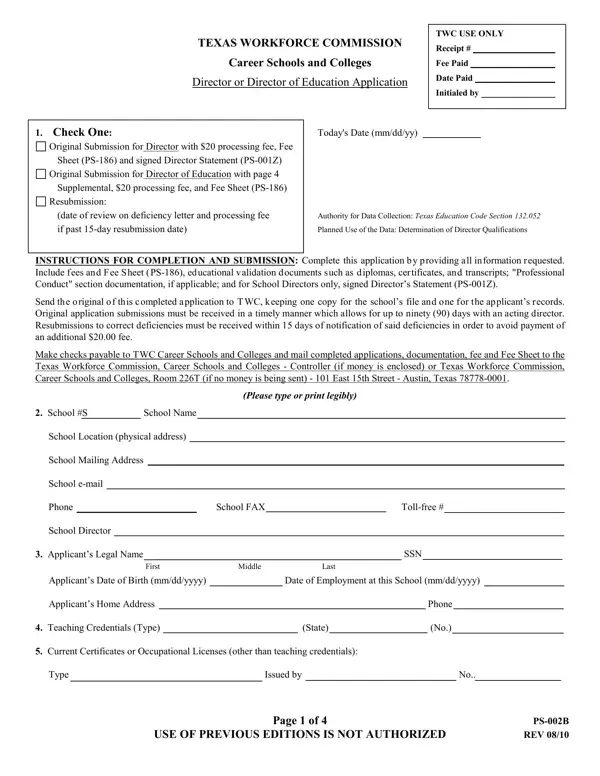
The PS 002B form is a crucial document for professionals navigating the regulatory landscape of career schools and colleges in Texas, under the oversight of the Texas Workforce Commission (TWC). Intended for those seeking to validate their qualifications for positions as Directors or Directors of Education within such institutions, this form encapsulates a detailed application process, including necessary fees, educational validation, and professional conduct checks. Prospective applicants are required to navigate through various sections, from personal data submission to detailed accounts of educational and work experience, aiming to ensure that individuals are well-qualified for their roles in educational leadership. This rigorous application process, reflecting stipulations under the Texas Education Code Section 132.052, emphasizes the importance of integrity, professional experience, and educational pedigree in shaping the quality of career education in the state. The form not only serves as an application but also a commitment to uphold the highest standards of professional conduct, as evidenced by the inclusion of questions about past legal and professional conduct issues. In essence, the PS 002B form is a testament to the TWC's dedication to maintaining a high caliber of education and management within Texas's career schools and colleges.

QuestionAnswer
Form NameForm Ps 002B
Form Length4 pages
Fillable?No
Fillable fields0
Avg. time to fill out1 min
Other namestwc forms, twcr payment request form, twc 1 form, twc quarterly report form

How to Edit Form Ps 002B Online for Free

You are able to work with forms twc effortlessly with our PDFinity® editor. Our tool is continually developing to grant the best user experience attainable, and that is due to our resolve for constant improvement and listening closely to comments from users. With a few basic steps, you can begin your PDF journey:

Step 1: Press the "Get Form" button above on this webpage to get into our tool.

Step 2: With our state-of-the-art PDF file editor, you could do more than simply fill out forms. Express yourself and make your documents appear great with custom text added, or tweak the file's original input to perfection - all backed up by the capability to add stunning graphics and sign the document off.

This PDF will need particular details to be filled out, therefore make sure you take the time to enter precisely what is expected:

1. Begin filling out the forms twc with a group of major fields. Get all of the information you need and ensure not a single thing overlooked!

Stage number 1 for completing twc 1 form

2. The subsequent step would be to submit these fields: School S, School Name, School Location physical address, School Mailing Address, School email, Phone, School Director, School FAX, Tollfree, Applicants Legal Name, First, Middle, Last, SSN, and Applicants Date of Birth mmddyyyy.

Filling out part 2 in twc 1 form

3. In this part, have a look at CityState, Date Begun mmyy, Date Ended mmyy, Diploma Degree Awarded Yes or No, High School College College, EmploymentWork Experience Please, A Job Title Employer, From, mmyy, thru, TOTAL, mmyy, yearsmonths, and Address. All these should be taken care of with greatest accuracy.

Completing part 3 of twc 1 form

4. To move ahead, this part requires typing in a couple of fields. These comprise of B Job Title, Employer, Phone, Describe the work you performed, Address, Supervisor, Describe the work you performed, Dates of Employment From, mmyy, thru, mmyy, TOTAL, and yearsmonths, which you'll find key to continuing with this process.

Filling in segment 4 of twc 1 form

5. This pdf must be completed by going through this area. Here you can find an extensive listing of blanks that have to be filled in with appropriate details in order for your document submission to be accomplished: and accuracy of all statements to, Yes, Yes, Yes, Yes, Yes, I certify that the following, Date mmddyyyy, Applicants Signature, Date, and APPLICANT CERTIFICATION I certify.

twc 1 form conclusion process shown (part 5)

In terms of Yes and Date mmddyyyy, make sure that you review things in this current part. The two of these are thought to be the key fields in this page.

Step 3: After you have looked over the information provided, simply click "Done" to conclude your form at FormsPal. Right after starting afree trial account at FormsPal, you'll be able to download forms twc or email it promptly. The PDF form will also be available from your personal cabinet with all your adjustments. FormsPal is devoted to the personal privacy of our users; we make sure that all personal information coming through our editor remains confidential.