Form Sers 123 PDF Details

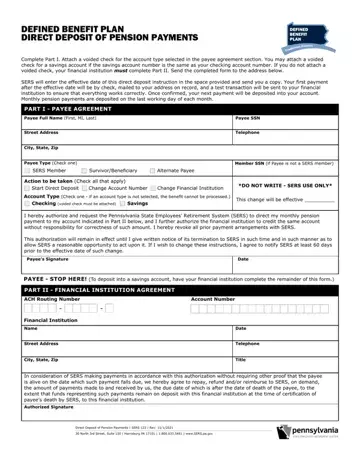
Navigating the process of ensuring smooth and timely pension payments is crucial for retirees, and the SERS 123 form serves as a foundational pillar in this pursuit. This document, titled "Defined Benefit Plan Direct Deposit of Pension Payments," lays out a straightforward path for beneficiaries under the Pennsylvania State Employees’ Retirement System (SERS) to have their monthly pension payments directly deposited into their bank accounts, ensuring both security and convenience. The form is meticulously designed to collect essential information through a two-part process. In Part I, called the Payee Agreement, retirees are asked to provide personal details and select their account type—be it checking or savings—while also attaching a voided check unless the savings account number mirrors their checking account. This part is concluded by the payee's authorization, which revokes any prior payment arrangements and insists on a 60-day notification period for any changes. If the voided check isn't provided, Part II requires the financial institution's input to complete the setup. With each section filled out, the form promises a seamless transition to direct deposit, underscored by an initial check payment and a test transaction to confirm the accuracy of the provided banking details. The commitment to deliver monthly pension payments on the last working day of each month through this arrangement speaks volumes of the system's effort to offer peace of mind and financial stability to its members.

QuestionAnswer
Form NameForm Sers 123
Form Length1 pages
Fillable?No
Fillable fields0
Avg. time to fill out15 sec
Other namespa sers payments form, sers pa gov, pa sers 123 form, sers direct deposit form

How to Edit Form Sers 123 Online for Free

Our finest programmers worked hard to implement the PDF editor we are now happy to deliver to you. This application helps you simply prepare pa sers deposit and can save valuable time. You just need to comply with this particular procedure.

Step 1: Choose the button "Get Form Here" on the webpage and select it.

Step 2: Now you are on the form editing page. You can edit, add content, highlight certain words or phrases, insert crosses or checks, and include images.

Fill out the pa s, ers deposit PDF and type in the material for each segment:

stage 1 to writing sers pa gov

Step 3: Select the Done button to save your file. Now it is ready for upload to your electronic device.

Step 4: You could make duplicates of the form toavoid any type of potential complications. You should not worry, we cannot distribute or track your details.

Please rate Form Sers 123

1 Votes
If you believe this page is infringing on your copyright, please familiarize yourself with and follow our DMCA notice and takedown process - click here to proceed .