

Form RUT-25-X at a glance
What it is: Form RUT-25-X is the Illinois Department of Revenue Amended Vehicle Use Tax Transaction Return.
Who signs: The purchaser signs on the Purchaser's signature line and enters the Date. If there is a co-owner, the co-owner signs on the Co-owner's signature line and enters the Date.
Everyone must complete Steps 1, 2, and 4. You must also complete Step 3 if you are changing financial information.
A filled-in Form RUT-25-X example: a purchaser corrects the vehicle description
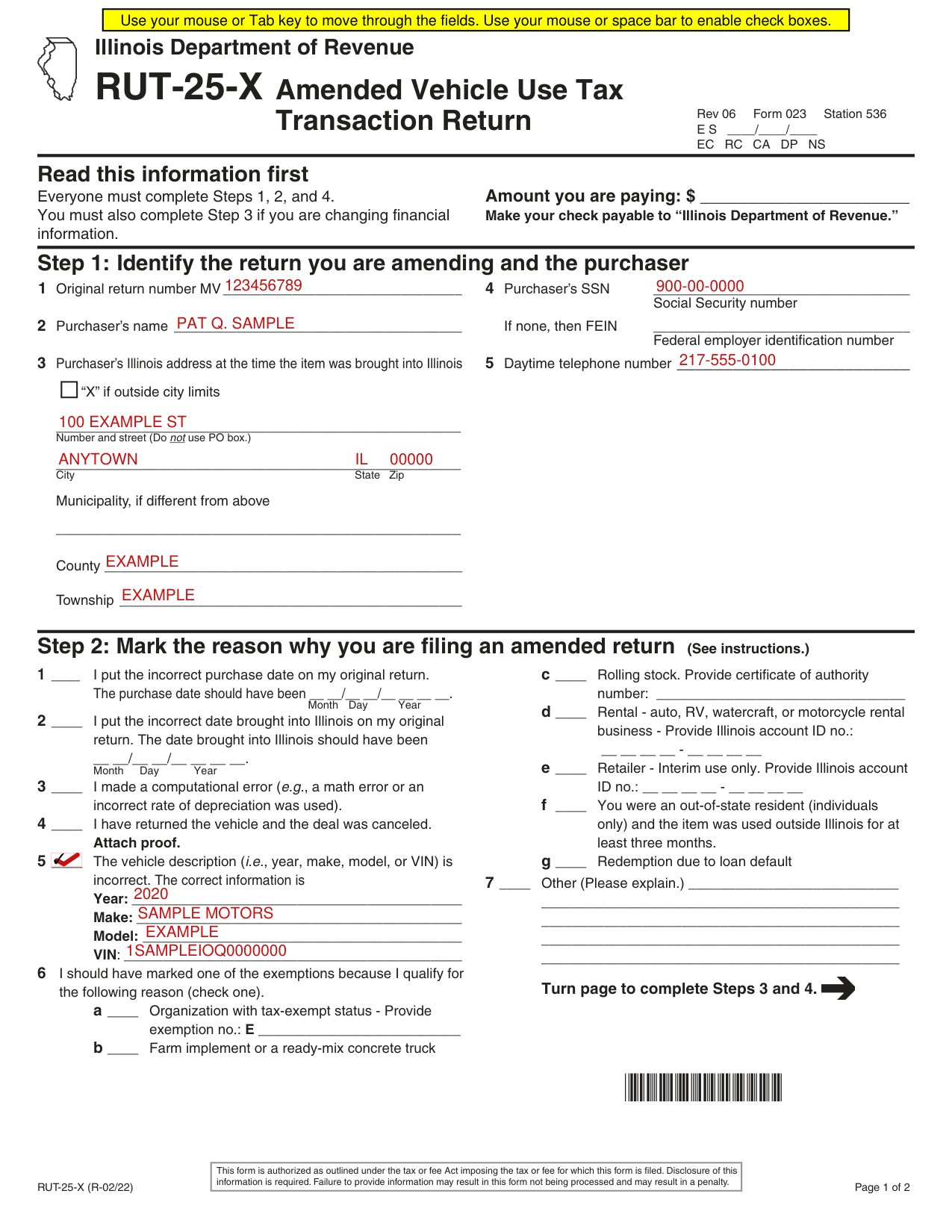
How to fill out Form RUT-25-X, box by box
Read this information first

Enter the amount you are paying on the line provided in the “Read this information first” section on the front of this return.
Make your check payable to “Illinois Department of Revenue.”
Step 1: Identify the return you are amending and the purchaser
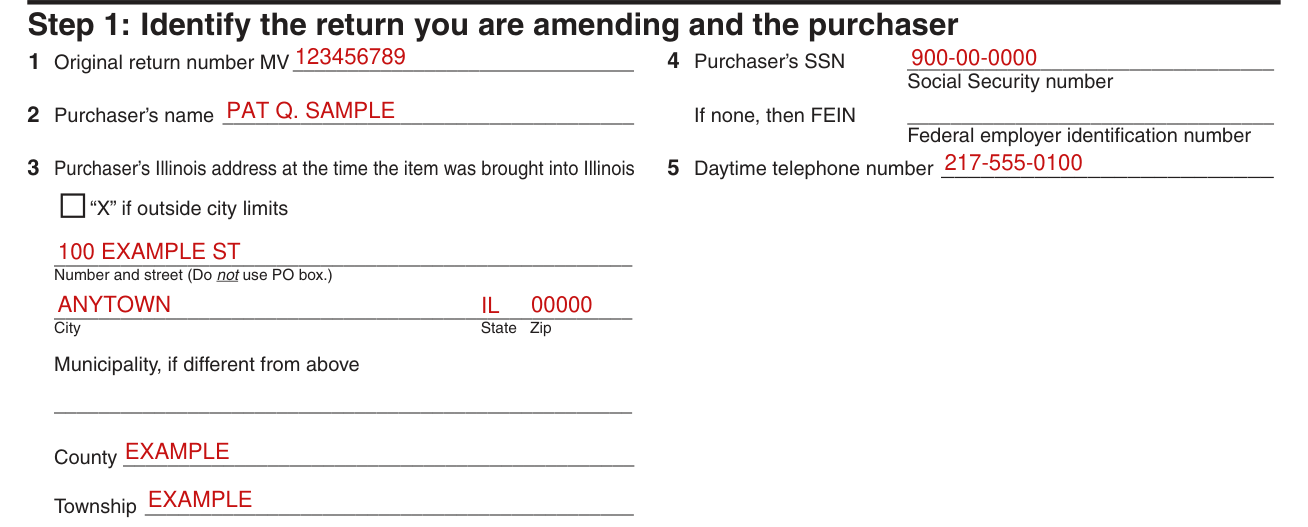
Step 1: Identify the return you are amending and the purchaser.
Enter the Original return number after MV.
Enter the Purchaser's name.
Enter the Purchaser's SSN, the Social Security number. If none, then enter the FEIN, the Federal employer identification number. Enter the Daytime telephone number.
Enter the Purchaser's Illinois address at the time the item was brought into Illinois.
Mark “X” if outside city limits.
Enter the Number and street. Do not use PO box.
Enter the City, State and Zip.
Enter the Municipality, if different from the City.
Enter the County.
Enter the Township.
Step 2: Mark the reason why you are filing an amended return
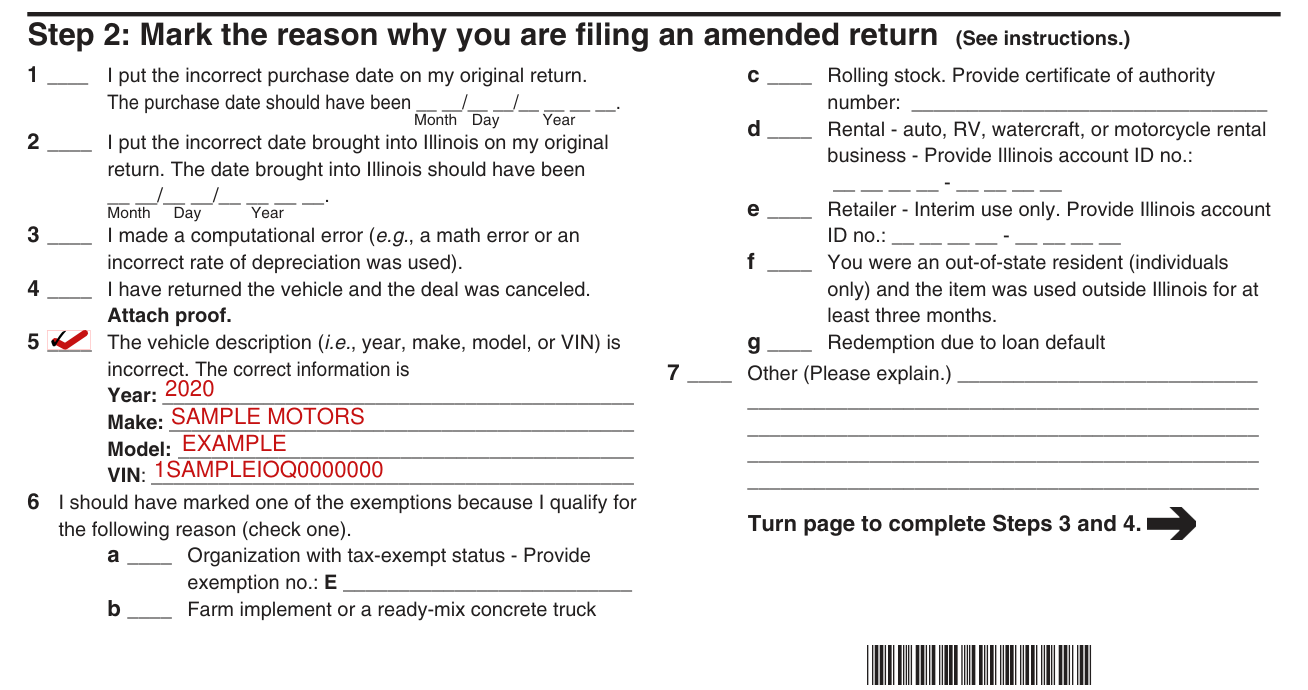
Step 2: Mark the reason why you are filing an amended return. (See instructions.)
Mark 1 if you put the incorrect purchase date on your original return. Then enter what the purchase date should have been, as Month, Day and Year.
Mark 2 if you put the incorrect date brought into Illinois on your original return. Then enter what the date brought into Illinois should have been, as Month, Day and Year.
Mark 3 if you made a computational error (e.g., a math error).
Mark 4 if you have returned the vehicle and the deal was canceled. Attach proof.
Mark 5 if the vehicle description is incorrect. The correct information is Year, Make, Model and VIN.
Mark 6 if you should have marked one of the exemptions because you qualify for the following reason (check one).
a: Organization with tax-exempt status - Provide exemption no.: E b: Farm implement or a ready-mix concrete truck.
c: Rolling stock. Provide certificate of authority number: d: Rental - auto, RV, watercraft, or motorcycle rental business - Provide Illinois account ID no.: e: Retailer - Interim use only. Provide Illinois account ID no.: f: You were an out-of-state resident (individuals only) and the item was used outside Illinois for at least three months. g: Redemption due to loan default. 7: Other (Please explain.)
Step 3: Correct your financial information
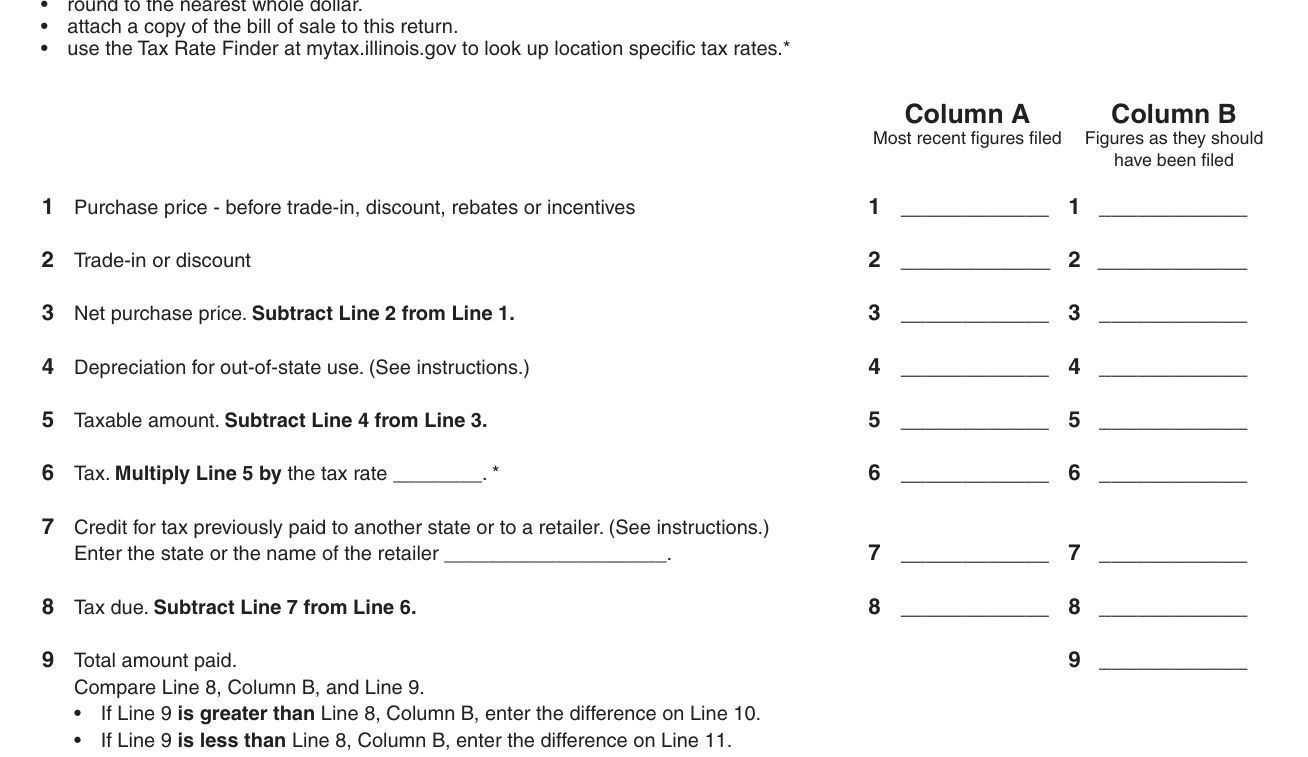
Complete Step 3 only if you are changing financial information. Otherwise, go to Step 4 and sign your return.
Remember to round to the nearest whole dollar.
Remember to attach a copy of the bill of sale to this return.
Remember to use the Tax Rate Finder at mytax.illinois.gov to look up location specific tax rates.
Column A is Most recent figures filed. Column B is Figures as they should have been filed.
Line 1: Purchase price - before trade-in, discount, rebates or incentives.
Line 2: Trade-in or discount.
Line 3: Net purchase price. Subtract Line 2 from Line 1.
Line 4: Depreciation for out-of-state use. (See instructions.)
Line 5: Taxable amount. Subtract Line 4 from Line 3.
Line 6: Tax. Multiply Line 5 by the tax rate.
Line 7: Credit for tax previously paid to another state or to a retailer. (See instructions.) Enter the state or the name of the retailer.
Line 8: Tax due. Subtract Line 7 from Line 6.
Line 9: Total amount paid.
Compare Line 8, Column B, and Line 9
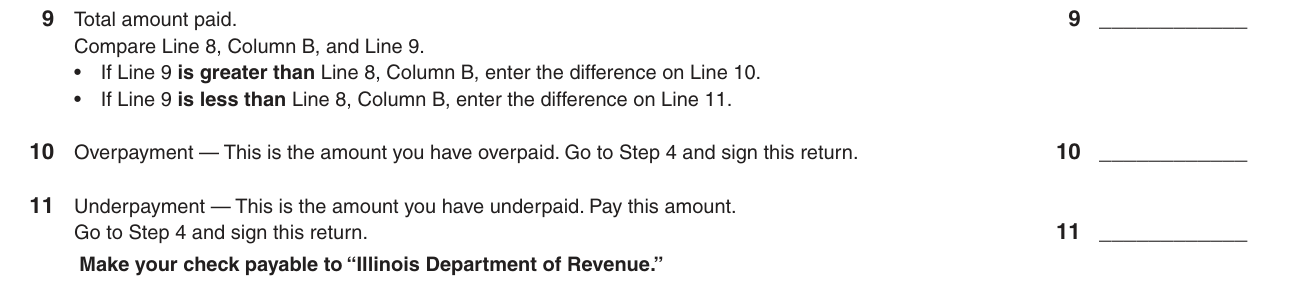
Compare Line 8, Column B, and Line 9. If Line 9 is greater than Line 8, Column B, enter the difference on Line 10. If Line 9 is less than Line 8, Column B, enter the difference on Line 11.
Line 10: Overpayment - This is the amount you have overpaid. Go to Step 4 and sign this return.
Line 11: Underpayment - This is the amount you have underpaid. Pay this amount. Go to Step 4 and sign this return.
Step 4: Sign below

Step 4: Sign. Under penalties of perjury, you state that you have examined this return and, to the best of your knowledge, it is true, correct, and complete.
Enter the Purchaser's Current mailing address, City, State and ZIP.
Mail to ILLINOIS DEPARTMENT OF REVENUE, PO BOX 19034, SPRINGFIELD IL 62794-9034
Common questions about Form RUT-25-X
Is there a penalty?
Failure to provide information may result in this form not being processed and may result in a penalty.
Sources
[1] Form RUT-25-X (R-02/22), Amended Vehicle Use Tax Transaction Return, Illinois Department of Revenue (the Official source link on this page).
