
Mo Ptc Form PDF Details

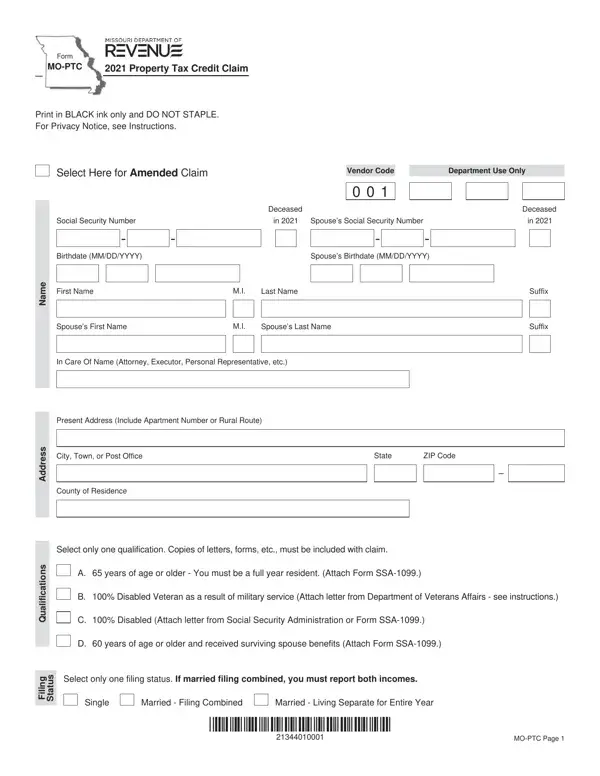
The Missouri Property Tax Credit Claim, commonly referred to as Form MO-PTC, stands as a vital financial tool for eligible Missourians, offering a mechanism to seek relief from property taxes or rent they have paid within the year. Now, envision a document designed with the utmost attention to details, requiring submissions in black ink without any staples, indicating its preparation must be meticulous. A pivotal aspect of this form is accommodating various groups, including those 65 and older, 100% disabled veterans, individuals with 100% disability, and surviving spouses aged 60 or above, each with distinct qualifications needing specific supporting documents like the SSA-1099 or letters from the Department of Veterans Affairs. The form demands a declaration of income from multiple sources, encompassing social security benefits, wages, pensions, and even public assistance, ensuring a comprehensive account of one’s financial intake. Critical too is the distinction in filing status, which affects the calculation of the credit - whether filing singly or combined as a married couple, with implications for total household income. The process is rigorous, emphasizing the necessity of attaching proof of rent paid and amount of property tax paid, conditional on the nature of your residence. Navigating through the MO-PTC form demonstrates an intersection of tax regulation and personal financial assessment, all aimed at providing fiscal relief to those who meet the stringent criteria, ultimately reflecting Missouri’s commitment to supporting its residents through tangible tax credit measures.

QuestionAnswer
Form NameMo Ptc Form
Form Length8 pages
Fillable?No
Fillable fields0
Avg. time to fill out2 min
Other namesmissouri property tax credit, moptc form, missouri ptc tax, missouri ptc

How to Edit Mo Ptc Form Online for Free

Handling PDF forms online is definitely a piece of cake with our PDF editor. Anyone can fill in missouri ptc tax here painlessly. To retain our tool on the leading edge of practicality, we strive to put into action user-oriented features and enhancements regularly. We are always thankful for any suggestions - join us in revampimg how we work with PDF forms. With a few basic steps, you'll be able to begin your PDF journey:

Step 1: Hit the "Get Form" button above. It'll open our tool so that you could start completing your form.

Step 2: With this advanced PDF tool, it's possible to accomplish more than just fill in forms. Express yourself and make your forms appear professional with custom textual content put in, or adjust the file's original content to excellence - all supported by the capability to add any type of graphics and sign it off.

Filling out this document needs attentiveness. Make certain each and every blank is filled out properly.

1. To start with, when filling in the missouri ptc tax, start out with the page that has the next fields:

How one can prepare mo ptc 2020 stage 1

2. Once your current task is complete, take the next step – fill out all of these fields - s s e r d d A, s n o i t a c i f i l a u Q, g n, s u t a t S, i l i, City Town or Post Office, State, ZIP Code, County of Residence, Select only one qualification, A years of age or older You must, B Disabled Veteran as a result of, C Disabled Attach letter from, D years of age or older and, and Select only one filing status If with their corresponding information. Make sure to double check that everything has been entered correctly before continuing!

County of Residence, g n, and D  years of age or older and in mo ptc 2020

3. Completing children before any deductions and, Enter the amount of social, Enter the amount of railroad, Attach Form RRBR TIER II, Enter the amount of veterans, Attach letter from Veterans, Enter the total amount received, assistance SSI child support or, e m o c n, d o h e s u o H, Total household income Add Lines, Enter the appropriate amount from, Single or Married Living Separate, and Married and Filing Combined is essential for the next step, make sure to fill them out in their entirety. Don't miss any details!

Enter the amount of railroad, Enter the total amount received, and e m o c n inside mo ptc 2020

4. To move onward, this fourth step requires filling in a few fields. These comprise of Net household income Subtract, If you rented or did not own and, If you owned and occupied your, If you owned your home enter the, assessments or whichever is less, If you rented enter the total, whichever is less Attach a, d i a P, t n e R d n a x a T e t a t s E, a e R, and Enter the total of Lines and or, which you'll find crucial to moving forward with this process.

a e R, d i a P, and Net household income  Subtract of mo ptc 2020

As for a e R and d i a P, make sure you don't make any errors here. Both of these could be the most important ones in the PDF.

5. Now, the following final part is precisely what you need to complete prior to closing the document. The blanks at issue include the following: Apply amounts from Lines and to, You must use the chart on pages, Under penalties of perjury I, Signature, Date MMDDYY, Spouses Signature If filing, Date MMDDYY, Email Address, e r u t a n g S, and Daytime Telephone.

Stage number 5 for filling out mo ptc 2020

Step 3: Revise what you've typed into the blank fields and then click the "Done" button. Join us now and instantly gain access to missouri ptc tax, ready for downloading. All adjustments you make are saved , meaning you can change the document later on anytime. FormsPal is devoted to the privacy of our users; we make certain that all information coming through our editor stays secure.