Please rate Mv 427 Penndot

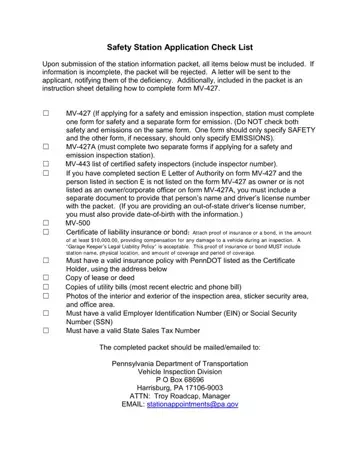
Navigating the complexities of becoming a designated safety inspection station in Pennsylvania requires thorough preparation and an understanding of the specific documentation required by the Pennsylvania Department of Transportation (PennDOT). Among these documents, the MV-427 form plays a critical role, acting as a cornerstone for both new applicants wishing to establish inspection stations and existing stations undergoing significant changes such as ownership transfer, relocation, or operational modifications. This form, accompanied by the MV-427A for those applying as both safety and emission inspection stations, necessitates careful completion to ensure that all pertinent information is accurately conveyed. Essential items like the MV-443 list for certified safety inspectors, an up-to-date certificate of liability insurance or bond, business and legal identifiers (such as EIN and State Sales Tax Number), and physical evidence of the station's capability in the form of photos and documentation of the inspection, sticker security, and office areas, are mandatory for a complete submission packet. Moreover, details reflecting the station’s operations, even down to the layout and size of the inspection area, must be meticulously compiled to meet PennDOT's stringent criteria. Failure to provide comprehensive and accurate information can lead to automatic rejection, underscoring the emphasis on diligence and precision in preparing the station information packet for submission.
| Question | Answer |
|---|---|
| Form Name | Mv 427 Penndot |
| Form Length | 9 pages |
| Fillable? | No |
| Fillable fields | 0 |
| Avg. time to fill out | 2 min 15 sec |
| Other names | pa form mv 427, pa state gov mv427, pa state inspection station application, mv 427 |
Mv 427 Penndot isn’t the one you’re looking for?
Please rate Mv 427 Penndot
