
Mw 507P Form PDF Details

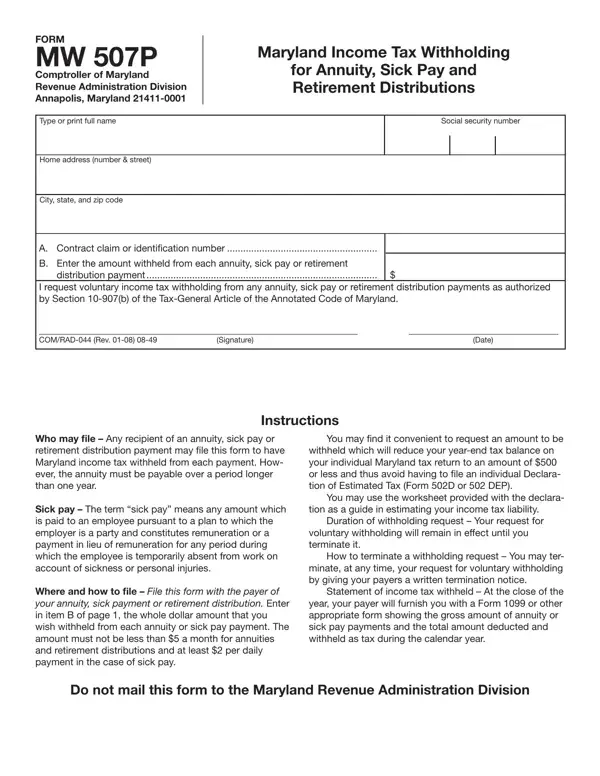
Understanding the intricacies of tax forms is essential for ensuring the proper management of one’s financial obligations, especially when it involves income sources such as annuities, sick pay, and retirement distributions. The Form MW 507P, issued by the Comptroller of Maryland's Revenue Administration Division, serves as a vital tool for individuals receiving these types of payments who wish to have Maryland income tax voluntarily withheld from each disbursement. This proactive approach not only facilitates smoother financial planning but also helps in avoiding lump-sum tax payments at the end of the fiscal year. Designed to support recipients in maintaining better control over their tax liabilities, the form outlines the requirements for initiating withholding, including stipulations regarding the minimum amounts that can be withheld from each type of payment. Moreover, it provides guidance on how to file this request with the payer of the annuity, sick pay, or retirement distribution, alongside instructions for terminating the withholding request should one's financial circumstances change. At the conclusion of the year, payers are obligated to furnish the recipient with a statement reflecting the total income paid and the amount of tax withheld, ensuring transparency and accuracy in annual tax reporting. By simplifying the tax withholding process, Form MW 507P represents an essential resource for Maryland residents navigating the complexities of tax withholding on specific income streams, thereby enabling them to manage their financial health more effectively.

QuestionAnswer
Form NameMw 507P Form
Form Length1 pages
Fillable?No
Fillable fields0
Avg. time to fill out15 sec
Other namesComptroller, 507P, annuities, mw 507p form

How to Edit Mw 507P Form Online for Free

Working with PDF files online is always very simple using our PDF tool. You can fill in DEP here painlessly. Our editor is continually developing to deliver the very best user experience achievable, and that is thanks to our commitment to continuous enhancement and listening closely to comments from users. If you are seeking to begin, here is what you will need to do:

Step 1: Just click the "Get Form Button" in the top section of this webpage to see our form editing tool. This way, you'll find everything that is necessary to fill out your document.

Step 2: As you start the editor, you will find the form all set to be completed. Besides filling out various blanks, you may also perform other things with the Document, particularly writing custom words, editing the initial textual content, adding graphics, putting your signature on the PDF, and a lot more.

It is an easy task to finish the form with our detailed guide! This is what you want to do:

1. It's vital to complete the DEP correctly, hence be attentive when filling out the parts that contain these specific blank fields:

mw 507p form completion process explained (part 1)

Step 3: Reread the information you've typed into the form fields and press the "Done" button. Make a free trial option at FormsPal and get direct access to DEP - downloadable, emailable, and editable from your personal account. FormsPal guarantees your information privacy by using a protected system that in no way records or distributes any type of sensitive information provided. Be assured knowing your documents are kept safe any time you use our services!