
Nc Form 22 PDF Details

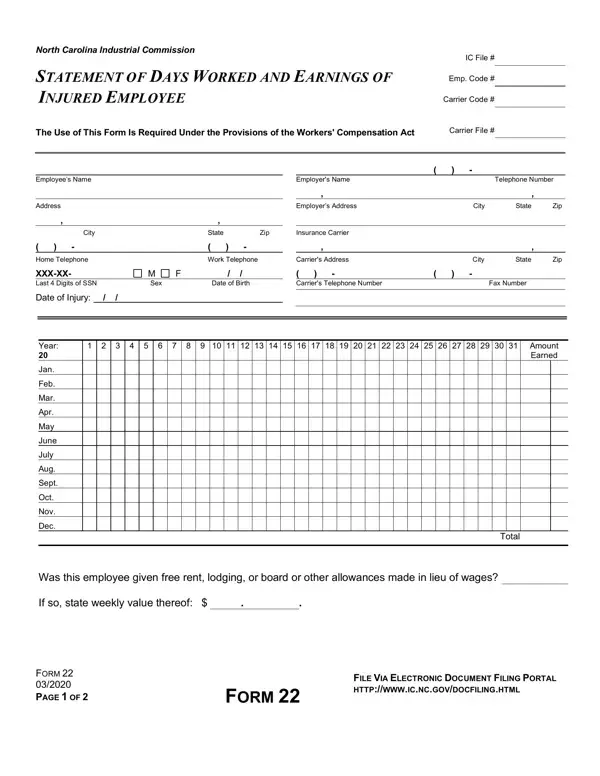
In the wake of an injury on the job, navigating the complexities of workers' compensation claims can feel overwhelming for both employees and employers. Central to this process in North Carolina is the Form 22, a document required under the Workers' Compensation Act, which meticulously records the days worked and earnings of an injured employee. This document serves a pivotal role, offering a detailed account of an employee's work history and compensation in the 52 weeks leading up to the injury. It is imperative not only for calculating the compensation due but also for verifying the employment details provided by the employee and the employer. Detailed within this form are sections for documenting the injured employee's personal information, comprehensive earnings over the specified period, and any non-monetary benefits provided in lieu of wages. Employers are tasked with accurately filling this form, noting changes in job roles or pay rates, and marking days paid in full, including paid leave. Additionally, the form includes essential instructions for its completion and stipulates the legal implications of falsifying information, reinforcing its significance in upholding the integrity of the workers' compensation claims process. Its thorough completion and submission through the designated electronic portal not only streamline the claims process but also ensure that all parties involved adhere to the legal and procedural expectations set forth by the North Carolina Industrial Commission.

QuestionAnswer
Form NameNc Form 22
Form Length2 pages
Fillable?No
Fillable fields0
Avg. time to fill out30 sec
Other namesform nc 22, nc form 22, workers compensation form 22, form 22 instructions

How to Edit Nc Form 22 Online for Free

nc form 22 can be filled in online effortlessly. Just open FormsPal PDF editing tool to complete the job quickly. Our editor is continually developing to present the best user experience attainable, and that is because of our dedication to continuous enhancement and listening closely to user comments. Here's what you will want to do to get started:

Step 1: First, open the tool by pressing the "Get Form Button" above on this site.

Step 2: This editor gives you the ability to modify your PDF document in various ways. Improve it with customized text, adjust what's originally in the PDF, and put in a signature - all when it's needed!

This form needs specific information; in order to guarantee consistency, don't hesitate to consider the subsequent tips:

1. Complete your nc form 22 with a group of necessary blanks. Consider all of the important information and ensure there's nothing left out!

form 22 fillable conclusion process explained (portion 1)

2. When the previous section is completed, go on to type in the applicable details in these: Year, Jan, Feb, Mar, Apr, May, June, July, Aug, Sept, Oct, Nov, Dec, Total, and Was this employee given free rent.

Stage no. 2 for completing form 22 fillable

3. Completing The undersigned employer of who, Day, Name of Employee, Month, Year, while in the employment of the, Employer, Authorized Signature, Date Signed, To Employer Making a false, compensation benefits may result, and INSTRUCTIONS is essential for the next step, make sure to fill them out in their entirety. Don't miss any details!

form 22 fillable completion process explained (stage 3)

As for Name of Employee and Month, be sure that you review things here. Those two are certainly the most important ones in the page.

Step 3: After you have looked once more at the information you filled in, click on "Done" to complete your FormsPal process. Find your nc form 22 once you sign up for a free trial. Readily view the pdf form inside your FormsPal account page, along with any edits and changes all kept! FormsPal guarantees your data confidentiality by having a secure method that never saves or shares any sort of personal information typed in. You can relax knowing your files are kept confidential any time you use our services!