
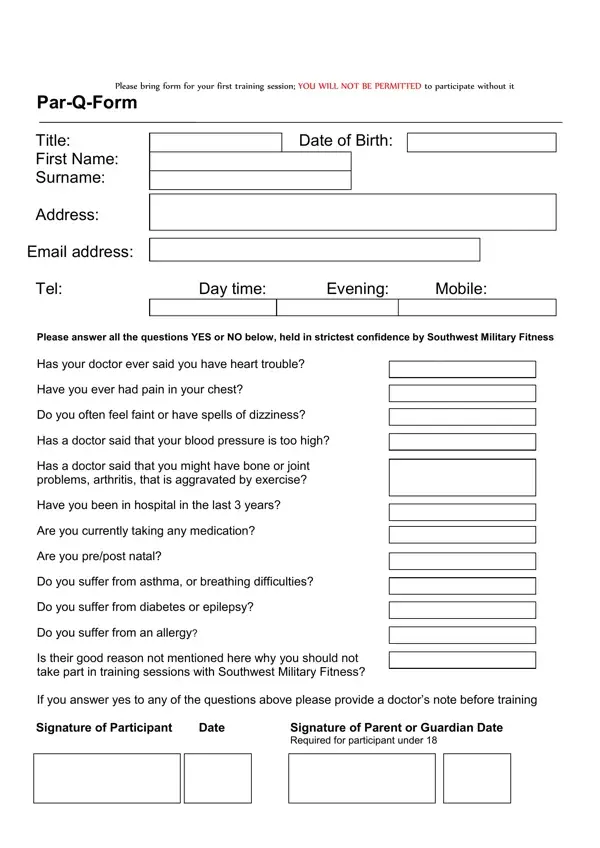
Par-Q Form PDF Details

Embarking on a journey toward personal fitness and well-being is a commendable endeavor, one that is often accompanied by excitement, anticipation, and the collection of necessary pre-requisites. Among these, the Physical Activity Readiness Questionnaire (Par-Q) form stands out as a crucial initial step for participants eager to join fitness groups such as Southwest Military Fitness. This document, designed to be brought along for the first training session, serves a dual purpose. Firstly, it ensures that all participants are medically fit to engage in physical activities by asking pointed questions related to heart health, chest pains, dizziness, blood pressure, joint problems, medication use, and other health concerns. Secondly, it incorporates elements of informed consent and liability waiver, acknowledging the inherent risks of physical exercise and the participant's acceptance of these risks. The form also asks for detailed personal information, emergency contacts, and declarations of truthfulness and understanding of the terms and conditions laid out by the fitness organization. By requiring a doctor's note for any "yes" answers, the form emphasizes safety and preparedness. Thus, the Par-Q form is not merely administrative paperwork; it is a testament to the commitment of both the participant and the fitness organization toward ensuring a safe, informed, and legally prudent exercise environment.

QuestionAnswer
Form Name Par-Q Form
Form Length 3 pages
Fillable? No
Fillable fields 0
Avg. time to fill out 45 sec
Other names print par q forms, blank par q form, military form par q, personal training par q form, par q, par q questionairre

How to Edit Par-Q Form Online for Free

You are able to work with par q test pdf instantly with the help of our PDFinity® online PDF tool. In order to make our editor better and easier to utilize, we consistently develop new features, taking into account feedback from our users. By taking several easy steps, you are able to start your PDF editing:

Step 1: Simply hit the "Get Form Button" in the top section of this webpage to see our pdf editor. Here you'll find everything that is required to work with your file.

Step 2: With this online PDF editor, you are able to accomplish more than merely complete blank fields. Edit away and make your forms seem great with customized textual content put in, or modify the original content to excellence - all that supported by an ability to insert almost any graphics and sign the document off.

With regards to the blank fields of this particular PDF, here is what you should consider:

1. It's vital to fill out the par q test pdf correctly, thus be attentive while filling in the segments containing all these blank fields:

Stage no. 1 in filling in personal training par q form

2. Just after filling out the previous section, head on to the subsequent part and fill out the necessary particulars in all these blank fields - Please answer all the questions, and Signature of Participant.

Signature of Participant, Signature of Participant, and Please answer all the questions inside personal training par q form

3. This subsequent step should be quite straightforward, Signature of Participant, Date, and Signature of Parent or Guardian - these empty fields needs to be filled in here.

Stage no. 3 for filling in personal training par q form

4. Your next part requires your input in the following parts: NEXT OF KIN FORM Title First Name, Day time, Date of Birth, Evening, Mobile, Relationship, and The information I have provided. Be sure to fill in all of the requested info to go forward.

Part # 4 for submitting personal training par q form

5. The pdf needs to be finished within this section. Here you will find a detailed set of blanks that need to be completed with correct information in order for your document submission to be accomplished: Signature of Participant, Date, and Signature of Parent or Guardian.

Signature of Participant, Signature of Parent or Guardian, and Date of personal training par q form

Always be extremely attentive while filling in Signature of Participant and Signature of Parent or Guardian, since this is where a lot of people make some mistakes.

Step 3: Soon after rereading your fields you have filled out, press "Done" and you're done and dusted! Sign up with FormsPal today and immediately obtain par q test pdf, all set for download. All changes made by you are kept , which means you can customize the document at a later point when required. We do not sell or share the details that you use when filling out documents at our site.