
Pwd 504 Form PDF Details

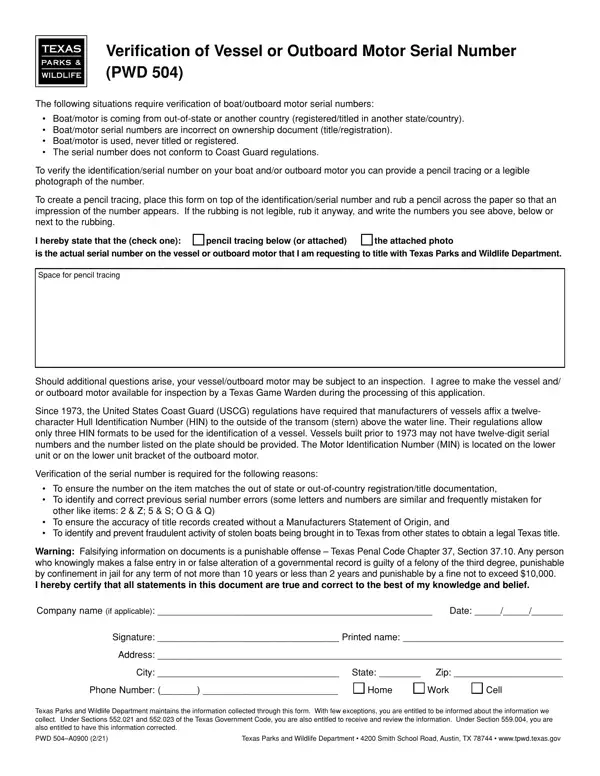
Navigating the process of verifying the identification or serial number of a vessel or outboard motor can be intricate, particularly when the boat or motor comes from out of state or another country, has incorrect serial numbers on ownership documents, is used and never titled or registered, or the serial number doesn't align with Coast Guard regulations. The Verification of Vessel or Outboard Motor Serial Number (PWD 504) form serves as a critical tool in this process, particularly within the Texas Parks and Wildlife Department's framework. This form enables individuals to provide evidence of the serial number through a pencil tracing or a legible photograph, ensuring that the identification number matches with out-of-state or out-of-country registration or title documentation, corrects any previous errors in the number, and assists in preventing fraudulent activities associated with stolen boats entering Texas. The requirement for a twelve-character Hull Identification Number (HIN) by the United States Coast Guard since 1973, along with specifics about the Motor Identification Number (MIN) placement, underscores the importance of diligent verification. Falsifying information on the PWD 504 form is a serious offense, punishable under the Texas Penal Code. The form also emphasizes compliance and cooperation with Texas Game Wardens during possible inspections, ensuring that the verification process is thorough and accurate. By certifying the accuracy of the information provided, individuals contribute to the integrity of the title records and uphold regulations designed to enhance safety and legality in the ownership and operation of vessels and outboard motors in Texas.

QuestionAnswer
Form NamePwd 504 Form
Form Length1 pages
Fillable?No
Fillable fields0
Avg. time to fill out15 sec
Other namespencil identification entitled search, which texas forms 504, pwd504, texas boat entitled

How to Edit Pwd 504 Form Online for Free

motor punishable verification form can be filled out with ease. Just make use of FormsPal PDF editing tool to accomplish the job promptly. Our team is focused on providing you with the ideal experience with our editor by regularly adding new capabilities and upgrades. Our editor is now much more intuitive thanks to the latest updates! Now, working with documents is a lot easier and faster than ever. With a few simple steps, you are able to begin your PDF journey:

Step 1: Just click on the "Get Form Button" at the top of this page to launch our pdf form editing tool. This way, you will find everything that is needed to work with your file.

Step 2: As soon as you launch the tool, there'll be the document ready to be filled in. Apart from filling in various fields, it's also possible to perform other things with the form, namely adding custom textual content, editing the initial textual content, inserting images, placing your signature to the form, and a lot more.

As a way to finalize this PDF form, ensure you enter the required details in every blank:

1. While completing the motor punishable verification form, be sure to include all essential fields in their associated area. It will help hasten the process, enabling your information to be handled fast and properly.

form texas 504 writing process outlined (stage 1)

2. Once the last array of fields is done, it is time to insert the needed specifics in Warning Falsifying information on, Company name if applicable, Date, Signature Printed name, Address, City State, Zip, Phone Number, Home, Work Cell, Texas Parks and Wildlife, PWD A, and Texas Parks and Wildlife so you can progress further.

form texas 504 completion process detailed (stage 2)

Always be really mindful while filling out Signature Printed name and Texas Parks and Wildlife, because this is where a lot of people make mistakes.

Step 3: Make sure your information is correct and just click "Done" to conclude the project. After starting afree trial account here, it will be possible to download motor punishable verification form or email it promptly. The PDF will also be available in your personal account menu with all of your modifications. FormsPal ensures your information privacy via a secure method that in no way saves or shares any type of private data typed in. Feel safe knowing your paperwork are kept protected whenever you work with our tools!