
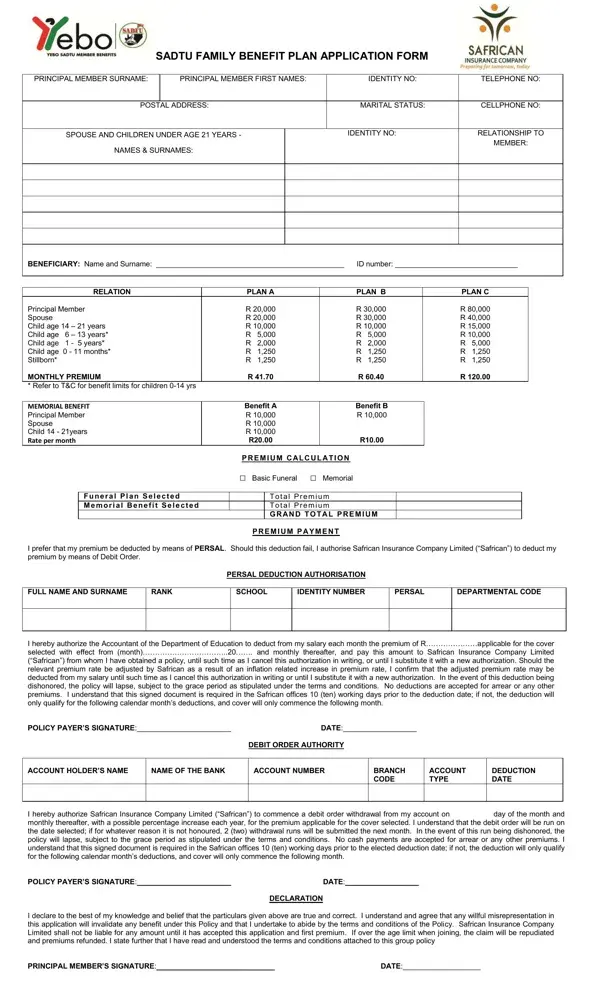
In the realm of insurance, particularly for educational professionals, the South African Democratic Teachers Union (SADTU) Family Benefit Plan application form plays a pivotal role. This comprehensive document meticulously outlines the procedure for enrolling principal members and their dependents—spouses and children up to the age of 21—into a protective net that promises financial benefits in the face of unforeseen life events. With options ranging from basic to more extensive coverage plans, members can secure benefits for themselves and their families with amounts up to R 80,000 for the principal member, and differing scales for spouses and children based on their age, all delineated in a straightforward manner. It's imperative that each applicant understands the payment mechanisms available, including deductions directly from their salary or via debit orders, to ensure continuous coverage. Furthermore, the form is not merely a static document but a gateway to understanding the conditions under which the benefits apply, the inception of coverage, waiting periods, exclusions, and the procedure to follow in the unfortunate event of a claim, emphasizing transparency and the importance of truthful disclosure. Accurate completion of the form is essentia—intentional or negligent misrepresentations can invalidate potential benefits. This document, therefore, stands not just as an application form but as a crucial inventory of information, terms, and conditions that underscores the mutual expectations between the insurer and the insured, ensuring that educators and their families are cushioned against the financial ramifications of mortality.
| Question | Answer |
|---|---|
| Form Name | Safrican SADTU Benefit Plan Form |
| Form Length | 2 pages |
| Fillable? | Yes |
| Fillable fields | 55 |
| Avg. time to fill out | 11 min 34 sec |
| Other names | sadtu member benefits, sadtu funeral claim form, sadtu funeral cover, safrican sadtu contact numbers |
Safrican SADTU Benefit Plan Form isn’t the one you’re looking for?