
Sf 144 Form PDF Details

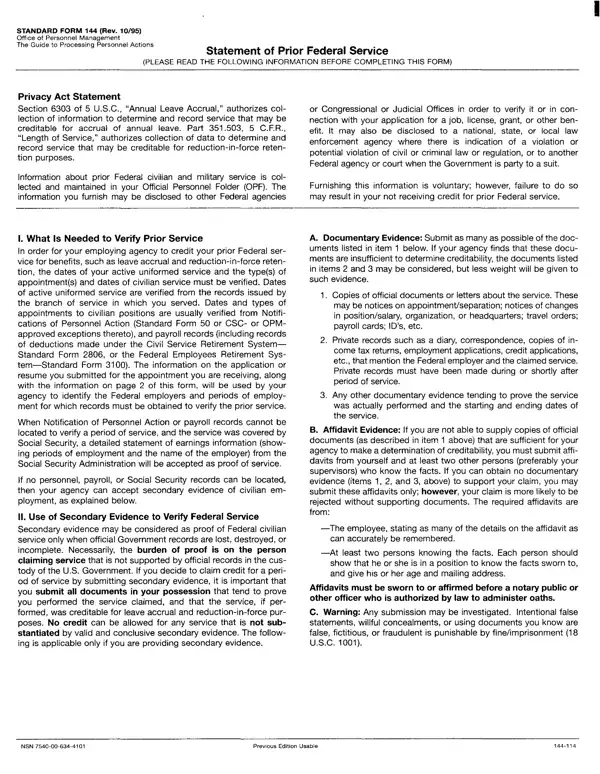
The complexity and intricacies of navigating federal employment can be daunting for many, and the Standard Form 144 (Rev. 10/95), also known as the Statement of Prior Federal Service, stands as a pivotal document within this framework. Created and maintained by the Office of Personnel Management, this form is a critical tool for individuals seeking to ensure that their previous federal civilian and military service is accurately documented and credited for benefits such as annual leave accrual and reduction-in-force retention purposes. This necessity stems from legal mandates under Section 6303 of 5 U.S.C. and Part 351.503, 5 C.F.R., which underline the process of collecting and verifying data related to an individual’s employment history within the federal government. The form meticulously guides applicants through the process of listing and substantiating prior service, including but not limited to, providing evidence through official documents, payroll records, or in cases where such primary sources are unavailable, secondary evidence such as affidavits. Furthermore, the form outlines the potential legal implications, including fines and imprisonment, for intentionally providing false, fictitious, or fraudulent documents, underscoring the gravity and significance of accurately completing this document. It is not merely a form but a gateway for federal employees to secure their rightful benefits and recognition for their service, highlighting the intricate balance between bureaucratic procedure and the personal histories of those serving the United States government.

QuestionAnswer
Form NameSf 144 Form
Form Length2 pages
Fillable?No
Fillable fields0
Avg. time to fill out30 sec
Other namessf 144, sf144a, sf 144a, sf 144a form

How to Edit Sf 144 Form Online for Free

sf 144 form can be filled out in no time. Simply try FormsPal PDF tool to finish the job right away. The tool is continually upgraded by us, receiving new awesome features and growing to be a lot more convenient. To start your journey, go through these easy steps:

Step 1: Open the form in our tool by clicking on the "Get Form Button" in the top section of this page.

Step 2: When you start the PDF editor, you will find the document prepared to be filled out. In addition to filling in different blank fields, you may also perform several other actions with the PDF, namely putting on any text, modifying the original textual content, adding images, affixing your signature to the form, and much more.

This PDF form will need specific details to be typed in, so make sure to take your time to provide what's expected:

1. Whenever filling out the sf 144 form, make sure to include all essential fields in its corresponding section. This will help facilitate the process, enabling your details to be handled without delay and appropriately.

Learn how to fill in statement service part 1

2. Soon after finishing the previous step, go on to the subsequent stage and fill out all required details in these blank fields - Year, Month Day, Year, Month, Day, Honorable or Dishonorable, Do you claim any type of veterans, cJ Yes Check one of the, Mother of a deceased or disabled, Spouse of a disabled veteran, Unmarried widowwidower of a veteran, CERTIFICATION The prior Federal, Signature, Date, and NSN.

Completing segment 2 of statement service

You can potentially make a mistake while filling in your Honorable or Dishonorable, and so make sure to reread it before you send it in.

Step 3: After you have looked over the details provided, press "Done" to finalize your form. Join us right now and immediately get access to sf 144 form, prepared for downloading. All adjustments you make are saved , which enables you to customize the document at a later time when required. FormsPal is devoted to the confidentiality of all our users; we make sure that all personal information used in our system is secure.