
Sf 52 Form PDF Details

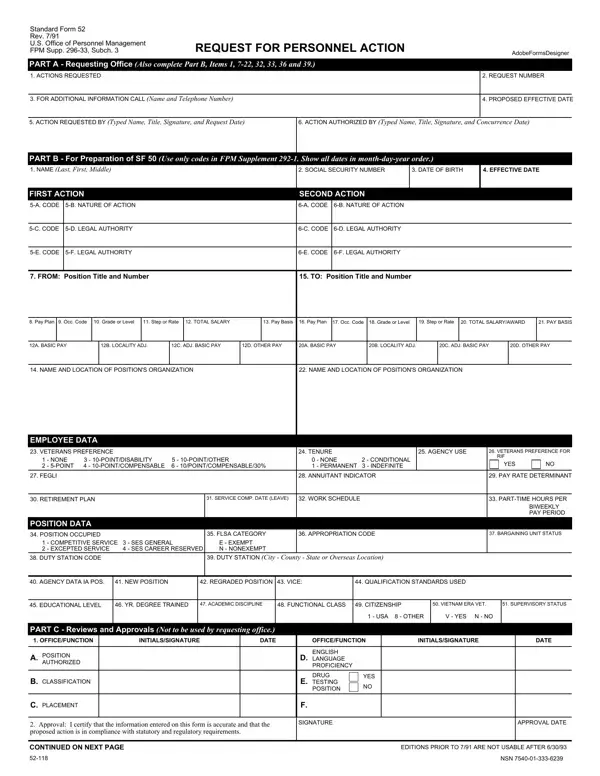
The Standard Form 52, known for its critical role within the U.S. federal employment system, operates as an official request for personnel action. This comprehensive document, revised last in July 1991, serves as a pivotal tool for the U.S. Office of Personnel Management and across various federal agencies. It facilitates a myriad of personnel actions, ranging from appointments and promotions to resignations and retirements, underscoring its versatility and importance in managing federal employment life cycle. The form is divided into several parts, each demanding specific information that ensures precise execution of personnel actions. For instance, Part A focuses on the requesting office's details, while Part B is dedicated to preparing the SF 50, a related document that records any official personnel action. Detailed fields capture essential information such as the employee's name, social security number, birth date, position titles, pay plans, and more, making it a comprehensive resource for personnel management. Furthermore, the form includes sections for veterans' preference, retirement plan details, and work schedule, among others, ensuring a holistic approach to federal employee management. The inclusion of privacy act statements attests to the careful consideration of privacy and confidentiality in handling personnel matters. Hence, the SF 52 form stands as a testament to the structured and meticulous approach adopted by federal agencies in managing their workforce, ensuring that each personnel action is well-documented and conducted in compliance with regulatory requirements.

QuestionAnswer
Form NameSf 52 Form
Form Length2 pages
Fillable?No
Fillable fields0
Avg. time to fill out30 sec
Other namessf 52 digital signature, request for personnel action, sf 52 request personnel action, sf 52 blank

How to Edit Sf 52 Form Online for Free

When you would like to fill out sf 52 personnel form, you don't have to install any sort of programs - simply try using our online tool. To make our tool better and easier to work with, we constantly develop new features, with our users' feedback in mind. Getting underway is effortless! All you need to do is adhere to the next basic steps directly below:

Step 1: Open the PDF doc in our editor by pressing the "Get Form Button" above on this webpage.

Step 2: With this handy PDF file editor, you are able to accomplish more than merely complete blanks. Express yourself and make your forms look perfect with custom textual content incorporated, or optimize the file's original input to excellence - all that accompanied by an ability to incorporate your own photos and sign the file off.

This PDF will need particular details to be filled in, so you should definitely take some time to enter exactly what is expected:

1. Begin completing the sf 52 personnel form with a number of necessary blank fields. Note all of the information you need and ensure there's nothing missed!

Filling out part 1 in sf 52

2. Given that this segment is finished, it is time to put in the necessary particulars in NAME AND LOCATION OF POSITIONS, NAME AND LOCATION OF POSITIONS, EMPLOYEE DATA, VETERANS PREFERENCE, TENURE, NONE POINTDISABILITY, NONE CONDITIONAL PERMANENT, AGENCY USE, VETERANS PREFERENCE FOR RIF, YES, FEGLI, ANNUITANT INDICATOR, PAY RATE DETERMINANT, RETIREMENT PLAN, and SERVICE COMP DATE LEAVE in order to move on further.

Best ways to fill out sf 52 portion 2

3. This next stage will be simple - fill in all of the empty fields in CLASSIFICATION, PLACEMENT, DRUG TESTING POSITION, YES, Approval I certify that the, SIGNATURE, APPROVAL DATE, CONTINUED ON NEXT PAGE, EDITIONS PRIOR TO ARE NOT USABLE, and NSN to conclude this process.

Filling out segment 3 of sf 52

4. Your next subsection will require your involvement in the following areas: Note to Supervisors Do you know of, YES, PART E Employee, PRIVACY ACT STATEMENT, You are requested to furnish a, issue regulations with regard to, and REASONS FOR RESIGNATIONRETIREMENT. Make certain you provide all of the requested information to move forward.

Writing section 4 of sf 52

Those who use this document generally get some things wrong while completing You are requested to furnish a in this section. Be certain to read again whatever you type in right here.

5. Finally, the following last portion is what you have to finish prior to using the PDF. The blank fields at this point include the next: REASONS FOR RESIGNATIONRETIREMENT, EFFECTIVE DATE, YOUR SIGNATURE, DATE SIGNED, FORWARDING ADDRESS Number Street, and PART F Remarks for SF.

sf 52 writing process detailed (portion 5)

Step 3: Make sure the information is accurate and just click "Done" to complete the process. Try a free trial account with us and gain direct access to sf 52 personnel form - downloadable, emailable, and editable in your personal account page. FormsPal offers secure document completion without data record-keeping or distributing. Be assured that your information is in good hands here!