
Transfer Ownership Form PDF Details

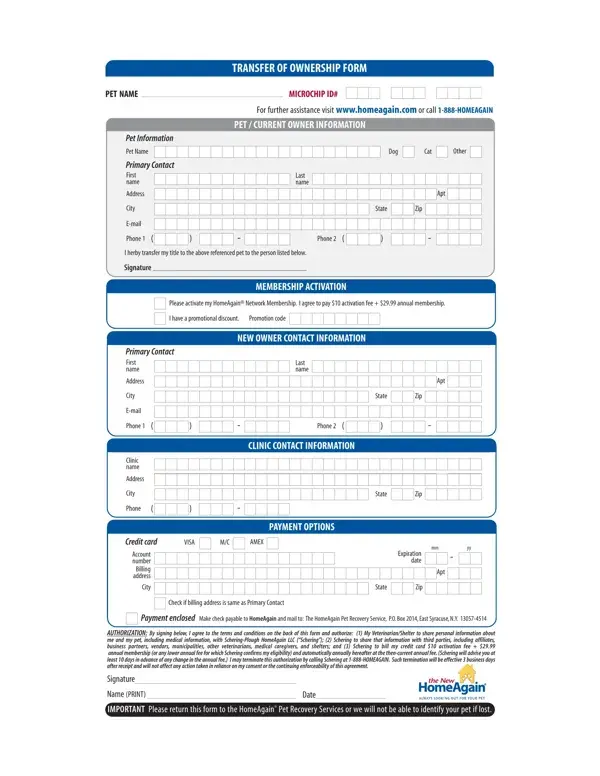
When pet ownership changes hands, it's vital for both the outgoing and incoming owners to navigate the legal and logistical requirements smoothly to ensure the welfare of the beloved pet. The Transfer of Ownership form serves this purpose, facilitating a seamless transition for pets, whether they are dogs, cats, or other animals. This comprehensive document captures essential information about the pet, including the pet's name and microchip ID, alongside current owner details. Moreover, it lays the groundwork for the new owner to activate a HomeAgain Network Membership, crucial for the pet's safety and recovery if lost. With a modest activation fee and annual membership cost, which could be adjusted based on promotions, this form also outlines the steps for proper completion and submission, including selecting a payment method and providing authorization by both parties involved. The form ensures that personal, medical, and billing information is shared appropriately, safeguarding the pet's future while adhering to privacy and policy terms set by Schering-Plough HomeAgain LLC. It's a critical tool in the pet recovery service offered, emphasizing the significance of keeping updated ownership records for our furry friends' safety and security.

QuestionAnswer
Form NameTransfer Ownership Form
Form Length2 pages
Fillable?No
Fillable fields0
Avg. time to fill out30 sec
Other nameshome again form, home again transfer ownership, dog ownership form, transfer dog ownership

How to Edit Transfer Ownership Form Online for Free

Making use of the online tool for PDF editing by FormsPal, you can easily fill in or edit home again microchip transfer ownership right here. FormsPal team is continuously endeavoring to enhance the editor and help it become even easier for users with its handy features. Bring your experience to a higher level with continuously developing and unique opportunities we offer! In case you are looking to start, here's what it will require:

Step 1: Click on the orange "Get Form" button above. It'll open our pdf tool so you could begin filling in your form.

Step 2: The editor helps you modify your PDF form in many different ways. Change it by writing any text, correct what is already in the file, and place in a signature - all at your convenience!

This PDF form will require some specific information; in order to guarantee accuracy, you should bear in mind the guidelines hereunder:

1. It's important to complete the home again microchip transfer ownership accurately, hence take care when working with the parts containing all of these blanks:

Completing section 1 of microchip transfer ownership

2. After finishing the last step, go to the next stage and complete all required details in all these blank fields - Last name, State, Zip, Phone, CLINIC CONTACT INFORMATION, Apt, Apt, Primary Contact First name, Address, City, Email, Phone, Clinic name, Address, and City.

Writing segment 2 of microchip transfer ownership

Be really attentive while filling out City and Apt, because this is the section in which most people make a few mistakes.

3. This next section will be focused on AUTHORIZATION By signing below I, Signature, Name PRINT, Date, the New, and IMPORTANT Please return this form - fill in all of these blank fields.

The way to prepare microchip transfer ownership stage 3

Step 3: Right after proofreading your completed blanks, hit "Done" and you are good to go! After setting up afree trial account with us, you will be able to download home again microchip transfer ownership or send it via email right away. The file will also be readily available through your personal account page with your edits. At FormsPal.com, we do our utmost to make sure all of your information is stored private.