Please rate U 26 3 Form

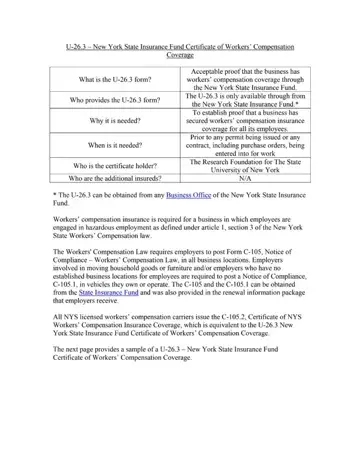
Understanding the intricacies of the U-26.3 form is crucial for businesses in New York State, particularly those involved in sectors deemed hazardous under workers' compensation laws. Essentially, this document serves as proof that a business has procured the necessary workers’ compensation insurance for its employees, aligning with regulations set forth by the New York State Workers' Compensation Law. The New York State Insurance Fund, the sole provider of the U-26.3 form, offers this certificate to businesses to affirm their compliance. Such documentation becomes indispensable prior to the issuance of any permits or the initiation of contracts, including purchase orders, ensuring that the business is adequately covered. The holder of the certificate typically is an entity requiring confirmation of coverage, such as The Research Foundation for The State University of New York in this instance. It's also notable that while the U-26.3 form specifically verifies coverage through the New York State Insurance Fund, equivalent forms like the C-105.2 are issued by all licensed workers' compensation carriers in New York. These measures underscore the state's commitment to safeguarding employees while providing clear and structured channels for employers to demonstrate their compliance with mandatory insurance coverage requirements.
| Question | Answer |
|---|---|
| Form Name | U 26 3 Form |
| Form Length | 2 pages |
| Fillable? | No |
| Fillable fields | 0 |
| Avg. time to fill out | 30 sec |
| Other names | form u 26 3, nysif workers comp certificate, workers comp form u 26 3, nysif form u26 3 |
U 26 3 Form isn’t the one you’re looking for?
Please rate U 26 3 Form
