
Vadoc Form PDF Details

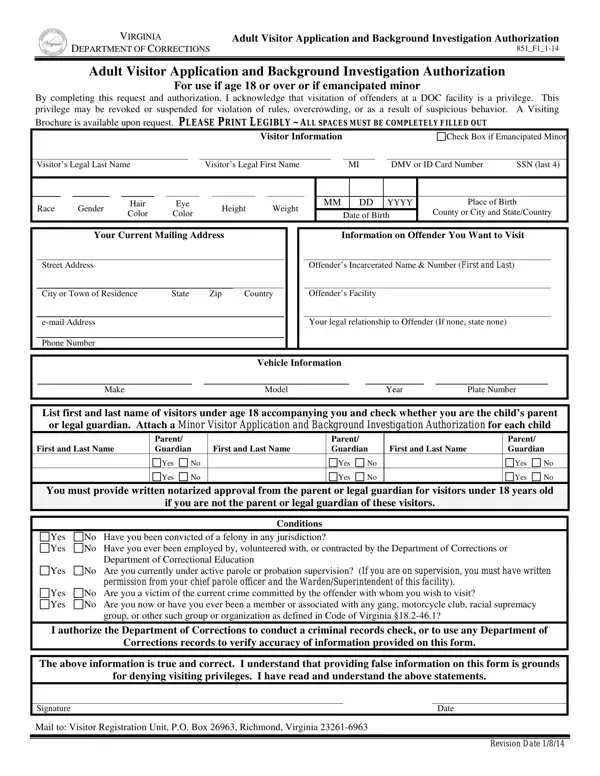
In the Commonwealth of Virginia, the process of visiting an inmate involves a crucial step: completing the Virginia Adult Visitor Application and Background Investigation Authorization (VADOC Form 851_F1_1-14). This form serves as both an application for those wishing to visit offenders in the Department of Corrections facilities and as authorization for the department to conduct a background check on the applicant. Meant for individuals who are either 18 years of age and over or emancipated minors, the form carefully outlines the understanding that visiting an inmate is not a right, but a privilege that can be revoked under certain circumstances, such as rule violations, overcrowding, or suspicious behavior. Applicants are required to fill in detailed personal information, the specifics of the offender they wish to visit, and any accompanying minors, including legal attestations regarding their relationship to these minors. The form also probes into the applicant's criminal history, employment history with correctional facilities, current parole or probation status, and any potential gang affiliations, ensuring the safety and security of the correctional environment. By signing the form, applicants not only declare the accuracy of their provided information but also acknowledge their understanding of the conditions under which their visiting privileges may be granted or denied. This comprehensive approach underscores the Virginia Department of Corrections' commitment to maintaining a safe and orderly environment for both visitors and inmates.

QuestionAnswer
Form NameVadoc Form
Form Length1 pages
Fillable?No
Fillable fields0
Avg. time to fill out15 sec
Other names851_F1 vadoc 2012 form

How to Edit Vadoc Form Online for Free

Any time you intend to fill out Vadoc Form, you don't need to download and install any sort of applications - simply try our online tool. To make our tool better and more convenient to utilize, we continuously design new features, with our users' suggestions in mind. With a few simple steps, it is possible to begin your PDF journey:

Step 1: Open the PDF doc inside our editor by clicking on the "Get Form Button" above on this webpage.

Step 2: As you open the editor, you'll notice the document ready to be filled in. Aside from filling out different blank fields, you might also perform other things with the form, specifically adding any text, changing the initial text, inserting images, putting your signature on the form, and a lot more.

As for the fields of this precise document, this is what you should do:

1. Whenever filling out the Vadoc Form, ensure to incorporate all important blank fields in its relevant form section. It will help to facilitate the process, enabling your information to be processed quickly and properly.

Completing section 1 of Vadoc Form

2. The next part is usually to submit all of the following blank fields: First and Last Name, Parent Guardian, First and Last Name, Parent Guardian, First and Last Name, Yes, Yes, Yes, Yes, Parent Guardian, Yes, Yes, You must provide written notarized, if you are not the parent or legal, and Conditions.

Stage no. 2 in submitting Vadoc Form

It's easy to make a mistake while filling out the First and Last Name, so ensure that you go through it again prior to deciding to finalize the form.

Step 3: Ensure that the information is right and then just click "Done" to proceed further. Get hold of the Vadoc Form the instant you register here for a 7-day free trial. Immediately view the pdf document from your FormsPal cabinet, with any modifications and changes being all saved! FormsPal ensures your data confidentiality by using a secure system that never saves or shares any type of private data involved in the process. Feel safe knowing your files are kept protected any time you work with our editor!