Valic Form 403B Rollover PDF Details

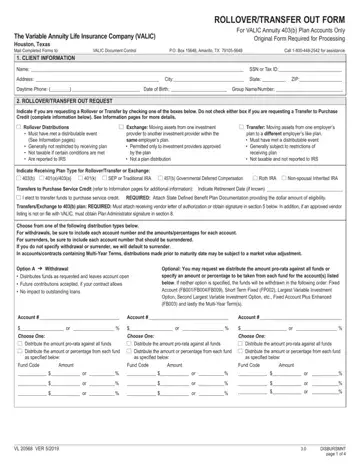
When it's time to move your retirement funds, the Valic 403B Rollover Form becomes an essential tool, especially for those holding accounts under the Variable Annuity Life Insurance Company (VALIC) Annuity 403(b) Plan. This form, necessary for processing any transfers or rollovers out of VALIC 403(b) plan accounts, outlines multiple steps to ensure the smooth transition of your retirement assets. It begins by collecting client information, including identifiers and contact details, which ensures your account is accurately identified for the rollover or transfer request. The form distinguishes between rollover distributions and transfers, each with its own set of rules and implications on your tax situation and requires detailed reasoning for the rollover distribution, if applicable. Special instructions for distribution, detailed information for the payee rollover/transfer company, and requirements for spousal consent for certain plans highlight the form’s comprehensive approach to address varied scenarios that might apply to account holders. Furthermore, it touches on the importance of vesting determination for employer contribution sources and mandates plan administrator approval in situations dictated by the employer's plan or federal regulations. Lastly, client and financial advisor signatures or a signature guarantee for amounts over $25,000 underscore the security and verification processes in place to protect the account holder’s interests. This form not only navigates the complexities of managing 403(b) accounts during significant events like job changes or retirement but also underscores the careful consideration needed to maintain the tax-preferred status of these retirement funds, demonstrating VALIC's commitment to facilitating these transitions with attention to regulatory compliance and client needs.

QuestionAnswer
Form NameValic Form 403B Rollover
Form Length5 pages
Fillable?No
Fillable fields0
Avg. time to fill out1 min 15 sec
Other namesaig valic rollover transfer, aig transfer out form, aig valic rollover transfer form, vl20568 ver 03 2018

How to Edit Valic Form 403B Rollover Online for Free

You can work with valic retirement services without difficulty with the help of our online editor for PDFs. We at FormsPal are devoted to making sure you have the absolute best experience with our editor by constantly adding new features and improvements. Our tool has become much more helpful with the latest updates! At this point, filling out PDF documents is easier and faster than ever before. This is what you will have to do to start:

Step 1: Open the form in our tool by clicking the "Get Form Button" above on this webpage.

Step 2: As you launch the tool, you'll see the form prepared to be filled out. Aside from filling out various fields, you may also perform some other actions with the file, particularly adding your own text, changing the original text, inserting images, placing your signature to the PDF, and more.

It is easy to finish the pdf with our helpful tutorial! Here's what you must do:

1. The valic retirement services usually requires certain information to be inserted. Make sure the following blanks are finalized:

Writing section 1 of aig transfer out form

2. Once the last section is done, go to type in the applicable information in these: For withdrawals be sure to include, Optional You may specify an amount, Account or Fund Code or, Amount, Account or Fund Code or, Amount, Account or Fund Code or, Amount, Option B Surrender Automatically, Account, Account, DO Terminate my Loan Separation, ROLLOVER DISTRIBUTION REASON This, DO Terminate my Loan, and DO Terminate my Loan.

Simple tips to fill in aig transfer out form portion 2

3. The following part will be about PAYEE ROLLOVERTRANSFER COMPANY, Payee RolloverTransfer Company, Attention LineInternal Mail Code, Address Amounts will not be, City, State, ZIP, Authorized Signers Name, Title, Authorized Signature, Date, SPOUSAL CONSENT, ERISA covered and certain other, Not Married Married Legally, and REQUIRED FOR SPOUSE Spousal Consent - fill out all these blanks.

REQUIRED FOR SPOUSE Spousal Consent, Date, and ERISA covered and certain other in aig transfer out form

4. To move forward, this part will require completing several empty form fields. Included in these are I agree to the payment of funds, release VALIC from all liability, Spouses Signature Date, SPOUSES SIGNATURE WITNESSED BY, This section is only to be used, Before me personally appeared, State of County of On this day, Notary Public, VESTING DETERMINATION FOR, Vesting Information To be, Employer Basic Vested, All Employers Indicate hours, Employer SupplementalMatching, Hours Worked or Months Worked or, and PLAN ADMINISTRATOR APPROVAL, which are key to going forward with this form.

aig transfer out form completion process described (portion 4)

5. This final notch to finalize this PDF form is integral. Ensure that you fill in the necessary fields, which includes I affirm that in the event of a, informationsharing agreement with, Plan Administrators Name Print, Plan Administrators Signature, Date, VL VER, and DISBURSMNT page of, before submitting. Failing to do this might generate a flawed and possibly incorrect form!

Find out how to fill out aig transfer out form portion 5

Regarding I affirm that in the event of a and Date, ensure you do everything properly here. The two of these are thought to be the most important fields in this form.

Step 3: Make sure your details are correct and click on "Done" to conclude the project. Obtain your valic retirement services once you register online for a free trial. Immediately access the pdf form from your personal account, with any modifications and changes being conveniently synced! FormsPal is devoted to the confidentiality of all our users; we make sure all personal information handled by our editor continues to be protected.