
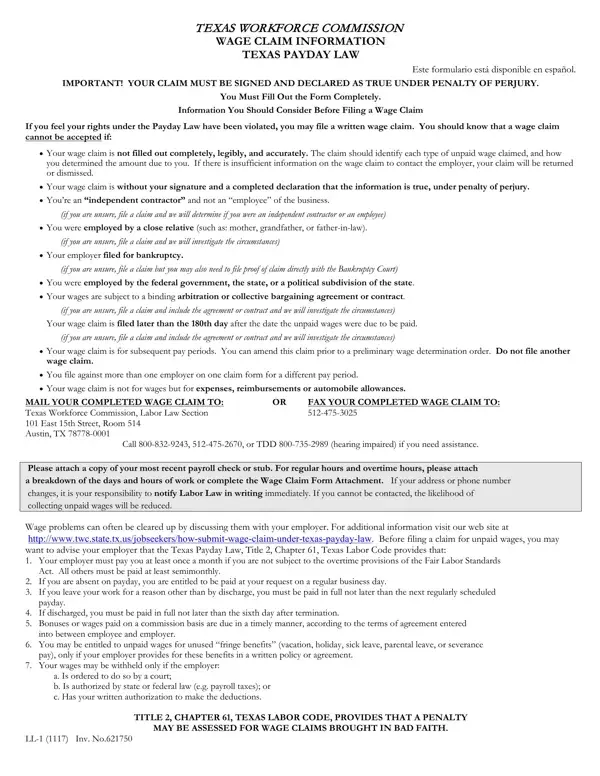
Navigating the complexities of employment law can often feel like a daunting task, especially when it comes to ensuring you've received all the wages owed to you by an employer. The Texas Workforce Commission (TWC) provides a beacon of hope in such situations through its Wage Claim Information form, governed by the Texas Payday Law, which aims to assist workers in claiming unpaid wages. It's crucial for employees to understand that for a wage claim to be considered, it must be meticulously filled out, providing clear identification of each type of unpaid wage and the corresponding amount due. This procedure requires not only the workers' precise details and their employment information but also demands an acknowledgment, under penalty of perjury, affirming the authenticity of the claim. Whether you're an employee mistaken as an independent contractor, encountering bankruptcy issues with your employer, or dealing with employment by a close relative, this form serves as your preliminary guide through the maze of pursuing your rightfully earned wages. Moreover, it underscores the importance of timely submission, within 180 days from when the wages were due, and lays out specific scenarios that might affect the eligibility of your claim. Complete with a detailed directive on attaching paychecks or stubs and a clear caveat on maintaining updated contact information, this document is pivotal for any employee in Texas looking to rectify wage discrepancies.
| Question | Answer |
|---|---|
| Form Name | Wage Claim Form |
| Form Length | 4 pages |
| Fillable? | Yes |
| Fillable fields | 284 |
| Avg. time to fill out | 1 min |
| Other names | twc wage claim, claim wages, claim information texas, form wage claim |
Wage Claim Form isn’t the one you’re looking for?