
The Arkansas motor vehicle power of attorney is a legal document that allows an individual (the principal) to authorize another person (the agent) to handle vehicle-related matters on their behalf. This may include registering, titling, or selling the vehicle. Adhering to the state’s specific signing requirements and laws is essential to ensure the power of attorney legality and enforceability.
Last Updated: October 2026. This guide is reviewed and updated regularly to reflect current law. If you notice an error or outdated information, please contact us.
Build Your Document
Answer a few simple questions to make your document in minutes
Save and Print
Save progress and finish on any device, download and print anytime
Sign and Use
Your valid, lawyer-approved document is ready
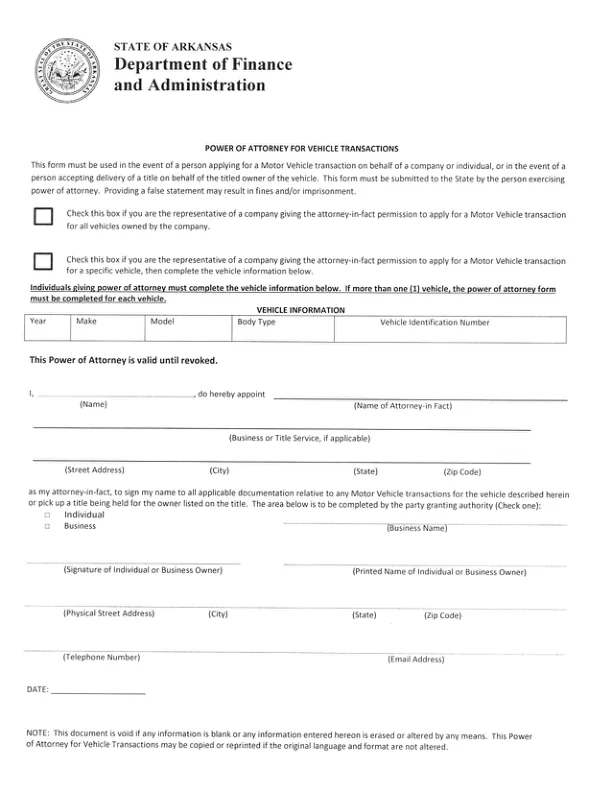
The state’s Power of Attorney for Vehicle Transactions is a form prescribed by a government agency. Under Ark. Code Ann. § 28-68-103(4), the Arkansas Uniform Power of Attorney Act does not apply to a power created on such a form, so the Act’s signing rule in § 28-68-105 does not govern it.[1] The form, issued by the Arkansas Department of Finance and Administration (DFA), has no notary section, and it says the document is void if any information is blank or any information entered on it is erased or altered.[2] Key requirements for the Arkansas motor vehicle power of attorney form include:
The DFA form states that the power of attorney is valid until revoked.[2] Under Ark. Code Ann. § 28-68-110, a power of attorney covered by the Arkansas Uniform Power of Attorney Act, such as the FormsPal template, ends when the principal revokes it.[3] In practice, it helps to tell the agent and the DFA in writing when you revoke.
You can also refer to Arkansas power of attorney forms for more detailed information and to obtain the necessary forms. It is crucial to follow these guidelines closely to avoid legal complications or document rejection by the state authorities.
Tip: Keep a signed copy of the finished form for your records, and give your agent a copy too.
The Arkansas Power of Attorney for Vehicle Transactions authorizes another person to handle vehicle transactions on your behalf. This includes tasks like applying for a duplicate title or picking up a title. The table below lists the basics of the DFA form this page hands out and links to the Arkansas Division of Motor Vehicles. The form is a scanned page with no fillable fields, so you print it and fill it in by hand.
| Document Name | Arkansas Motor Vehicle Power of Attorney Form |
| State Form Name | Power of Attorney for Vehicle Transactions |
| Relevant Link | Arkansas Division of Motor Vehicles |
| Avg. Time to Fill Out | 10 minutes |
| # of Fillable Fields | 0 (printed form, filled in by hand) |
| Available Formats | Adobe PDF |
These steps follow the Arkansas Department of Finance and Administration’s Power of Attorney for Vehicle Transactions, the official form this page hands out. It is a single printed page with no fillable fields, so print it and fill it in by hand, in the order below. Each step names one part of the form and tells you what to enter there. The form says it must be submitted to the State by the person exercising power of attorney, and that providing a false statement may result in fines and/or imprisonment.[2]
The screenshots under each step show the Arkansas DFA Power of Attorney for Vehicle Transactions, the official Arkansas form, filled with sample entries in blue, so you can see where each answer goes. The names, addresses, dates and vehicle details are examples only.
Company check boxes
The two boxes at the top are for the representative of a company. Check the first box to give the attorney-in-fact permission to apply for a motor vehicle transaction for all vehicles the company owns. Check the second box to give that permission for one specific vehicle, then complete the vehicle information. If you are not acting for a company, these boxes are not for you.

Vehicle Information
Enter the vehicle’s year, make, model, body type and vehicle identification number (VIN) in the table. Copy them from your title. If you are giving power of attorney as an individual and more than one vehicle is involved, complete a separate form for each vehicle.[2]

I, (Name), do hereby appoint
Print your full name on the line after “I,” and the full name of the person you appoint on the Name of Attorney-in Fact line. The sentence above these lines, “This Power of Attorney is valid until revoked,” is printed on the form, so there is nothing to enter there.

Business or Title Service and address
If your attorney-in-fact acts for a business or title service, enter its name on the Business or Title Service line. Then enter the attorney-in-fact’s street address, city, state and zip code on the line below.[2]

Individual or Business
The paragraph under the address lines is printed. It lets your attorney-in-fact sign your name to all applicable documentation for motor vehicle transactions for the vehicle described, or pick up a title being held for the owner listed on the title. Below it, check Individual or Business to show who is granting the authority. If you check Business, enter the business name on the Business Name line.

Signature and Printed Name of Individual or Business Owner
Sign on the Signature of Individual or Business Owner line and print your name on the Printed Name of Individual or Business Owner line.[2]

Physical Street Address, Telephone Number and Email Address
Provide the complete address of the principal, including the street address, city, state, and zip code.[2] Then enter your telephone number and email address on the next line.

DATE
Write the date on the DATE line at the bottom of the form.

The note at the bottom of the form says the document is void if any information is blank or any information entered on it is erased or altered by any means. If you make a mistake, print a fresh copy and start again. The form may be copied or reprinted if the original language and format are not altered.[2]
After the fields are filled in, the last part is signing. What signing takes depends on the document you use: the DFA form this page hands out, or the FormsPal template you get from Create My Document. Check that names and numbers match your IDs and vehicle papers before anyone signs.
Most problems come from small slips, not from the form itself. A quick read-through before you sign catches the common ones. Go through this short list once the form is filled in.
It is a document in which a vehicle owner names another person, called the agent or attorney-in-fact, to handle vehicle tasks on the owner's behalf. Common tasks include registering the vehicle, applying for a title, and selling the vehicle.
The DFA form this page hands out has no fillable fields, so print it and fill it in by hand. To prepare a document online instead, select Create My Document at the top of this page and answer a few questions. The FormsPal tool builds the FormsPal template from your answers, and you can save your progress, print it, or download it as a PDF.
The DFA form has no fillable fields. You can print it and fill it in by hand, or open the downloaded file in the FormsPal PDF editor to add your entries as text before you print. Do not change the printed wording. The form may be copied or reprinted only if the original language and format are not altered.[2]
The principal is the vehicle owner who signs the form. The agent, also called the attorney-in-fact, is the person the owner names to act for them.
The DFA form has no successor section. The FormsPal template from Create My Document has one. It names an alternate agent by name and address, for the case where your first agent is unable or unwilling to serve.
Yes. Download the PDF and store it with your other vehicle papers. You can print more copies whenever you want them.
Have these details ready before you start. The DFA form asks for the following:
If you are acting for a company, also have the business name ready.
General information, not legal or tax advice.
