
A California motor vehicle power of attorney (POA) is a form that names another person, your agent, to handle vehicle matters for you. Typical tasks include registration, title paperwork and a sale, often at the California Department of Motor Vehicles (DMV). You can download the DMV’s own form, REG 260, as a PDF on this page, or create the FormsPal template online with Create My Document.
Last Updated: October 2026. This guide is reviewed and updated regularly to reflect current law. If you notice an error or outdated information, please contact us.
Build Your Document
Answer a few simple questions to make your document in minutes
Save and Print
Save progress and finish on any device, download and print anytime
Sign and Use
Your valid, lawyer-approved document is ready
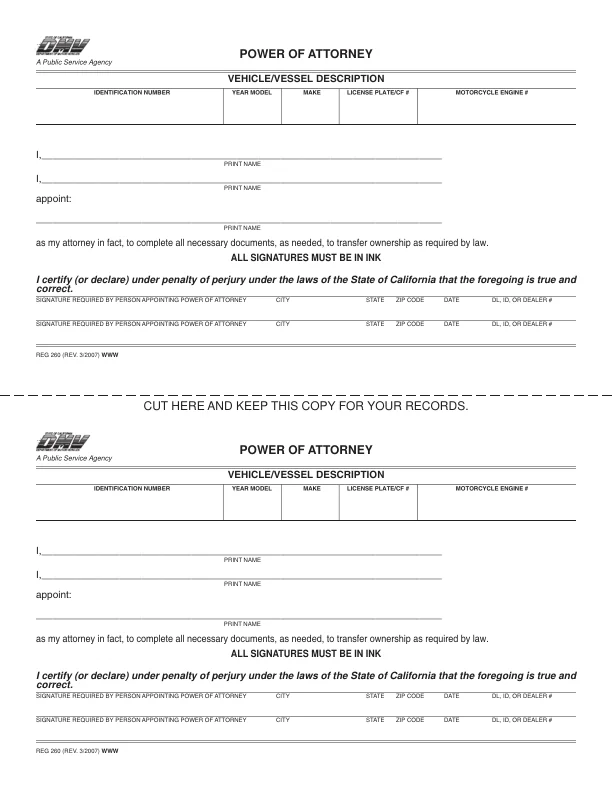
The PDF this page hands out is the California DMV’s Power of Attorney, REG 260 (REV. 3/2007).[1] It is a single page. The top half has the Vehicle/Vessel Description boxes, two “I,” lines for the people appointing, the “appoint:” line for the attorney in fact, and two signature lines under a certification made under penalty of perjury. It has no notary section. The lower half repeats the form as a copy to keep for your records. The FormsPal template behind Create My Document is a different document, and its page 3 is a notary acknowledgment page.
| Document Name | California Motor Vehicle Power of Attorney Form |
| State Form Name | Power of Attorney, REG 260 (REV. 3/2007) |
| Relevant Link | California Department of Motor Vehicles |
| Avg. Time to Fill Out | 5 minutes |
| # of Fillable Fields | 18 |
| Available Formats | Adobe PDF |
Form REG 260, the state form named in the table above, is the PDF this page hands out. The FormsPal template behind Create My Document is a separate document. Go through REG 260 one part at a time. Following these steps carefully, you can properly complete California Form REG 260, ensuring it is legally valid and enforceable.
These steps follow the California DMV’s Power of Attorney, REG 260 (REV. 3/2007), the official form this page hands out. Open the PDF, fill in each part in the order below, and check your entries before you print. Use the same spelling and wording that appear on your ID and on the vehicle’s title or registration paperwork.
The screenshots under each step show the California DMV Power of Attorney (REG 260), the official California form, filled with sample entries in blue, so you can see where each answer goes. The names, dates and vehicle details are examples only.




The lower half of the page repeats the form under “CUT HERE AND KEEP THIS COPY FOR YOUR RECORDS.” In the PDF, its fields fill in with the same entries as the top half. Cut along the dashed line and keep the lower copy for your records.
Once the form is filled in, the remaining steps cover signing, the final review and the copies. What signing takes depends on the document you use: REG 260, the DMV form this page hands out, or the FormsPal template you get from Create My Document. Check each entry against your ID and the vehicle’s title or registration paperwork from the DMV before you sign.
Tip: Take a photo or scan of every signed page before you hand the original to anyone. Store the copy with your other vehicle papers, ready for any DMV visit.
To ensure the legal standing of a power of attorney, it must comply with specific requirements set forth under California law. These requirements are detailed in the California Probate Code, which governs the use and limitations of California POA forms.[2]
Section 4121 outlines the legal requirements for executing the power of attorney document, including the necessity for the principal’s signature and either witness signatures or a notary acknowledgment.[2] Section 4128 requires a printed form of a durable power of attorney that is sold or distributed in California for use without a lawyer's advice to contain certain warning statements.[3] California's statutory form power of attorney is a separate form, found in Probate Code Part 3, starting with section 4400.[3]
For the FormsPal template from Create My Document to be considered valid and enforceable, the following components must be included:
The form must be filled out completely and accurately to avoid any legal issues or delays in the transactions for which the power of attorney is intended. Moreover, it’s advisable for both the principal and the agent to keep copies of the completed form for their records and potential future verification.
These are the questions that come up most often when people fill in a vehicle POA for a car, a truck or a motorcycle. Each answer points back to the steps above, so you can check the form as you read, before you take it to the DMV.
The principal is the person who gives the authority. The agent, also called the attorney-in-fact, is the person who receives it. On REG 260, the principal prints their name on an “I,” line and the agent’s name goes on the line after “appoint:”.
Have these items ready before you start:
Sample entries in the screenshots above show where each answer goes.
Yes. Download the PDF and type into its fields, or fill it in with the FormsPal PDF editor, then print it. REG 260 says all signatures must be in ink, so sign the printed form by hand.[1] You can also create the FormsPal template online with Create My Document.
REG 260 has no successor line. The FormsPal template from Create My Document has a successor attorney-in-fact block at the top of page 2. It names a backup agent and gives that person’s address.
Yes. FormsPal lists related power of attorney forms for many states and tasks. Pick the template that matches the job you have in mind, then fill in the document online the same way.
General information, not legal or tax advice.
