
A Michigan motor vehicle power of attorney is a form that lets a vehicle owner appoint another person, called the agent, to handle vehicle paperwork for them. That paperwork can include buying, titling, and registering a vehicle. You can create the FormsPal template online or download the PDF below. To compare it with other documents, see our page on Michigan POA forms.
Last Updated: October 2026. This guide is reviewed and updated regularly to reflect current law. If you notice an error or outdated information, please contact us.

Build Your Document
Answer a few simple questions to make your document in minutes
Save and Print
Save progress and finish on any device, download and print anytime
Sign and Use
Your valid, lawyer-approved document is ready
The one who grants authorities to the other part is known as “the principal,” while the one entitled is recognized as an attorney-in-fact. The PDF this page hands out is the Michigan Department of State’s TR-128 Appointment of Agent (Rev. 2/26).[1] Its instructions set rules you need to follow for the form to be accepted:
| Document Name | Michigan Motor Vehicle Power of Attorney Form |
| State Form Name | TR-128 Appointment of Agent (Rev. 2/26) |
| Relevant Link | Michigan Office of Secretary of State |
| Avg. Time to Fill Out | 7 minutes |
| # of Fillable Fields | 18 |
| Available Formats | Adobe PDF |
Tip: Write your entries on a scrap sheet first. Then copy them onto the form in ink, so the final copy stays neat and easy to read.
These steps follow the Michigan Department of State’s TR-128 Appointment of Agent (Rev. 2/26), the official form this page hands out, part by part in the order the PDF runs.[1] Read the Instructions box at the top of the form first. Compile all necessary documents to fill out the required data correctly. The form demands that you insert the information in ink.
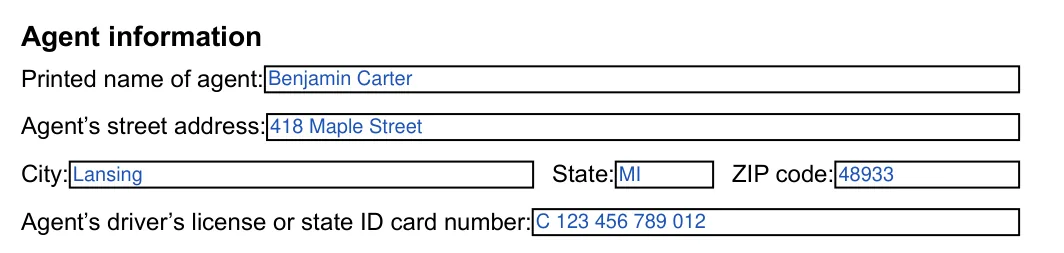
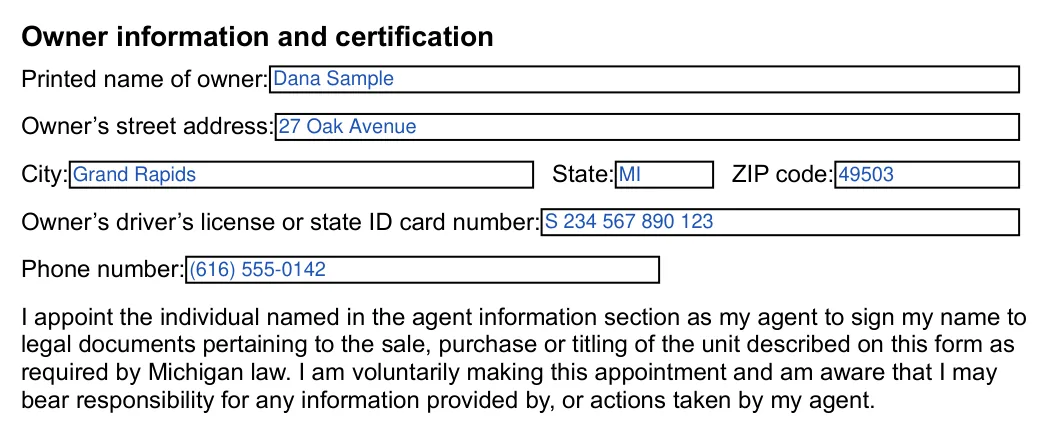
The screenshots under each step show TR-128 Appointment of Agent, the official Michigan form, filled with sample entries in blue, so you can see where each answer goes. The names, addresses, dates and numbers are examples only.
Agent information
Print the agent’s name on the Printed name of agent line. Then enter the agent’s street address, city, state and ZIP code, and the agent’s driver’s license or state ID card number.
Vehicle, watercraft, ORV, or mobile home information
Enter the year, the HIN or VIN, the make, and the plate or registration number if there is one. Copy the HIN or VIN from the title or registration to avoid typos.

Owner information and certification
Print the owner’s name, street address, city, state and ZIP code, the owner’s driver’s license or state ID card number, and a phone number. The paragraph below these lines is printed on the form. In it, the owner appoints the agent to sign the owner’s name to legal documents for the sale, purchase or titling of the unit, so read it before you sign.
Signature of owner and Date
Check every entry on the form first. To put a Michigan Vehicle POA in force, the car owner must place their signature at the bottom of Form TR-128.[1] Then write the date on the Date line.

Once every field is filled in, a few practical steps help you finish the paperwork and get it into the agent's hands. Follow them in order, and keep the signed original and your copies together so everything is easy to find when the agent starts on the vehicle paperwork.
Check the agent's entries, the vehicle details, and the owner's entries against the IDs and the vehicle's title or registration.
Make a photocopy of the signed form for your records.
Form TR-128 has no notary section. The owner signs and dates it.[1]
If you use the FormsPal template from Create My Document instead, Michigan’s Uniform Power of Attorney Act applies to it. It must be signed to take effect. If you sign it yourself, it is durable only if it is also acknowledged before a notary public or another individual authorized to take acknowledgments, or signed in the presence of two witnesses who both also sign it. A witness may not be an agent named in it.[2] A signature acknowledged before a notary public or another individual authorized by law to take acknowledgments is presumed to be genuine.[2]
Hand the signed original to the agent together with a photocopy of the owner’s valid driver’s license or state ID card, which must be presented with the completed form at a Secretary of State branch.[1]
Most mistakes on this form are small, such as a mistyped VIN or an entry that differs from the ID. Check the list carefully before you hand over Form TR-128 to the agent.

Quick answers to common questions about gathering details, filling in each part of the form, and fixing small slips along the way. Keep your scrap sheet and the vehicle title within reach while you work through them.
Collect the following information before you open the form, because having everything nearby makes the entire process considerably faster.
The details table above lists 18 fillable fields and about 7 minutes. Most of that time goes to the agent, vehicle, and owner entries.
Copy it from the vehicle's title or registration. Read it back once after you write it, because one wrong character can lead to a mismatch.
Yes, but it is a different document. Select Create My Document at the top of this page, answer a few questions, and save your progress. You can then print the finished FormsPal template and sign it. The template is not Form TR-128, and its signing rules are explained in How to Sign and Use Your Vehicle POA above.
The owner is the person who holds the vehicle and signs at the bottom of the document. The agent is the individual the owner names to handle the vehicle paperwork. Each person has a separate part of the form, so keep their details apart and double-check that nothing is entered in the wrong place.
Form TR-128’s instructions say all information must be completed in ink, so if you fill it in by hand, use ink and write each entry slowly and neatly. The online template lets you type your entries and then print the finished document, which keeps the text clean and easy to read.
Keep the signed original and your photocopy together in one folder along with the vehicle title, so that you can find everything quickly when the agent asks for it. Storing a digital scan on your smartphone provides a convenient additional backup.
Keep the driver license or ID card of both the agent and the owner within reach, because the form asks for each ID number. Reviewing the identification cards before you begin saves considerable time and prevents transcription errors afterward.
Do not cross out or change an entry on the form you plan to hand over. Form TR-128 says any alterations void it.[1] Print a fresh page and enter the details again, using your scrap sheet so that the second attempt goes quickly.
Read through every entry on screen, compare the VIN with the vehicle title one more time, and confirm the spelling of each person's details. Printing only after this thorough review avoids unnecessary waste and produces a professional copy that is ready for signature.
Hand over the signed original together with a short note listing the vehicle's year, make, and VIN. A one page cover note helps the agent keep track of which vehicle the paperwork belongs to, especially when several different documents are involved.
General information, not legal or tax advice.
