
The Virginia motor vehicle power of attorney is a legal document that allows a car owner to designate another person to handle specific transactions related to their motor vehicle. This type of power of attorney is particularly useful for activities such as registering, titling, buying, or selling a car on behalf of the owner.
Last Updated: October 2026. This guide is reviewed and updated regularly to reflect current law. If you notice an error or outdated information, please contact us.
Build Your Document
Answer a few simple questions to make your document in minutes
Save and Print
Save progress and finish on any device, download and print anytime
Sign and Use
Your valid, lawyer-approved document is ready
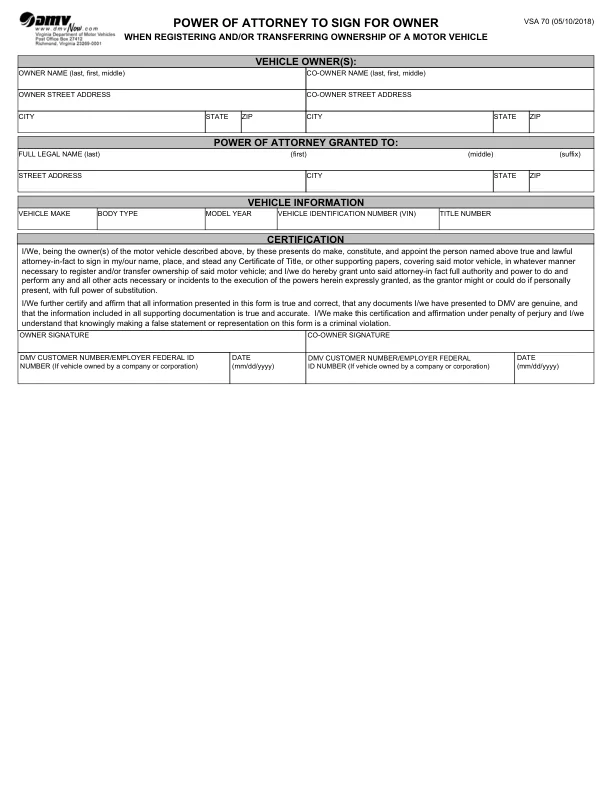
A Virginia motor vehicle power of attorney names an agent to deal with one vehicle for its owner. The owner is called the principal, and the person chosen to act is the agent, also known as the attorney-in-fact. The PDF this page hands out, the Virginia DMV’s Form VSA 70, appoints the agent to sign any Certificate of Title or other supporting papers for the vehicle, as needed to register it or transfer its ownership.[1]
Form VSA 70 is one of several Virginia POAs. It is in writing and lists the vehicle’s make, body type, model year, VIN and title number, along with the powers granted.[1] The Virginia Department of Motor Vehicles (DMV) provides Form VSA 70 as a power of attorney to register and transfer motor vehicles. This document is necessary when the car owner cannot sign the required documents in person. A power of attorney remains effective until its specified expiration date or until the vehicle owner revokes it.
The PDF this page hands out is the Virginia DMV’s Form VSA 70, Power of Attorney to Sign for Owner (05/10/2018).[1] It is a single page with 24 fillable fields and takes about 10 minutes to complete.
| Document Name | Virginia Motor Vehicle Power of Attorney Form |
| State Form Name | Form VSA 70, Power of Attorney to Sign for Owner (05/10/2018) |
| Relevant Link | Virginia Department of Motor Vehicles |
| Avg. Time to Fill Out | 10 minutes |
| # of Fillable Fields | 24 |
| Available Formats | Adobe PDF |
The steps below follow the Virginia DMV’s Form VSA 70, the official form this page hands out, from the top of the page down.[1] Each step names one section of the form and tells you what to enter there. Gather the agent’s details and the vehicle’s VIN before you start.
The screenshots under each step show Form VSA 70, the official Virginia form, filled with sample entries in blue, so you can see where each answer goes. The names, addresses, dates and numbers are examples only.



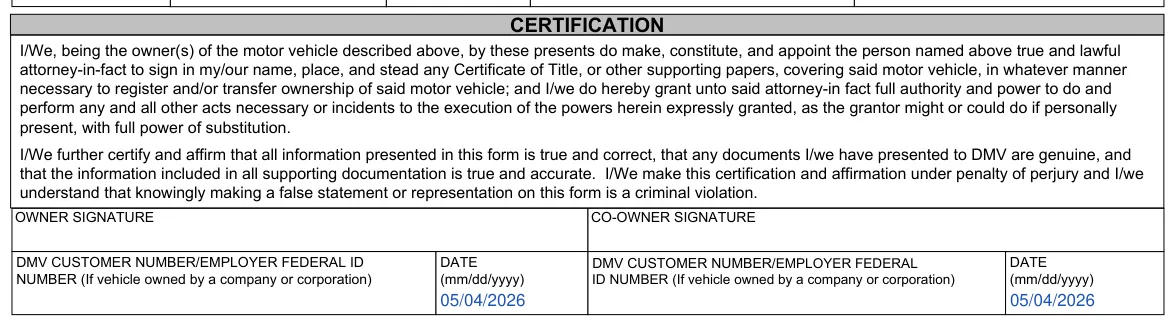
Once Form VSA 70 is filled in, a few practical steps remain before you hand it to anyone. Print the page, check the details and keep a copy of everything you sign. The steps below follow the order most people work in.
It is a document in which a vehicle owner names an agent to handle certain matters for a vehicle, such as registration or a title transfer. It helps when the owner cannot be there in person.
Gather these items before you open the form:
Having them on hand keeps the form to one sitting.
The VIN is usually printed on the vehicle's title and registration card. You can also find it on the insurance card and on a plate at the base of the windshield on the driver's side.
Form VSA 70 is the vehicle power of attorney published by the Virginia DMV, and it is the PDF this page hands out. The FormsPal template from Create My Document is a separate document with its own layout, with an appointment paragraph, a vehicle section, a successor agent part and an acknowledgment for a notary.
Yes. Use the Create My Document button to answer a few questions, or download the PDF and complete it with the FormsPal PDF editor. After downloading, print the page for signing.
Form VSA 70 has no successor part. The FormsPal template from Create My Document names an alternate agent on its page 2, and its text says the alternate takes over if the first agent is unable or unwilling to serve.
General information, not legal or tax advice.
