
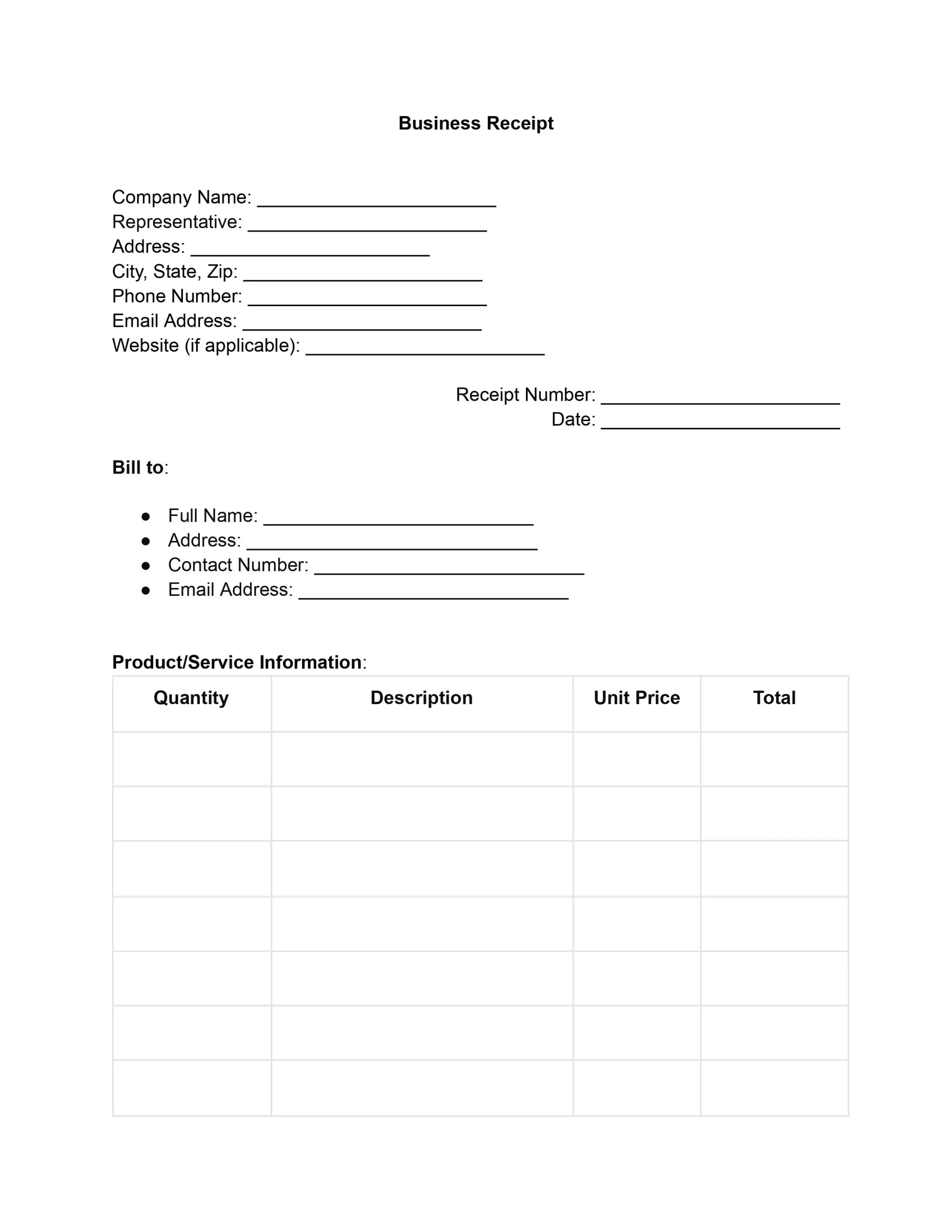
A business receipt template is a printable form that records a sale. It lists the seller, the buyer, what was bought, the amount paid and a signature. Fill out our free business receipt template online, then print it or save it as a PDF and hand a copy to your customers.
Last Updated: October 2026. This guide is reviewed and updated regularly to reflect current law. If you notice an error or outdated information, please contact us.
A good receipt template records a sale between a seller and its customers, so every part of the form has a job. These eight parts give both sides a clear record of what was sold and for how much:
Together, these parts give you a full record of each sale, and they show customers that you keep careful records. Whether you sell goods or do jobs for clients, the same receipt template works for every sale.
Starting from a free receipt template also saves time. The layout is ready, so you only fill in the blanks instead of building a new page for every sale. You can download the blank form, make as many copies as you need and keep a stack ready for the next buyer. It is an easy way to look professional. A clean free template is simple to view, share and file, even when the same receipt template is used by several people on your team.
Follow these eight steps to fill out the receipt template from top to bottom. Type your answers into the fields on screen, or print the blank form and write each answer by hand. Either way, you end up with a clear PDF receipt for your customers, and the whole job takes only a few minutes.
If you need to change a saved file later, you can edit the PDF online with our PDF editor.
Enter your company’s full legal name, then the name of the person who is handling the sale. This gives your customers a direct point of contact.
Next, fill in your physical address, including suite or unit numbers. It should be accompanied by the city, state, and ZIP code to complete the address details.
Finish with a contact phone number and a professional email address.
Give the receipt its own number, such as 0001, so you can find it later. A running number keeps your records in order and helps when a buyer asks about a past sale. Then enter the date of the sale.
Write the full name of the buyer or client you are billing. Then add:
This step is a breakdown of the sale. For each item or service, fill in:
A clear breakdown builds trust with your customers.
Enter the subtotal of all items before tax. It gives you and the buyer a clear view of the base cost. Next, enter the tax rate for the sale and work out the total tax amount. Add the subtotal and the total tax to get the grand total.
Mark the payment method: cash, check, credit card, or another way to pay. For a check, add the check number. For a card, add the last four digits of the card.
Go over any terms and conditions for the sale with the buyer, such as a return policy or a warranty note. This keeps expectations clear for both sides.
Have an authorized representative of your company sign the receipt. Print the name and title of the person signing, then add the date. Hand your customers a copy and keep one for your records.
A receipt does not need to be fancy, but a few habits make it look professional and easy to trust. These tips take only a minute, and they work for any free receipt template, whether you work on paper or on screen.
Plus, a tidy set of documents makes your books easier to follow, because every sale has a matching record that you can pull up on demand.
Business receipts are indispensable for maintaining accountability. They allow companies to track their sales, manage inventories, and ensure accurate financial reporting. Business receipt forms also make it easier to comply with tax laws and regulations, helping to avoid legal complications and financial discrepancies.
A receipt also shows exactly what changed hands, from the quantity and description of the goods or work to the amounts agreed. With that record, the seller and the buyer can both see the full picture of the sale.
A receipt confirms a payment that has already been made. An invoice asks for payment, so some sellers send an invoice template first and a receipt once the money arrives. For a cash sale, our cash receipt form works the same way.
A business receipt is a written record that a buyer handed over money for goods or work. It lists the seller, the buyer, the items, the amounts and the payment method, and the seller usually signs it.
Yes. Open the template, type your answers into the fields, then print the receipt or download it as a PDF receipt. You can also fill in a paper copy by hand if that is easier for you.
To create a receipt for a cash sale, work through these points:
Any simple number that is unique to the sale works. Many sellers count up from 0001 so that no two receipts share a number.
Many sellers add a logo to the printed copy by hand or with a stamp. That is a nice touch for returning customers, but the receipt works well without one.
Yes. In step 4, list each job with the hours worked and the price per hour, the same way you would list items with a quantity and a unit price.
Yes. This template is free to fill out, print and download. You can reuse the same free template for as many sales as you like, which makes it a practical choice for small shops and independent sellers alike.
An invoice asks a buyer to pay, and a receipt confirms that the buyer has paid. Many sellers send an invoice first and then issue the receipt once the money arrives, so each sale ends up with both documents.
Our collection of receipt templates has a variety of free templates, whether you need a short cash receipt template for a small sale or a longer template for bigger jobs. Every template in the collection can be downloaded as a blank form and filled out later.
General information, not legal or tax advice.
